
一、
using System;

namespace ConsoleApp1
{
    class Program
    {
        static void Main(string[] args)
        {
            Console.Write(args[0]);
        }
    }
}
编译生成ConsoleApp1.exe,并放到ConsoleApp2-bin-的Debug文件夹
using System;
using System.Diagnostics;

namespace ConsoleApp2
{
    class Program
    {
        static void Main(string[] args)
        {
            Process p = new Process();
            p.StartInfo.FileName = "ConsoleApp1.exe";
            p.StartInfo.Arguments = "a b c";//用空格来分隔参数,传给cmd.exe 时相当于传了个包含 a,b,c的字符串数组
            p.StartInfo.UseShellExecute = false;    //是否使用操作系统shell启动
            p.StartInfo.RedirectStandardInput = true;//接受来自调用程序的输入信息
            p.StartInfo.RedirectStandardOutput = true;//由调用程序获取输出信息
            p.StartInfo.RedirectStandardError = true;//重定向标准错误输出
            //p.StartInfo.CreateNoWindow = true;//不显示程序窗口?????
            p.Start();
            string output = p.StandardOutput.ReadToEnd();//获取cmd窗口的输出信息
            Console.WriteLine(output);
            Console.ReadLine();
        }
    }
}
修改一下ConsoleApp2
        static void Main(string[] args)
        {

            while (1 == 1)
            {
                Console.Write("输入指令:");
                string str = Console.ReadLine();
                Process p = new Process();
                p.StartInfo.FileName = "ConsoleApp1.exe";
                p.StartInfo.Arguments = str;//用空格来分隔参数,传给cmd.exe 时相当于传了个包含 a,b,c的字符串数组
                p.StartInfo.UseShellExecute = false;    //是否使用操作系统shell启动
                p.StartInfo.RedirectStandardInput = true;//接受来自调用程序的输入信息
                p.StartInfo.RedirectStandardOutput = true;//由调用程序获取输出信息
                p.StartInfo.RedirectStandardError = true;//重定向标准错误输出
                //p.StartInfo.CreateNoWindow = true;//不显示程序窗口?????
                p.Start();
                string output = p.StandardOutput.ReadToEnd();//获取cmd窗口的输出信息
                p.WaitForExit();//等待程序执行完退出进程
                p.Close();
                Console.WriteLine("返回信息:" + output);
                Console.WriteLine("");
            }
        }
就可以和调用的控制台交互了

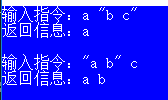
但是有个问题,如果输入的字符串带空格,就会截取到空格前的字符输出
多加上双引号就可以表示成一个字符串
二、调用cmd
官方
        static void Main(string[] args)
        {

            //Console.WriteLine("Ready to sort one or more text lines...");

            using (Process myProcess = new Process())
            {
                myProcess.StartInfo.FileName = "cmd.exe";
                myProcess.StartInfo.UseShellExecute = false;
                myProcess.StartInfo.RedirectStandardInput = true;

                myProcess.Start();

                StreamWriter myStreamWriter = myProcess.StandardInput;

                String inputText;
                do
                {
                    //Console.WriteLine("Enter a line of text (or press the Enter key to stop):");

                    inputText = Console.ReadLine();
                    if (inputText.Length > 0)
                    {
                        myStreamWriter.WriteLine(inputText);
                    }
                } while (inputText.Length > 0);

                myStreamWriter.Close();

                myProcess.WaitForExit();
            }
            Console.ReadLine();
        }