
什么是rabbitMQ?
rabbitMQ是一款基于AMQP协议的消息中间件,它能够在应用之间提供可靠的消息传输。在易用性,扩展性,高可用性上表现优秀。而且使用消息中间件利于应用之间的解耦,生产者(客户端)无需知道消费者(服务端)的存在。而且两端可以使用不同的语言编写,大大提供了灵活性。
centos7 上安装 rabbitmq 参考链接: https://www.cnblogs.com/liaojie970/p/6138278.html
rabbitmq 安装好后,远程连接rabbitmq server的话,需要配置权限
1. 首先在rabbitmq server上创建一个用户
[root@rabbitmq ~]# rabbitmqctl add_user admin 123456

2. 同时还要配置权限,允许从外面访问:
[root@rabbitmq ~]# rabbitmqctl set_permissions -p / admin ".*" ".*" ".*"

3. 给用户分配管理员权限(optional)
[root@rabbitmq ~]# rabbitmqctl set_user_tags admin administrator

4. 列出所有用户命令:
[root@rabbitmq ~]# rabbitmqctl list_users
客户端连接的时候需要配置认证参数,如下:
credentials = pika.PlainCredentials('admin','123456')    # 用户名和密码
connection = pika.BlockingConnection(
        pika.ConnectionParameters("10.0.0.124",5672,"/",credentials)
    )
channel = connection.channel()
rabbitMQ基本概念
- exchange:producer只能将消息发送给exchange。而exchange负责将消息发送到queues。Exchange必须准确的知道怎么处理它接受到的消息,是被发送到一个特定的queue还是许多quenes,还是被抛弃,这些规则则是通过exchange type来定义。主要的type有direct,topic,headers,fanout。具体针对不同的场景使用不同的type。
- queue: 消息队列,消息的载体。接收来自exchange的消息,然后再由consumer取出。exchange和queue是可以一对多的,它们通过routingKey来绑定。
- Producer : 生产者,消息的来源,消息必须发送给exchange。而不是直接给queue
- Consumer : 消费者,直接从queue中获取消息进行消费,而不是从exchange。
从以上可以看出Rabbitmq工作原理大致就是producer把一条消息发送给exchange。rabbitMQ根据routingKey负责将消息从exchange发送到对应绑定的queue中去,这是由rabbitMQ负责做的。而consumer只需从queue获取消息即可。基本效果图如下:

持久化问题
1. 消息确认机制
这里就会有一个问题,如果consumer在执行任务时需要花费一些时间,这个时候如果突然挂了,消息还没有被完成,消息岂不是丢失了,为了不让消息丢失,rabbitmq提供了消息确认机制,consumer在接收到,执行完消息后会发送一个ack给rabbitmq告诉它可以从queue中移除消息了。如果没收到ack。Rabbitmq会重新发送此条消息,如果有其他的consumer在线,将会接收并消费这条消息。消息确认机制是默认打开的。如果想关闭它只需要设置no_ack=true。
2. 队列持久化
- 除了consumer之外我们还得确保rabbitMQ挂了之后消息不被丢失。这里我们就需要确保队列queue和消息messages都得是持久化的。
- 队列的持久话需要设置durable属性。
channel.queue_declare(queue= task_queue, durable=True) # durable=True 队列持久化
3. 消息持久化
消息的持久话则是通过delivery_mode属性,设置值为2即可。
channel.basic_publish(exchange='',
                      routing_key="task_queue",
                      body=message,
                      properties=pika.BasicProperties(
                         delivery_mode = 2,     # make message persistent (消息持久化)
                      ))
一、简单发送模型
在rabbit MQ里消息永远不能被直接发送到queue。这里我们通过提供一个 空字符串 来使用 默认的exchange。这个exchange是特殊的,它可以根据routingKey把消息发送给指定的queue。所以我们的设计看起来如下所示:
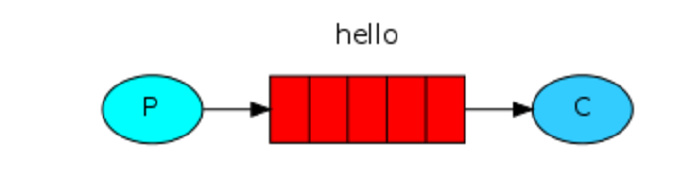
发送端代码: send.py
import pika
credentials = pika.PlainCredentials('admin','123456')

connection = pika.BlockingConnection(
        pika.ConnectionParameters("10.0.0.124",5672,"/",credentials)
    )

channel = connection.channel()

# 声明 queue
channel.queue_declare(queue="hello")

# n RabbitMQ a message can never be sent directly to the queue, it always needs to go through an exchange.
channel.basic_publish(
        exchange='',        # 空字符串表示使用默认的exchange。这个exchange是特殊的,它可以根据routingKey把消息发送给指定的queue。
        routing_key='hello',
        body='Hello World'
    )

print("[x] sent 'Hello World!'")
connection.close()
接收端代码: receive.py
import pika
credentials = pika.PlainCredentials('admin','123456')

connection = pika.BlockingConnection(
        pika.ConnectionParameters("10.0.0.124",5672,"/",credentials)
    )

channel = connection.channel()


#You may ask why we declare the queue again ‒ we have already declared it in our previous code.
# We could avoid that if we were sure that the queue already exists. For example if send.py program
#was run before. But we're not yet sure which program to run first. In such cases it's a good
# practice to repeat declaring the queue in both programs.
channel.queue_declare(queue='hello')

def callback(ch,method,properties,body):
    print("[x] Received %r" % body)


channel.basic_consume(
        callback,
        queue='hello',
        no_ack=True        # 默认为 False
    )

print("[*] Waiting for messages.To exit press CTRL+C")
channel.start_consuming()
二、工作队列模式
一个生产者发送消息到队列中,有多个消费者共享一个队列,每个消费者获取的消息是唯一的。在这种模式下,RabbitMQ会默认把p发的消息依次分发给各个消费者(c),跟负载均衡差不多,如下图所示:
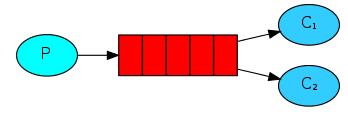
消息公平分发原则(类似负载均衡)
如果Rabbit只管按顺序把消息发到各个消费者身上,不考虑消费者负载的话,很可能出现,一个机器配置不高的消费者那里堆积了很多消息处理不完,同时配置高的消费者却一直很轻松。为解决此问题,可以在各个消费者端,配置perfetch=1,意思就是告诉RabbitMQ在我这个消费者当前消息还没处理完的时候就不要再给我发新消息了。,如下图所示:
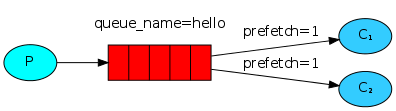
发送端代码: send.py
import pika
import sys

credentials = pika.PlainCredentials("admin","123456")

connection = pika.BlockingConnection(
        pika.ConnectionParameters("10.0.0.124",5672,"/",credentials)
    )

channel = connection.channel()

channel.queue_declare(queue="task_queue",durable=True)

msg = " ".join(sys.argv[1:]) or "Hello World!"
channel.basic_publish(
        exchange="",
        routing_key="task_queue",
        body=msg,
        properties=pika.BasicProperties(
            delivery_mode=2,    # make message persistent (使消息持久化)
        )
    )

print("[x] Send %r" % msg)
connection.close()
接收端代码: receive.py
import pika
import time
import random

credentials = pika.PlainCredentials("admin","123456")

connection = pika.BlockingConnection(
        pika.ConnectionParameters("10.0.0.124",5672,"/",credentials)
    )

channel = connection.channel()

channel.queue_declare(queue="task_queue",durable=True)

def callback(ch,method,properties,body):
    print("[x] Received %r"%body)
    time.sleep(random.randint(1,50))
    print("[x] Done")
    ch.basic_ack(delivery_tag=method.delivery_tag)        # 主动发送ack

channel.basic_qos(prefetch_count=1)        # 在各个消费者端,配置perfetch=1,意思就是告诉RabbitMQ在我这个消费者当前消息还没处理完的时候就不要再给我发新消息了。
channel.basic_consume(
        callback,
        queue="task_queue"
    )        # no_ack 默认为 False

print("[x] Waiting for messages.To exit press CTRL+C")
channel.start_consuming()