
I am making a map editor for a game I am working on. There is a JPanel in the JScrollPane that displays the map to be edited. What I would like to do is make it that when the user is holding down the Spacebar and dragging their mouse in the JPanel, the JScrollPanel will scroll along with the dragging. Here is what I have so far:
panelMapPanel.addMouseMotionListener(new MouseMotionListener(){

        @Override
        public void mouseDragged(MouseEvent e) {
            //Gets difference in distance x and y from last time this listener was called
            int deltaX = mouseX - e.getX();
            int deltaY = mouseY - e.getY();
            mouseX = e.getX();
            mouseY = e.getY();
            if(spacePressed){
                //Scroll the scrollpane according to the distance travelled
                scrollPane.getVerticalScrollBar().setValue(scrollPane.getVerticalScrollBar().getValue() + deltaY);
                scrollPane.getHorizontalScrollBar().setValue(scrollPane.getHorizontalScrollBar().getValue() + deltaX);
            }
        }

});
Currently it works but the scrolling is not smooth at all. Moving the mouse a lot at a time is fine but doing small drags makes the scrollpane go berserk.
Any ideas how to improve this?
For those who enjoy a visual to help, here is the editor:

Addition Notes (Edit):
- I have tried
scrollPane.getViewport().setViewPosition(new Point(scrollPane.getViewport().getViewPosition().x + deltaX, scrollPane.getViewport().getViewPosition().y + deltaY)); - The dragging is more fidgety when moving the mouse slowly, while big movements are more smooth
- I tried using scrollRectToVisible without luck
Okay, that ended up been much simpler then I though it would be...
First, don't mess with the JViewport, instead, use JComponent#scrollRectToVisible directly on the component which is acting as the contents of the JScrollPane, onto which the MouseListener should be attached.
The following example simply calculates the difference between the point at which the user clicked and the amount they have dragged. It then applies this delta to the JViewport's viewRect and uses JComponent#scrollRectToVisible to update the viewable area, simple :)
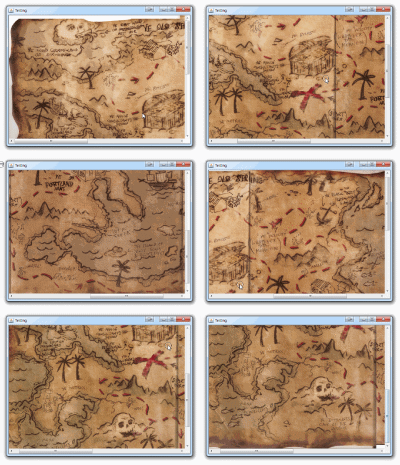
public class Test {

    public static void main(String[] args) {
        new Test();
    }

    public Test() {
        EventQueue.invokeLater(new Runnable() {
            @Override
            public void run() {
                try {
                    UIManager.setLookAndFeel(UIManager.getSystemLookAndFeelClassName());
                } catch (ClassNotFoundException | InstantiationException | IllegalAccessException | UnsupportedLookAndFeelException ex) {
                    ex.printStackTrace();
                }

                JFrame frame = new JFrame("Testing");
                frame.setDefaultCloseOperation(JFrame.EXIT_ON_CLOSE);
                frame.add(new TestPane());
                frame.pack();
                frame.setLocationRelativeTo(null);
                frame.setVisible(true);
            }
        });
    }

    public class TestPane extends JPanel {

        private JLabel map;

        public TestPane() {
            setLayout(new BorderLayout());
            try {
                map = new JLabel(new ImageIcon(ImageIO.read(new File("c:/treasuremap.jpg"))));
                map.setAutoscrolls(true);
                add(new JScrollPane(map));

                MouseAdapter ma = new MouseAdapter() {

                    private Point origin;

                    @Override
                    public void mousePressed(MouseEvent e) {
                        origin = new Point(e.getPoint());
                    }

                    @Override
                    public void mouseReleased(MouseEvent e) {
                    }

                    @Override
                    public void mouseDragged(MouseEvent e) {
                        if (origin != null) {
                            JViewport viewPort = (JViewport) SwingUtilities.getAncestorOfClass(JViewport.class, map);
                            if (viewPort != null) {
                                int deltaX = origin.x - e.getX();
                                int deltaY = origin.y - e.getY();

                                Rectangle view = viewPort.getViewRect();
                                view.x += deltaX;
                                view.y += deltaY;

                                map.scrollRectToVisible(view);
                            }
                        }
                    }

                };

                map.addMouseListener(ma);
                map.addMouseMotionListener(ma);
            } catch (IOException ex) {
                ex.printStackTrace();
            }
        }

        @Override
        public Dimension getPreferredSize() {
            return new Dimension(200, 200);
        }

    }

}
I'm currently working on a map editor myself. I have gotten mouse scrolling to work smoothly on mine although it is a pretty verbose solution.
I wrote two custom AWTEventListeners one for mouse events the other for mouse move events. I did this because my map is a custom JComponent and as such does not fill the entire view-port. This means that scroll pane mouse events wont be detected if the cursor is over the component.
For me this works very smoothly, the content scrolls in perfect lock-step with the mouse cursor.
(I should mention I use the mouse wheel click and not the space bar but it's easy to change).
    Toolkit.getDefaultToolkit().addAWTEventListener(new AWTEventListener() {
        public void eventDispatched(AWTEvent event) {
            if(event instanceof MouseEvent){
                MouseEvent e = (MouseEvent)event;
                //Begin a scroll if mouse is clicked on our pane
                if(isMouseInMapPane()){
                    if(e.getID() == MouseEvent.MOUSE_PRESSED){
                        if(e.getButton() == MouseEvent.BUTTON2){
                            mouseWheelDown = true;
                            currentX = MouseInfo.getPointerInfo().getLocation().x;
                            currentY = MouseInfo.getPointerInfo().getLocation().y;
                        }
                    }
                }
                //Stop the scroll if mouse is released ANYWHERE
                if(e.getID() == MouseEvent.MOUSE_RELEASED){
                    if(e.getButton() == MouseEvent.BUTTON2){
                        mouseWheelDown = false;
                    }
                }
            }
        }
    }, AWTEvent.MOUSE_EVENT_MASK);

    Toolkit.getDefaultToolkit().addAWTEventListener(new AWTEventListener() {
        public void eventDispatched(AWTEvent event) {
            if(event instanceof MouseEvent){
                MouseEvent e = (MouseEvent)event;

                //Update the scroll based on delta drag value
                if(e.getID() == MouseEvent.MOUSE_DRAGGED){
                    if(mouseWheelDown){
                        int newX = MouseInfo.getPointerInfo().getLocation().x;
                        int newY = MouseInfo.getPointerInfo().getLocation().y;
                        int scrollStepX = (currentX - newX);
                        int scrollStepY = (currentY - newY);
                        currentX = newX;
                        currentY = newY;

                        //mapScroll is the reference to JScrollPane
                        int originalValX = mapScroll.getHorizontalScrollBar().getValue();
                        mapScroll.getHorizontalScrollBar().setValue(originalValX + scrollStepX);

                        int originalValY = mapScroll.getVerticalScrollBar().getValue();
                        mapScroll.getVerticalScrollBar().setValue(originalValY + scrollStepY);
                    }
                }

            }
        }
    }, AWTEvent.MOUSE_MOTION_EVENT_MASK);
This is the isMouseInPane method:
    private boolean isMouseInMapPane(){
    //Note: mapPane does not need to be your scroll pane.
    //it can be an encapsulating container as long as it is in
    //the same position and the same width/height as your scrollPane.
    //For me I used the JPanel containing my scroll pane.
    Rectangle paneBounds = mapPane.getBounds();
    paneBounds.setLocation(mapPane.getLocationOnScreen());
    boolean inside = paneBounds.contains(MouseInfo.getPointerInfo().getLocation());

    return inside;
}
This code can be placed anywhere that you have access to your scroll pane reference or you could create a custom scroll pane class and add it there.
I hope it helps!
来源:https://stackoverflow.com/questions/31171502/scroll-jscrollpane-by-dragging-mouse-java-swing