
02setInterval.html
<!DOCTYPE html>
<html lang="en">
<head>
    <meta charset="UTF-8">
    <meta name="viewport" content="width=device-width, initial-scale=1.0">
    <meta http-equiv="X-UA-Compatible" content="ie=edge">
    <title>Document</title>
</head>
<body>
    <script>
        // 定时器
        /*
           setInterval() window.setIn...
           setInterval(函数,时间);
            每隔一段时间 执行函数中代码
           ---取消  clearInterval(timeId);
           setTimeout(函数,时间)  隔一段时间 执行函数一次 并且只执行一次
           clearTimeout(timeId)
        */
        var i = 0;
        var timeId = setInterval(fn,1000);
        //setTimeout(fn,1000);
        function fn() {
            console.log(i);
            i++;
            if(i===101) {
                // 取消定时器
                clearInterval(timeId);
            }
        }
    </script>
</body>
</html>
03clock.html
<!DOCTYPE html>
<html lang="en">

<head>
    <meta charset="UTF-8">
    <meta name="viewport" content="width=device-width, initial-scale=1.0">
    <meta http-equiv="X-UA-Compatible" content="ie=edge">
    <title>Document</title>
    <style>
        div.clock {
            text-align: center;
            font-size: 30px;
        }

        div.clock>span {
            padding: 6px;
            background-color: skyblue;
        }

        .title {
            width: 430px;
            height: 45px;
            margin: 200px auto 50px;
        }

        .title-item strong {
            background-color: orange;
            color: #fff;
            font-size: 36px;
            padding: 0 10px;
            border-radius: 5px;
            box-shadow: 1px 1px 3px rgba(0, 0, 0, 0.2);
            font-family: Arial, Helvetica, sans-serif;
            margin-right: 10px;
            line-height: 49px;
        }

        .title-item {
            width: 430px;
            height: 45px;
            margin: 0 auto;
        }

        .title-item>span {
            line-height: 49px;
            font-size: 32px;
            color: orange;
        }
    </style>
</head>

<body>
    <div class="clock">
        <span id="h"></span>:
        <span id="m"></span>:
        <span id="s"></span>
    </div>
    <h1 class="title">距离双12,还有</h1>
    <div class="title-item">
        <span><span id="days"></span>天</span>
        <strong><span id="hours"></span>时</strong>
        <strong><span id="minutes"></span>分</strong>
        <strong><span id="seconds"></span>秒</strong>
    </div>
    <script src="./tool.js"></script>
    <script>
        // 16:20:03
        // 获取时间
        function getCurrentTime() {
            var date = new Date();
            var hs = toTwo(date.getHours());
            var ms = toTwo(date.getMinutes());
            var ss = toTwo(date.getSeconds());
            // 设置
            $("h").innerHTML = hs;
            $("m").innerHTML = ms;
            $("s").innerHTML = ss;
        }

        function toTwo(val) {
            return val < 10 ? "0" + val : val;
        }
        getCurrentTime();
        setInterval(getCurrentTime, 1000);

        // 倒计时 距离12月12日还有多少天多少时多少分多少秒
        var endTime = new Date("2019-12-12 0:0:0");
        setInterval(getDjs, 1000);

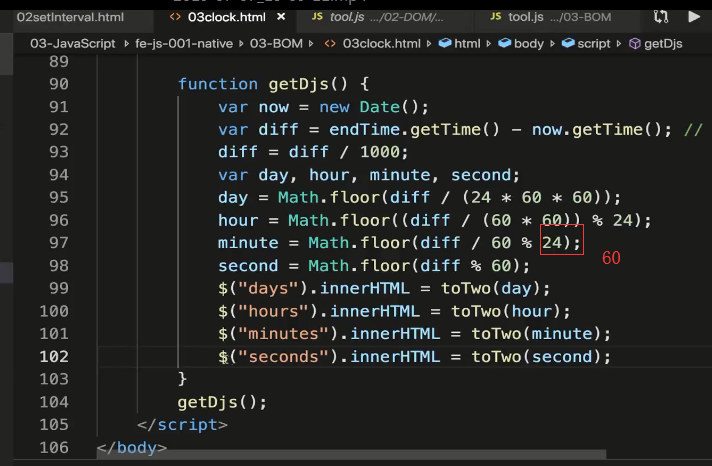
        function getDjs() {
            var now = new Date();
            var diff = endTime.getTime() - now.getTime(); // 相差的毫秒数
            diff = diff / 1000;
            var day, hour, minute, second;
            day = Math.floor(diff / (24 * 60 * 60));
            hour = Math.floor((diff / (60 * 60)) % 24);
            minute = Math.floor(diff / 60 % 60);
            second = Math.floor(diff % 60);
            $("days").innerHTML = toTwo(day);
            $("hours").innerHTML = toTwo(hour);
            $("minutes").innerHTML = toTwo(minute);
            $("seconds").innerHTML = toTwo(second);
        }
        getDjs();
    </script>
</body>

</html>
tool.js
function rand(min, max) {
    return Math.round(Math.random() * (max - min) + min);
}

function $(id) {
    return document.getElementById(id);
}

// 封装一个函数 对元素注册事件
function addEventListener(ele, eventName, fn) {
    // 能力检测
    if (ele.addEventListener) {
        ele.addEventListener(eventName, fn);
    } else if (ele.attachEvent) {
        ele.attachEvent("on" + eventName, fn);
    } else {
        ele["on" + eventName] = fn;
    }
}

// 移除事件
function removeEventListener(ele, eventName, fn) {
    // 能力检测
    if (ele.removeEventListener) {
        ele.removeEventListener(eventName, fn);
    } else if (ele.detachEvent) {
        ele.detachEvent("on" + eventName, fn);
    } else {
        ele["on" + eventName] = null;
    }
}

// 获取两个日期时间差
function getInterval(start, end) {
    var diff = end.getTime() - start.getTime(); // 相差的毫秒数
    diff = diff / 1000;
    var day, hour, minute, second;
    day = Math.floor(diff / (24 * 60 * 60));
    hour = Math.floor((diff / (60 * 60)) % 24);
    minute = Math.floor(diff / 60 % 24);
    second = Math.floor(diff % 60);
    return {
        day,
        hour,
        minute,
        second
    }
}
04djs.html
<!DOCTYPE html>
<html lang="en">

<head>
    <meta charset="UTF-8">
    <meta name="viewport" content="width=device-width, initial-scale=1.0">
    <meta http-equiv="X-UA-Compatible" content="ie=edge">
    <title>Document</title>
    <style>
        div.clock {
            text-align: center;
            font-size: 30px;
        }

        div.clock>span {
            padding: 6px;
            background-color: skyblue;
        }

        .title {
            width: 430px;
            height: 45px;
            margin: 200px auto 50px;
        }

        .title-item strong {
            background-color: orange;
            color: #fff;
            font-size: 36px;
            padding: 0 10px;
            border-radius: 5px;
            box-shadow: 1px 1px 3px rgba(0, 0, 0, 0.2);
            font-family: Arial, Helvetica, sans-serif;
            margin-right: 10px;
            line-height: 49px;
        }

        .title-item {
            width: 430px;
            height: 45px;
            margin: 0 auto;
        }

        .title-item>span {
            line-height: 49px;
            font-size: 32px;
            color: orange;
        }
    </style>
</head>

<body>
    <h1 class="title">距离双12,还有</h1>
    <div class="title-item">
        <span><span id="days"></span>天</span>
        <strong><span id="hours"></span>时</strong>
        <strong><span id="minutes"></span>分</strong>
        <strong><span id="seconds"></span>秒</strong>
    </div>
    <script src="./tool.js"></script>
    <script>
        function toTwo(val) {
            return val < 10 ? "0" + val : val;
        }
        // 倒计时 距离12月12日还有多少天多少时多少分多少秒
        var endTime = new Date("2019-12-12 0:0:0");
        setInterval(getDjs, 1000);

        function getDjs() {
            var now = new Date();
            // 计算两个日期差
            var interval = getInterval(now,endTime);
            $("days").innerHTML = toTwo(interval.day);
            $("hours").innerHTML = toTwo(interval.hour);
            $("minutes").innerHTML = toTwo(interval.minute);
            $("seconds").innerHTML = toTwo(interval.second);
        }
        getDjs();
    </script>
</body>

</html>
05setTimeout.html
<!DOCTYPE html>
<html lang="en">
<head>
    <meta charset="UTF-8">
    <meta name="viewport" content="width=device-width, initial-scale=1.0">
    <meta http-equiv="X-UA-Compatible" content="ie=edge">
    <title>Document</title>
    <style>
        #tip {
            width: 150px;
            height: 30px;
            line-height: 30px;
            opacity: 0.5;
            margin: 200px auto;
            color: red;
            text-align: center;
            display: none;
            background-color: lightgray;
        }
    </style>
    <script>
        onload = function() {
            var btn_del = document.getElementById("btn_del");
            btn_del.onclick = function() {
                // 首先显示删除成功元素
                var tip = document.getElementById("tip");
                tip.style.display = "block";
                setTimeout(()=>{
                    tip.style.display = "none";
                },3000);
            }
        }
    </script>
</head>
<body>
    <input type="button" id="btn_del" value="删除" />
    <div id="tip">删除成功</div>
</body>
</html>
来源:https://www.cnblogs.com/HiJackykun/p/11160273.html