
数据的排序方法有多种,每种排序都有各自的特点和优点,在实际的使用中需要根据实际的情况灵活的选择排序方式,不仅可以提高效率,还可以节约资源。以下用选择排序,冒泡排序和快速排序三种排序方法对相同大小的数据进行排序效率的比较。
以下是设计器代码:
  1 namespace SortsCompare
  2 {
  3     partial class FormSort
  4     {
  5         /// <summary>
  6         /// 必需的设计器变量。
  7         /// </summary>
  8         private System.ComponentModel.IContainer components = null;
  9
 10         /// <summary>
 11         /// 清理所有正在使用的资源。
 12         /// </summary>
 13         /// <param name="disposing">如果应释放托管资源,为 true;否则为 false。</param>
 14         protected override void Dispose(bool disposing)
 15         {
 16             if (disposing && (components != null))
 17             {
 18                 components.Dispose();
 19             }
 20             base.Dispose(disposing);
 21         }
 22
 23         #region Windows 窗体设计器生成的代码
 24
 25         /// <summary>
 26         /// 设计器支持所需的方法 - 不要
 27         /// 使用代码编辑器修改此方法的内容。
 28         /// </summary>
 29         private void InitializeComponent()
 30         {
 31             this.pBox1 = new System.Windows.Forms.PictureBox();
 32             this.pBox2 = new System.Windows.Forms.PictureBox();
 33             this.pBox3 = new System.Windows.Forms.PictureBox();
 34             this.label1 = new System.Windows.Forms.Label();
 35             this.label2 = new System.Windows.Forms.Label();
 36             this.label3 = new System.Windows.Forms.Label();
 37             this.tSelection = new System.Windows.Forms.Label();
 38             this.tBubble = new System.Windows.Forms.Label();
 39             this.tQuick = new System.Windows.Forms.Label();
 40             this.btnGenData = new System.Windows.Forms.Button();
 41             this.btnSort = new System.Windows.Forms.Button();
 42             ((System.ComponentModel.ISupportInitialize)(this.pBox1)).BeginInit();
 43             ((System.ComponentModel.ISupportInitialize)(this.pBox2)).BeginInit();
 44             ((System.ComponentModel.ISupportInitialize)(this.pBox3)).BeginInit();
 45             this.SuspendLayout();
 46             //
 47             // pBox1
 48             //
 49             this.pBox1.BorderStyle = System.Windows.Forms.BorderStyle.FixedSingle;
 50             this.pBox1.Location = new System.Drawing.Point(12, 12);
 51             this.pBox1.Name = "pBox1";
 52             this.pBox1.Size = new System.Drawing.Size(304, 208);
 53             this.pBox1.TabIndex = 0;
 54             this.pBox1.TabStop = false;
 55             //
 56             // pBox2
 57             //
 58             this.pBox2.BorderStyle = System.Windows.Forms.BorderStyle.FixedSingle;
 59             this.pBox2.Location = new System.Drawing.Point(322, 13);
 60             this.pBox2.Name = "pBox2";
 61             this.pBox2.Size = new System.Drawing.Size(304, 208);
 62             this.pBox2.TabIndex = 1;
 63             this.pBox2.TabStop = false;
 64             //
 65             // pBox3
 66             //
 67             this.pBox3.BorderStyle = System.Windows.Forms.BorderStyle.FixedSingle;
 68             this.pBox3.Location = new System.Drawing.Point(632, 13);
 69             this.pBox3.Name = "pBox3";
 70             this.pBox3.Size = new System.Drawing.Size(304, 208);
 71             this.pBox3.TabIndex = 2;
 72             this.pBox3.TabStop = false;
 73             //
 74             // label1
 75             //
 76             this.label1.AutoSize = true;
 77             this.label1.Font = new System.Drawing.Font("宋体", 15.75F, System.Drawing.FontStyle.Regular, System.Drawing.GraphicsUnit.Point, ((byte)(134)));
 78             this.label1.Location = new System.Drawing.Point(117, 223);
 79             this.label1.Name = "label1";
 80             this.label1.Size = new System.Drawing.Size(94, 21);
 81             this.label1.TabIndex = 3;
 82             this.label1.Text = "选择排序";
 83             //
 84             // label2
 85             //
 86             this.label2.AutoSize = true;
 87             this.label2.Font = new System.Drawing.Font("宋体", 15.75F, System.Drawing.FontStyle.Regular, System.Drawing.GraphicsUnit.Point, ((byte)(134)));
 88             this.label2.Location = new System.Drawing.Point(427, 224);
 89             this.label2.Name = "label2";
 90             this.label2.Size = new System.Drawing.Size(94, 21);
 91             this.label2.TabIndex = 4;
 92             this.label2.Text = "冒泡排序";
 93             //
 94             // label3
 95             //
 96             this.label3.AutoSize = true;
 97             this.label3.Font = new System.Drawing.Font("宋体", 15.75F, System.Drawing.FontStyle.Regular, System.Drawing.GraphicsUnit.Point, ((byte)(134)));
 98             this.label3.Location = new System.Drawing.Point(737, 224);
 99             this.label3.Name = "label3";
100             this.label3.Size = new System.Drawing.Size(94, 21);
101             this.label3.TabIndex = 5;
102             this.label3.Text = "快速排序";
103             //
104             // tSelection
105             //
106             this.tSelection.Font = new System.Drawing.Font("宋体", 15.75F, System.Drawing.FontStyle.Regular, System.Drawing.GraphicsUnit.Point, ((byte)(134)));
107             this.tSelection.Location = new System.Drawing.Point(57, 254);
108             this.tSelection.Name = "tSelection";
109             this.tSelection.Size = new System.Drawing.Size(214, 38);
110             this.tSelection.TabIndex = 6;
111             this.tSelection.Text = "用时";
112             this.tSelection.TextAlign = System.Drawing.ContentAlignment.MiddleCenter;
113             //
114             // tBubble
115             //
116             this.tBubble.Font = new System.Drawing.Font("宋体", 15.75F, System.Drawing.FontStyle.Regular, System.Drawing.GraphicsUnit.Point, ((byte)(134)));
117             this.tBubble.Location = new System.Drawing.Point(367, 254);
118             this.tBubble.Name = "tBubble";
119             this.tBubble.Size = new System.Drawing.Size(214, 38);
120             this.tBubble.TabIndex = 7;
121             this.tBubble.Text = "用时";
122             this.tBubble.TextAlign = System.Drawing.ContentAlignment.MiddleCenter;
123             //
124             // tQuick
125             //
126             this.tQuick.Font = new System.Drawing.Font("宋体", 15.75F, System.Drawing.FontStyle.Regular, System.Drawing.GraphicsUnit.Point, ((byte)(134)));
127             this.tQuick.Location = new System.Drawing.Point(677, 254);
128             this.tQuick.Name = "tQuick";
129             this.tQuick.Size = new System.Drawing.Size(214, 38);
130             this.tQuick.TabIndex = 8;
131             this.tQuick.Text = "用时";
132             this.tQuick.TextAlign = System.Drawing.ContentAlignment.MiddleCenter;
133             //
134             // btnGenData
135             //
136             this.btnGenData.Font = new System.Drawing.Font("宋体", 15.75F, System.Drawing.FontStyle.Regular, System.Drawing.GraphicsUnit.Point, ((byte)(134)));
137             this.btnGenData.Location = new System.Drawing.Point(315, 338);
138             this.btnGenData.Name = "btnGenData";
139             this.btnGenData.Size = new System.Drawing.Size(139, 34);
140             this.btnGenData.TabIndex = 9;
141             this.btnGenData.Text = "生成排序数据";
142             this.btnGenData.UseVisualStyleBackColor = true;
143             this.btnGenData.Click += new System.EventHandler(this.btnGenData_Click);
144             //
145             // btnSort
146             //
147             this.btnSort.Font = new System.Drawing.Font("宋体", 15.75F, System.Drawing.FontStyle.Regular, System.Drawing.GraphicsUnit.Point, ((byte)(134)));
148             this.btnSort.Location = new System.Drawing.Point(505, 338);
149             this.btnSort.Name = "btnSort";
150             this.btnSort.Size = new System.Drawing.Size(139, 34);
151             this.btnSort.TabIndex = 10;
152             this.btnSort.Text = "开始排序";
153             this.btnSort.UseVisualStyleBackColor = true;
154             this.btnSort.Click += new System.EventHandler(this.btnSort_Click);
155             //
156             // FormSort
157             //
158             this.AutoScaleDimensions = new System.Drawing.SizeF(6F, 12F);
159             this.AutoScaleMode = System.Windows.Forms.AutoScaleMode.Font;
160             this.ClientSize = new System.Drawing.Size(948, 432);
161             this.Controls.Add(this.btnSort);
162             this.Controls.Add(this.btnGenData);
163             this.Controls.Add(this.tQuick);
164             this.Controls.Add(this.tBubble);
165             this.Controls.Add(this.tSelection);
166             this.Controls.Add(this.label3);
167             this.Controls.Add(this.label2);
168             this.Controls.Add(this.label1);
169             this.Controls.Add(this.pBox3);
170             this.Controls.Add(this.pBox2);
171             this.Controls.Add(this.pBox1);
172             this.Name = "FormSort";
173             this.StartPosition = System.Windows.Forms.FormStartPosition.CenterScreen;
174             this.Text = "排序算法比较";
175             ((System.ComponentModel.ISupportInitialize)(this.pBox1)).EndInit();
176             ((System.ComponentModel.ISupportInitialize)(this.pBox2)).EndInit();
177             ((System.ComponentModel.ISupportInitialize)(this.pBox3)).EndInit();
178             this.ResumeLayout(false);
179             this.PerformLayout();
180
181         }
182
183         #endregion
184
185         private System.Windows.Forms.PictureBox pBox1;
186         private System.Windows.Forms.PictureBox pBox2;
187         private System.Windows.Forms.PictureBox pBox3;
188         private System.Windows.Forms.Label label1;
189         private System.Windows.Forms.Label label2;
190         private System.Windows.Forms.Label label3;
191         private System.Windows.Forms.Label tSelection;
192         private System.Windows.Forms.Label tBubble;
193         private System.Windows.Forms.Label tQuick;
194         private System.Windows.Forms.Button btnGenData;
195         private System.Windows.Forms.Button btnSort;
196     }
197 }
以下为后台代码:
  1 using System;
  2 using System.Collections.Generic;
  3 using System.ComponentModel;
  4 using System.Data;
  5 using System.Drawing;
  6 using System.Text;
  7 using System.Windows.Forms;
  8 using System.Threading;
  9
 10 namespace SortsCompare
 11 {
 12     public partial class FormSort : Form
 13     {
 14         private System.Drawing.Graphics g1, g2, g3;
 15         DateTime startDateTime;
 16         int[] sortDataS, sortDataB, sortDataQ;
 17         const int DATA_COUNT = 300;
 18         const int MAX_VALUE = 200;
 19         int thrCount;
 20         DateTime endSelection, endBubble, endQuick;
 21         Thread thrdSelectionSort, thrdBubbleSort, thrdQuickSort;
 22         public FormSort()
 23         {
 24             InitializeComponent();
 25             g1 = pBox1.CreateGraphics();
 26             g2 = pBox2.CreateGraphics();
 27             g3 = pBox3.CreateGraphics();
 28             sortDataS = new int[DATA_COUNT];
 29             sortDataB = new int[DATA_COUNT];
 30             sortDataQ = new int[DATA_COUNT];
 31         }
 32         // 产生 DATA_COUNT 个 最大值为 MAX_VALUE 的随机数并存入三个待排序的数组
 33         private void btnGenData_Click(object sender, EventArgs e)
 34         {
 35             Random rd = new Random(System.DateTime.Now.Millisecond);
 36             for (int i = 0; i < DATA_COUNT; i++)
 37             {
 38                 sortDataS[i] =
 39                 sortDataB[i] =
 40                 sortDataQ[i] = rd.Next(MAX_VALUE);
 41             }
 42             ShowData(g1, Color.Red);
 43             ShowData(g2, Color.Green);
 44             ShowData(g3, Color.Blue);
 45             btnSort.Enabled = true;
 46             btnGenData.Text = "重新生成排序数据";
 47             tSelection.Text = tBubble.Text = tQuick.Text = "用时";
 48         }
 49         // 在图形 gs 上 用 color 色显示未排序的数据
 50         private void ShowData(Graphics gs, Color color)
 51         {
 52             gs.Clear(Color.FromName("Control"));
 53             for (int i = 0; i < DATA_COUNT; i++)
 54                 gs.DrawLine(new Pen(color), i, MAX_VALUE - sortDataS[i], i, MAX_VALUE);
 55         }
 56         // 选择法
 57         private void SelectionSort()
 58         {
 59             Pen p1 = new Pen(Color.FromName("Control"));
 60             Pen p2 = new Pen(Color.Red);
 61             for (int i = 0; i < DATA_COUNT - 1; i++)
 62             {
 63                 for (int j = i + 1; j < DATA_COUNT; j++)
 64                 {
 65                     if (sortDataS[i] < sortDataS[j])
 66                     {
 67                         int a = sortDataS[i];
 68                         sortDataS[i] = sortDataS[j];
 69                         sortDataS[j] = a;
 70
 71                         g1.DrawLine(p1, i, 0, i, MAX_VALUE);
 72                         g1.DrawLine(p2, i, MAX_VALUE - sortDataS[i], i, MAX_VALUE);
 73                         g1.DrawLine(p1, j, 0, j, MAX_VALUE);
 74                         g1.DrawLine(p2, j, MAX_VALUE - sortDataS[j], j, MAX_VALUE);
 75                     }
 76                 }
 77             }
 78             endSelection = DateTime.Now;
 79             Interlocked.Decrement(ref thrCount);
 80             while (thrCount != 0) ;
 81         }
 82
 83         // 冒泡法
 84         private void BubbleSort()
 85         {
 86             Pen p1 = new Pen(Color.FromName("Control"));
 87             Pen p2 = new Pen(Color.Green);
 88             bool xchg = true;
 89             while (xchg)
 90             {
 91                 for (int i = 0; xchg && i < DATA_COUNT - 1; i++)
 92                 {
 93                     xchg = false;
 94                     for (int j = 0; j < DATA_COUNT - i - 1; j++)
 95                     {
 96                         if (sortDataB[j] < sortDataB[j + 1])
 97                         {
 98                             xchg = true;
 99                             int a = sortDataB[j];
100                             sortDataB[j] = sortDataB[j + 1];
101                             sortDataB[j + 1] = a;
102
103                             g2.DrawLine(p1, j, 0, j, MAX_VALUE);
104                             g2.DrawLine(p2, j, MAX_VALUE - sortDataB[j], j, MAX_VALUE);
105                             g2.DrawLine(p1, j + 1, 0, j + 1, MAX_VALUE);
106                             g2.DrawLine(p2, j + 1, MAX_VALUE - sortDataB[j + 1], j + 1, MAX_VALUE);
107                         }
108                     }
109                 }
110             }
111             endBubble = DateTime.Now;
112             Interlocked.Decrement(ref thrCount);
113             while (thrCount != 0) ;
114         }
115         // 快速法
116         private void QuickSort()
117         {
118             DoQuickSort(sortDataQ, 0, DATA_COUNT - 1);
119             endQuick = DateTime.Now;
120             Interlocked.Decrement(ref thrCount);
121             while (thrCount != 0) ;
122         }
123         private void DoQuickSort(int[] a, int iLo, int iHi)
124         {
125             int lo, hi, mid, t;
126             Pen p1 = new Pen(Color.FromName("Control"));
127             Pen p2 = new Pen(Color.Blue);
128             lo = iLo;
129             hi = iHi;
130             mid = a[(lo + hi) / 2];
131             while (lo <= hi)
132             {
133                 while (a[lo] > mid) lo++;
134                 while (a[hi] < mid) hi--;
135                 if (lo <= hi)
136                 {
137                     t = a[lo];
138                     a[lo] = a[hi];
139                     a[hi] = t;
140                     g3.DrawLine(p1, lo, 0, lo, MAX_VALUE);
141                     g3.DrawLine(p2, lo, MAX_VALUE - a[lo], lo, MAX_VALUE);
142                     g3.DrawLine(p1, hi, 0, hi, MAX_VALUE);
143                     g3.DrawLine(p2, hi, MAX_VALUE - a[hi], hi, MAX_VALUE);
144                     lo++;
145                     hi--;
146                 }
147             }
148             if (hi > iLo) DoQuickSort(a, iLo, hi);
149             if (lo < iHi) DoQuickSort(a, lo, iHi);
150         }
151
152         private void btnSort_Click(object sender, EventArgs e)
153         {
154             btnSort.Enabled = false;
155             btnGenData.Enabled = false;
156             thrdSelectionSort = new Thread(new ThreadStart(SelectionSort));
157             thrdSelectionSort.IsBackground = true;
158             thrdBubbleSort = new Thread(new ThreadStart(BubbleSort));
159             thrdBubbleSort.IsBackground = true;
160             thrdQuickSort = new Thread(new ThreadStart(QuickSort));
161             thrdQuickSort.IsBackground = true;
162             thrCount = 3;
163
164             thrdSelectionSort.Start();
165             thrdBubbleSort.Start();
166             thrdQuickSort.Start();
167             startDateTime = DateTime.Now;
168
169             // 等待所有排序(进程)结束
170             while (true)
171             {
172                 if ((thrdSelectionSort.ThreadState & ThreadState.Stopped) != 0 &&
173                     (thrdBubbleSort.ThreadState & ThreadState.Stopped) != 0 &&
174                     (thrdQuickSort.ThreadState & ThreadState.Stopped) != 0)
175                 {
176                     break;
177                 }
178                 System.Threading.Thread.Sleep(100);
179             }
180
181             btnGenData.Enabled = true;
182             tSelection.Text = (endSelection - startDateTime).ToString();
183             tBubble.Text = (endBubble - startDateTime).ToString();
184             tQuick.Text = (endQuick - startDateTime).ToString();
185             GC.Collect();
186         }
187     }
188 }
运行代码后效果如下:
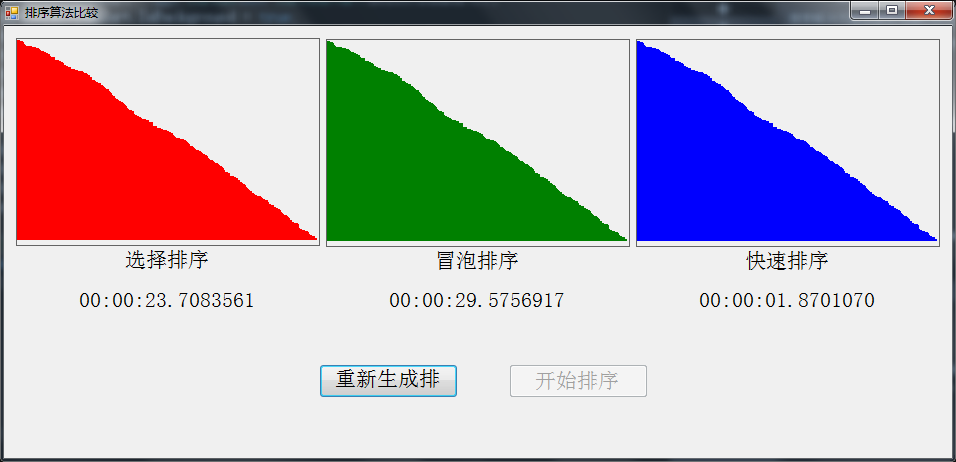
从以上图片的排序过程和排序时间可以看出,快速排序最快。选择排序次子,冒泡最慢。
来源:https://www.cnblogs.com/yangery/archive/2012/05/01/10801038.html