
问题
I've recently started up a django project on a new computer and recently found pycharm and am loving it so far. I've searched for my question online and read that setting pycharm to recognize django template syntax is as easy as settings -> Python Template Language -> Select Django from the dropdown.
Well that's all well and good, but this tab doesn't seem to exist for me.
The closest thing I can see is "Live Templates", but this does not seem to be the tab I'm looking for. Am I missing a plugin or something?
I'm sorry for this nub question, I just couldn't seem to find anyone having the same issue. Sorry if it's right in front of my eyes and I'm just being a dud.
回答1:
You must be using the Community Edition which is not full featured and probably does not include Web Development.
回答2:
Should be here, under Languages & Frameworks
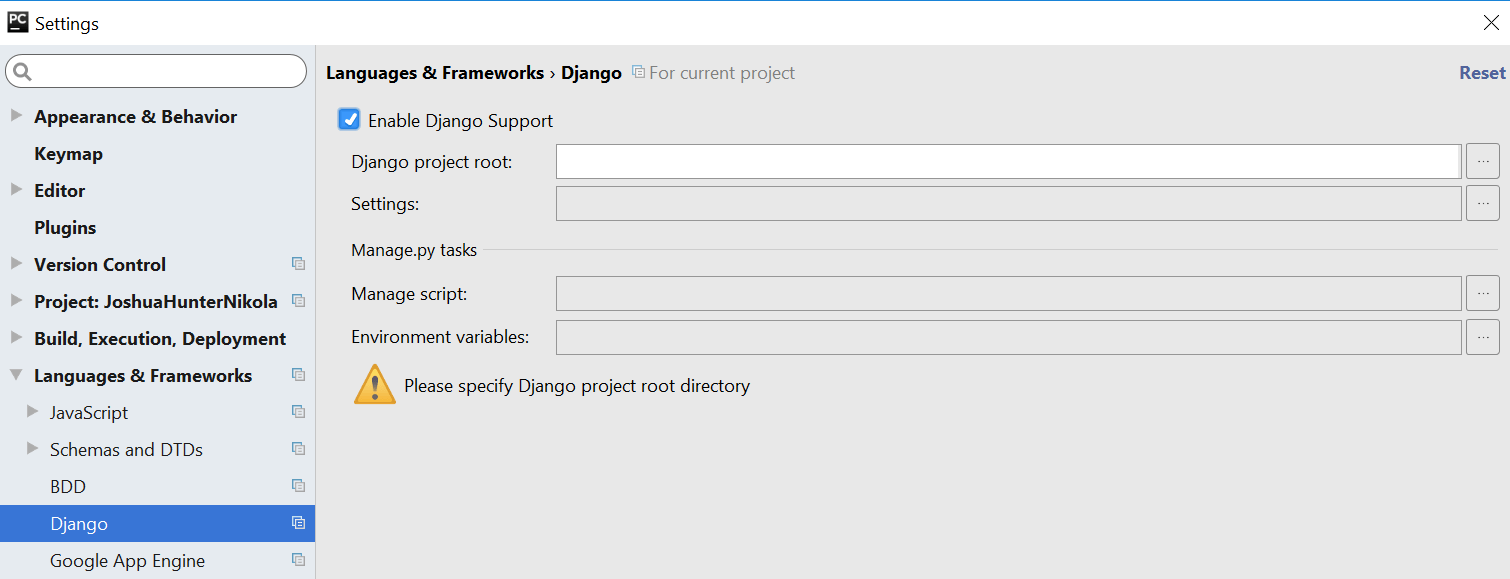
I got this image from following this tutorial I do however not have Django either on my Pycharm and I am further reading for ways to add it.
When I went on and installed django with pipenv, at reopening pycharm it was prompted to me that Paid version has specific stuff for Django and was linked to the site where it said full-stack stuff was added so I assume this is as you say a pay thing.
来源:https://stackoverflow.com/questions/41079540/pycharm-switch-python-template-language-to-django