
问题
I'm looking to essentially replicate this:

What is the most appropriate Qt container widget for displaying my custom widgets containing image+subscript? I'm looking at QTableView and it seems to be supposed to have a set number of rows/columns, while I would like my program to change layout depending on window width (so that there is no horizontal scroll), and adding new widget should be done with addWidget(QWidget * w), not setWidget(int row, int column, QWidget * w). Is there a better component for this than QTableView (which requires much coding for my task)?
回答1:
You should use QListWidget (or QListView and subclass QAbstractItemModel) and set it's view mode to IconMode.
Example :
m_listeWidget->setViewMode(QListWidget::IconMode);

m_listeWidget->setIconSize(QSize(200,200));

m_listeWidget->setResizeMode(QListWidget::Adjust);

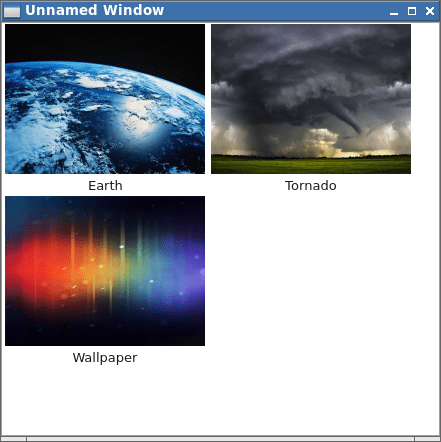
m_listeWidget->addItem(new QListWidgetItem(QIcon("../earth.jpg"),"Earth"));
m_listeWidget->addItem(new QListWidgetItem(QIcon("../tornado.jpg"),"Tornado"));
m_listeWidget->addItem(new QListWidgetItem(QIcon("../ics.jpg"),"Wallpaper"));
Result :
回答2:
definitly QTableView, Using custom itemDelegate to present every block, implements the custom widget to display the Image and Text Title
来源:https://stackoverflow.com/questions/14114737/which-qt-widget-to-use-for-implementing-image-thumbnail-browser-displaying-tile