
问题
I want to make a small software which can provide the windows running applications to "always on top functionality" as available in Linux terminal, VLC media player etc. I have found some application related to this on internet. but i want to create my own always on top utility.
It will be better if u can suggest c# .net code. and IDE: i will prefer Visual Studio
My goal is to make the application as shown here:
http://www.pcworld.com/article/218511/Windows.html
回答1:
For making it generic to any process, you have to overload two methods of the User32.dll which is a part of Win32 API.
Just use the code given below and specify your process name without its extension, say for vlc - specify
processName = "vlc"; and NOT LIKE "vlc.exe"
using System.Runtime.InteropServices;
using System.Diagnostics;

public class ProcessManager
{
    [DllImport("user32.dll")]
    private static extern bool ShowWindow(IntPtr hWnd, uint windowStyle);

    [DllImport("user32.dll")]
    private static extern bool SetWindowPos(IntPtr hWnd, IntPtr hWndInsertAfter, int x, int y, int cx, int cy, uint uFlags);

    ProcessManager()
    {
      string processName = "vlc"; /* Your process name here */
      SearchProcessAndModifyState(processName);
    }

    void SearchProcessAndModifyState(string targetProcessName)
    {
        Process specifiedProcess = null;
        Process[] processes = Process.GetProcesses();
        for (int i = 0; i < processes.Length; i++)
        {
            Process process = processes[i];
            if (process.ProcessName == targetProcessName)
            {
                specifiedProcess = process;
                break;
            }
        }
        if (specifiedProcess != null)
        {
          ProcessManager.ShowWindow(specifiedProcess.MainWindowHandle, 1u);
          ProcessManager.SetWindowPos(specifiedProcess.MainWindowHandle, new IntPtr(-1), 0, 0, 0, 0, 3u);
        }
    }
}
回答2:
Try to add this in your code, preferably on load
myTopForm.TopMost = true;
回答3:
Try to use this.TopMost = true; on your initialization.
Anyway it could be good if your read this.
回答4:
Go to the Form Property and set TopMost property to 'True' like this
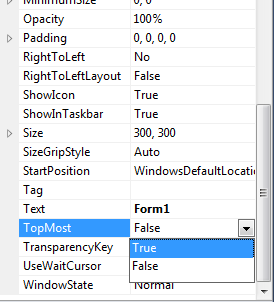
You can also set the value of the TopMost property of Form on code behind:
public Form1() { this.TopMost=true; }
Or on load
private void Form1_Load(object sender, EventArgs e) { this.TopMost=true; }
来源:https://stackoverflow.com/questions/21475710/how-to-make-windows-always-on-top-application