
问题
I'm developing a simple Java application using NetBeans and its GUI editor. I'm stuck on creating a simple dialog: runtime it looks different from what I designed and from what is previewed in the editor. Basically, clicking on a button make my dialog appears.
    private void jButton1MouseReleased(java.awt.event.MouseEvent evt) {
       PanelDialogNuovoCliente pan = new PanelDialogNuovoCliente();
       JDialog jd=new JDialog();
       jd.setTitle("Nuovo Cliente");
       jd.setMinimumSize(new Dimension(500, 400));
       jd.setLocationRelativeTo(null);
       jd.add(pan);
       jd.setModal(true);
       jd.setVisible(true);
    }
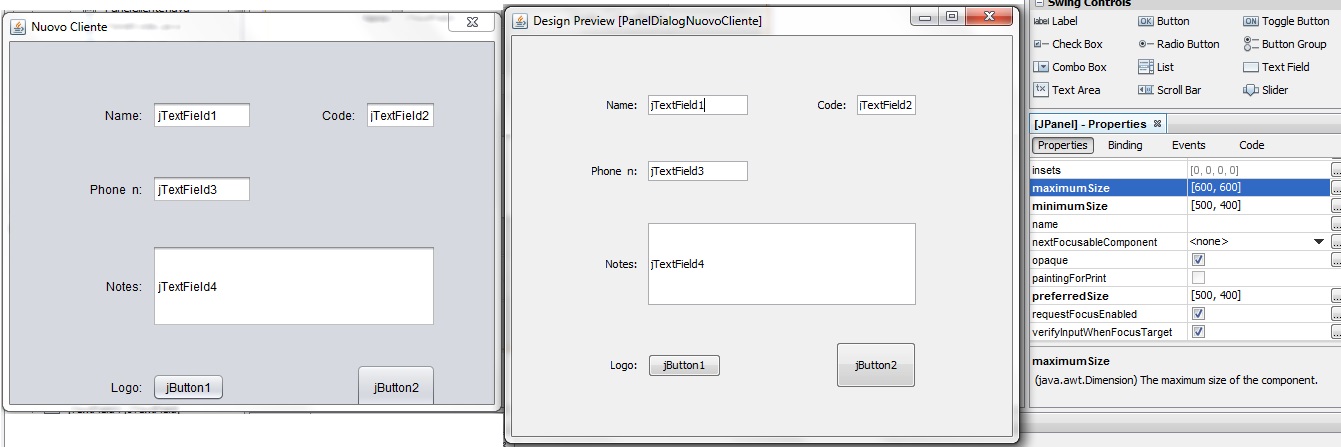
The problem is that when the dialog appears it has a different look, the dialog window seems smaller and not all the components fit in it.
PanelDialogNuovoCliente is just a JPanel with some labels and JTextField.
Maximum, Minimum and Preferred sizes are all set to (500,400) from the JPanel properties in the editor.
JDialog minimum size is set to (500,400) from the code that I snipped.
Unfortunately I can't post a screenshot because I need at least 10 reputation but when I run the application Dialog's window is smaller compared to the one that I can see from the preview button in NetBean's GUI editor.
EDIT: Here's the screenshot. Runtime JDialog is on the left, while preview of it in netbeans is on the right. I tried to call JDialog#pack() just before setVisible(true) without success. I set nimbus look and feel for my app. Anyways if i try to preview the design from ide with nimbus l&f it looks perfect so i don't think that this one is the real problem
回答1:
Perhaps what you're experiencing is similar to this post:
NetBeans (Java Swing): Set window size
I remember experiencing something similar and shared my experiences in a post there.
Edit: (28/05/2015)
Just to clarify/elaborate, here are steps I've got to replicate (and resolve) the issue I encountered, which might be what you've faced.
Problem Replication Steps
- Create a new project with "File >> New Project..."
- Choose "Java >> Java Desktop Application"
- Click 'Next' button
- Project Name: "TestApp", then "Finish" button - You then get two tabs opening up in the Matisse editor, "TestView.java" (the app's main window) and "TestAboutBox.java".
- In the Matisse editor, I re-size the window to be a large size.
- I then press Ctrl+F5 to run it
- It runs and the window is the same size as in the ide.
- Upon closing the app, it writes data to a "~/.TestApp/mainFrame.session.xml" file on my linux system (I think this equates to "%APPDATA%\CompanyName\TestApp\mainFrame.session.xml" on a windows system)
- Taking a look inside this "mainFrame.session.xml" file, I see there's a "mainFrame" node that contains the x, y, width and height of the window.
- Back in the mattisse editor, I resize the window to be smaller.
- I then press Ctrl+F5 to run it again
- The app's window then appears at the larger size (ie, it didn't abide by the smaller size specified in the IDE)
Workaround
I tried the workaround suggested in Tomas Pavek's post here:
http://forums.netbeans.org/ptopic28011.html
Basically, these steps:
- Delete this "mainFrame.session.xml" file (or the folder that contains it)
- then do CTRL+F5 to run the app again
...and hey presto! It appears at the correct size that the IDE had specified.
来源:https://stackoverflow.com/questions/30455840/netbeans-gui-preview-is-different-from-runtime-view