
In my app i making use of uitable to select category from my list. my task is,when ever user click or select a cell he should be able to view the selected cell detail in next view(detail view). and when he select the item in a detail view he should be able to move back in a table view and should be able to see the selected item in a rootivew controller.
i am able to navigate properly from tableview to detail view,but i am not able to show the item which is selected in detail view to rootviewcontroller.
please help me out with this issue.
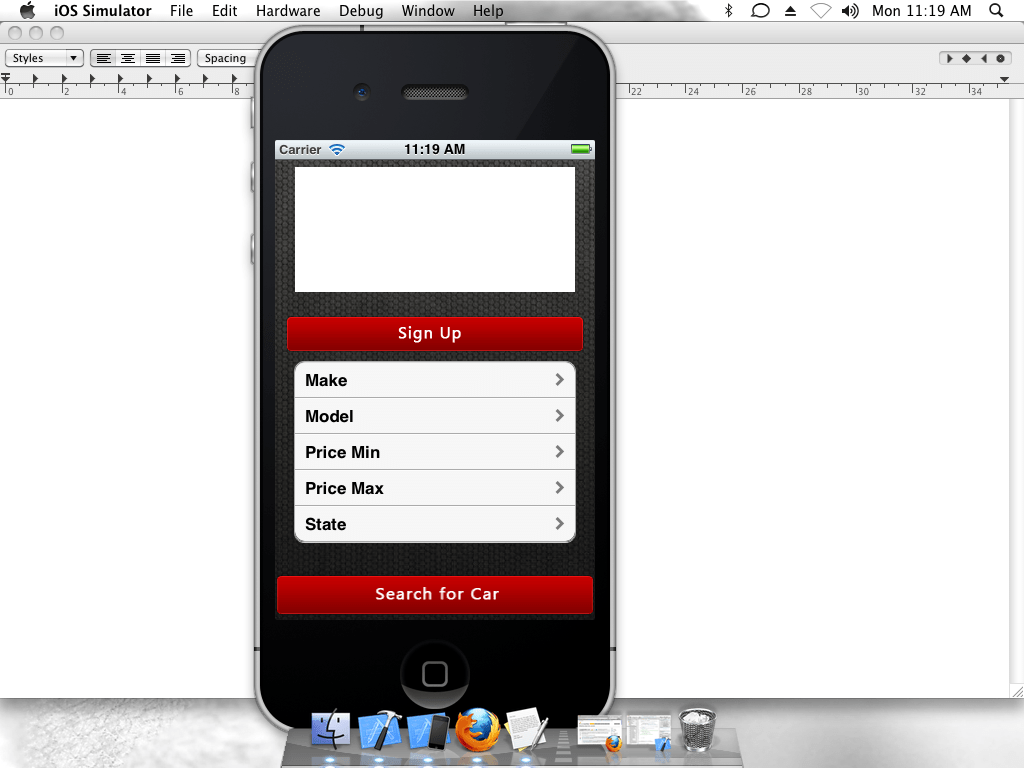 image one is my rootview controller page.
for example : if user select @"make" he will able to see all the releated category of @"make"
. in a next page(which image2).
image one is my rootview controller page.
for example : if user select @"make" he will able to see all the releated category of @"make"
. in a next page(which image2).
 image to is my detail page.
and when user select @"abarth" it should be display in a rootview controller page(which is page one).
following is my code of rootview controller page:
- (void)viewDidLoad
{

    self.car = [[NSArray alloc]initWithObjects:@"Make",@"Model",@"Price Min",@"Price Max",@"State",nil];


    [super viewDidLoad];

}

-(NSInteger) numberOfSectionInTableView:(UITableView *)tableView
{
    return 1;
}

-(NSInteger)tableView:(UITableView *)tableView numberOfRowsInSection:(NSInteger)section
{
    return [self.car count];
}


-(UITableViewCell *)tableView:(UITableView *)tableView cellForRowAtIndexPath:(NSIndexPath *)indexPath
{
    static NSString *TextCellIdentifier = @"Cell";

    UITableViewCell *cell =[tableView dequeueReusableCellWithIdentifier:TextCellIdentifier];
    if (cell==nil)
    {
        cell = [[UITableViewCell alloc]initWithStyle:UITableViewCellStyleDefault reuseIdentifier:TextCellIdentifier];
        cell.accessoryType = UITableViewCellAccessoryNone;
        cell.selectionStyle = UITableViewCellSelectionStyleNone;
    }

        cell.textLabel.text = [self.car objectAtIndex:[indexPath row]];
    cell.accessoryType = UITableViewCellAccessoryDisclosureIndicator;


       return cell;
}


- (void)tableView:(UITableView *)tableView
didSelectRowAtIndexPath:(NSIndexPath *)indexPath {


        if (0 == indexPath.row)
    {
        NSLog(@"0");
       self.detailcontroller.title = @"Make";
    }
    else if (1 == indexPath.row)
    {
        NSLog(@"1");
        self.detailcontroller.title = @"Model";
    }
    else if (2 == indexPath.row)
    {
        NSLog(@"2");
        self.detailcontroller.title = @"Price Min";
    }
    else if (3 == indexPath.row)
    {
        self.detailcontroller.title = @"Price Max";
    }
    else if (4 == indexPath.row)
    {
        NSLog(@"3");
        self.detailcontroller.title = @"State";
    }
    [self.navigationController
     pushViewController:self.detailcontroller
     animated:YES];
}


following is my detail view page code:

- (void)viewWillAppear:(BOOL)animated
{
    [super viewWillAppear:animated];

    if ([self.title isEqualToString:@"Make"])
    {
        detail = [[NSArray alloc]initWithObjects:@"Any Make",@"Abarth",@"AC",@"ADAYER",@"Adelaide",@"ALFA ROMEO",@"ALLARD",@"ALPINE-RENAULT",@"ALVIS",@"ARMSTRONG",
                  @"ASTON MARTIN",@"AUDI",@"AUSTIN",@"AUSTIN HEALEY",@"Barossa",@"BEDFORD",
                  @"BENTLEY",@"BERTONE",@"BMW",@"BOLWELL",@"BRISTOL",@"BUICK",@"BULLET",
                  @"CADILLAC",@"CATERHAM",@"CHERY",@"CHEVROLET",@"CHRYSLER",@"CITROEN",
                  @"Country Central",@"CSV",@"CUSTOM",@"DAEWOO",@"DAIHATSU",@"DAIMLER",
                  @"DATSUN",@"DE TOMASO",@"DELOREAN",@"DODGE",@"ELFIN",@"ESSEX",
                  @"EUNOS",@"EXCALIBUR",@"FERRARI",nil];

        if ([self.title isEqualToString:@"Abarth"])
        {
            detail = [[NSArray alloc]initWithObjects:@"HI", nil];
        }
    }
    else if ([self.title isEqualToString:@"Model"])
    {
        detail = [[NSArray alloc]initWithObjects:@"Any Model", nil];


    }
    else if ([self.title isEqualToString:@"Price Min"])
    {
        detail = [[NSArray alloc]initWithObjects:@"Min",@"$2,500",
                  @"$5,000",
                  @"$7,500",
                  @"$10,000",
                  @"$15,000",
                  @"$20,000",
                  @"$25,000",
                  @"$30,000",
                  @"$35,000",
                  @"$40,000",
                  @"$45,000",
                  @"$50,000",
                  @"$60,000",
                  @"$70,000",
                  @"$80,000",
                  @"$90,000",
                  @"$100,000",
                  @"$500,000",
                  @"$1,000,000",nil];

    }
    else if ([self.title isEqualToString:@"Price Max"])
    {
        detail = [[NSArray alloc]initWithObjects:@"Max",
                  @"$2,500",
                  @"$5,000",
                  @"$7,500",
                  @"$10,000",
                  @"$15,000",
                  @"$20,000",
                  @"$25,000",
                  @"$30,000",
                  @"$35,000",
                  @"$40,000",
                  @"$45,000",
                  @"$50,000",
                  @"$60,000",
                  @"$70,000",
                  @"$80,000",
                  @"$90,000",
                  @"$100,000",
                  @"$500,000",
                  @"$1,000,000",nil];
    }
    else if ([self.title isEqualToString:@"State"])
    {
        detail = [[NSArray alloc]initWithObjects:@"Any State",
                  @"Australian Capital Territory",
                  @"New South Wales",
                  @"Northern Territory",
                  @"Queensland",
                  @"South Australia",
                  @"Tasmania",
                  @"Victoria",
                  @"Western Australia",nil];
    }
    [self.tableView reloadData];
}

- (NSInteger)numberOfSectionsInTableView:(UITableView *)tableView
{

    return 1;
}

- (NSInteger)tableView:(UITableView *)tableView numberOfRowsInSection:(NSInteger)section
{

    return [detail count];
}

- (UITableViewCell *)tableView:(UITableView *)tableView cellForRowAtIndexPath:(NSIndexPath *)indexPath
{
    static NSString *CellIdentifier = @"Cell";

    UITableViewCell *cell = [tableView dequeueReusableCellWithIdentifier:CellIdentifier];
    if (cell == nil) {
        cell = [[UITableViewCell alloc] initWithStyle:UITableViewCellStyleDefault reuseIdentifier:CellIdentifier];
    }

    cell.textLabel.text = [detail objectAtIndex:
                           [indexPath row]];


    cell.font = [UIFont systemFontOfSize:14.0];
    return cell;


}


- (void)tableView:(UITableView *)tableView didSelectRowAtIndexPath:(NSIndexPath *)indexPath
{


    [self.navigationController popViewControllerAnimated:YES];

}
You need to make use of custom delegates. Create a protocol in your detailview and implement it in your rootview.Pass the selected string as parameter to delegate method and from the delegate method, display it in your textfield.
//something like this
@interface detailViewController

// protocol declaration
@protocol myDelegate
@optional
   -(void)selectedValueIs:(NSString *)value;

// set it as the property
@property (nonatomic, assign) id<myDelegate> selectedValueDelegate;

// in your implementation class synthesize it and call the delegate method
@implementation detailViewController
@synthesize selectedValueDelegate
// in your didselectRowAtIndex method call this delegate method
- (void)tableView:(UITableView *)tableView didSelectRowAtIndexPath:(NSIndexPath *)indexPath
 {

      [self  selectedValueDelegate])selectedValueIs:valueString] ;
      [self.navigationController popViewControllerAnimated:YES];

  }


@end

// In your rootViewController conform to this protocol and then set the delegate

         detailViewCtrlObj.selectedValueDelegate=self;
//Implement  the delegate Method
     -(void)selectedValueIs:(NSString *)value{
       {
            // do whatever you want with the value string
       }
Hi you will have to do it using protocols and delegate Please see my linkon protocol and delegate
you can also do it by creating a variable in appdelegate , setting its property and accessing it in any other view .
YourAppDelegate *appDelegate = (YourAppDelegate *)[[UIApplication sharedApplication] delegate];
delegate.yourVariable;
来源:https://stackoverflow.com/questions/10578281/how-to-pass-data-back-from-detail-view-controller-to-uitableview