
This is total refactoring of my old question on new level of knowledge.
Questions summary
My eclipse product is not working. Does it require any additional feature?
Creating Simplistic RCP Application


At this moment all wizard features were disabled and I press Finish button. As a result, Eclipse creates nearly empty project with MANIFEST.MF and build.properties files only.

Now I am creating an application. Application is an extension to org.eclipse.core.runtime.applications extension point, which is implemented inside org.eclipse.core.runtime plug-in. So I add this plug-in as a dependency:

This creates new node in Package Explorer, called Plug-in Dependencies:

Now I add new extension to this point in my plug-in:

I am giving an id myappid to my application and assign a class myproject.Application to it.
This creates a file plugin.xml
<?xml version="1.0" encoding="UTF-8"?>
<?eclipse version="3.4"?>
<plugin>
   <extension
         id="myappid"
         point="org.eclipse.core.runtime.applications">
      <application
            cardinality="singleton-global"
            thread="main"
            visible="true">
         <run
               class="myproject.Application">
         </run>
      </application>
   </extension>

</plugin>
which contains all this information. Also this file is referred from build.properties:
source.. = src/
output.. = bin/
bin.includes = META-INF/,\
               .,\
               plugin.xml
Simultaneously MANIFEST.MF becomes invalid, since it is now required to be singleton, which is set either automatically, or by check box from Overview tab:

Note, that although my application id is myappid, this name is not fully qualified. Fully qualified name appears from concatenation between plug-in id and this is. In my case it is myproject.myappid.
Now I am going (back) to Extensions tab of manifest editor, and create class file for application by clicking class hyperlink:

This invokes New Java class wizard and finally creates java file and opens it in the editor:
package myproject;

import org.eclipse.equinox.app.IApplication;
import org.eclipse.equinox.app.IApplicationContext;

public class Application implements IApplication {

    @Override
    public Object start(IApplicationContext context) throws Exception {
        // TODO Auto-generated method stub
        return null;
    }

    @Override
    public void stop() {
        // TODO Auto-generated method stub

    }

}
I am adding only one line here, inside start method:
System.out.println("Hello world from myproject");
Now after saving all I am able to run application from Overview tab of manifest editor. Program works and prints what is expected:
Hello world from myproject
Printing occurs in Eclipse Console View.
Creating Product Configuration
Now I am creating a product configuration, which is required for export wizard can work.

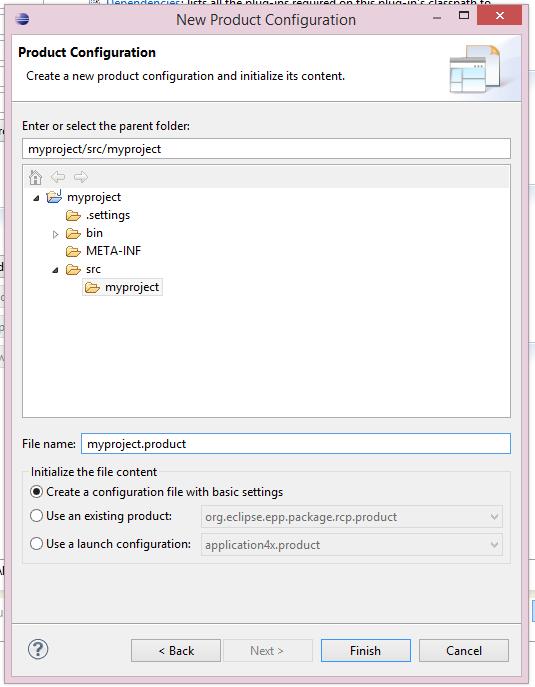
Creating and setting product file simultaneously adds extension to plugin.xml file to org.eclipse.core.runtime.products extension point.
On the Overview tab of product file editor, I press New button, which invokes New Product Definition window:

I filled it with new product name, product id and also referred application, which fully qualified name I derived before.
Now my plugin.xml file lokks like follows:
<?xml version="1.0" encoding="UTF-8"?>
<?eclipse version="3.4"?>
<plugin>
   <extension
         id="myappid"
         point="org.eclipse.core.runtime.applications">
      <application
            cardinality="singleton-global"
            thread="main"
            visible="true">
         <run
               class="myproject.Application">
         </run>
      </application>
   </extension>
   <extension
         id="myproductid"
         point="org.eclipse.core.runtime.products">
      <product
            application="myproject.myappid"
            name="MyProduct">
      </product>
   </extension>

</plugin>
You see that our product is represented there.
Now I need to do a trick which I was not able to find for a long time.
Despite the fact that product file refers to application and plugin correctly, it is not included into product content automatically. I regard this as Eclipse bug.
So, I go to Dependencies tab of product file editor, and add my own plugin to it:

After that I need to press magic button Add Required Plug-ins


Now I am able to run my application from within Overview panel of product file editor and it works as expected (printing text inside console view).
Exporting Product
Only now I am able to utilize export wizard


This will create directory D:\myproject and put everything into it. It can be ran by running eclipse.exe inside

Unfortunately, it does nothing, although, cause no exceptions.
Questions
1) Why my exported program does nothing? Does it require eclipse console or something? Or it just doesn't work?
2) How to make the program to print? Is it possible to provide GUI console like in Eclipse? Or is it possible to force it to print to operating system terminal/console?
1) Check you environment, especially JAVA_OPTS. If there's anything there, unset the variable and try running again
2) Check the JDK on your path with "java -version". Is it a 1.7.0 version (as specified in the execution environment) and does it match the eclipse launcher (i.e. if you are using 64-bit eclipse, it should be a 64-bit JDK and not a 32-bit one, and vice-versa). If there is a mismatch, fix (set PATH / JAVA_HOME to proper location and retry running). Note that on Windows the default JRE may be configured in the registry and your path may be clear. Check the Java settings in Control Panel to see what's the preferred one. Heck, even better, don't risk it: add the following lines in eclipse.ini instead, pointing to the correct JDK location, ABOVE the -vmargs line:
-vm
C:\path\to\the\proper\jdk\bin\javaw.exe
3) Look in the folder "configuration/.log" (timestamp is a UNIX long). Sometimes when a workspace doesn't get created Eclipse will log errors there...
4) Try running with "eclipse -consoleLog"
P.S. I haven't actually tried your steps, but the above is the list of things that have bitten me in the past (with 2 being the most common one)... :-)
I think your program works correctly, but you are not seeing anything because the output is not directed anywhere. Please edit the file eclipse.ini and add two options before the vmargs:
-console
-consoleLog
Then open a terminal/command interpreter in the folder and execute:
eclipse
Then see whether there is still no output.
来源:https://stackoverflow.com/questions/20689979/how-to-make-simplistic-rcp-application-really-standalone