
想要做到的效果是:
- 当用户访问 http://127.0.0.1:4002/pic 时,在pic.js文件中对数据做相关的操作,并返回结果;
- 当用户访问http://127.0.0.1:4002/txt 或者 http://127.0.0.1:4002 时,在txt.js文件中对数据做相关的操作,并返回结果。
- 也就是当接口路径不同时,执行node.js的不同文件。
简单的目录结构: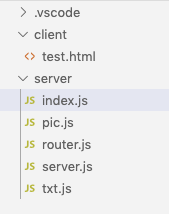
index.js文件,node.js启动服务的默认文件:
//index.js
var server=require("./server"),
router=require("./router");
var handle = {
    //不同接口名称,对应不同的文件
    "/":require("./txt"),
    "/txt":require("./txt"),
    "/pic":require("./pic")
};
server(router,handle);
router.js文件,返回一个方法,返回的方法中有两个参数,也就是server.js文件中代入的handle和pathname。handle就是index中声明的对象,pathname是接口路径。
//router.js
module.exports=(function(){
    return function(handle,pathname){
        if(typeof handle[pathname]==="function")
            return handle[pathname]();
    }
})();
server.js文件,创建node服务,将接口路径带入到route方法中,就可以执行加载不同的js文件。
//server.js
//加载http模块
var http=require("http"),
//加载url模块
url=require("url");

module.exports=(function(){
    var res,route,handle;
    return function(_route,_handle){
        route=_route;
        handle=_handle;
        var server=http.createServer(setServer);
        server.listen(4002,"localhost",function(){
            console.log("服务已开启");
        })
    }
    function setServer(request,response){
        res=response;
        var data="";
        request.on("data",function(_data){
            data+=_data;
        });
        request.on("end",function(){
            // 关闭nodejs 默认访问 favicon.ico
            if(request.url.indexOf("favicon.ico")>-1) return;
            //获取请求路径
            let pathname=url.parse(request.url).pathname;
            //返回处理的数据
            let result=route(handle,pathname);
            //发送给客户端
            setData(result);
        })
    }
    function setData(result){
        res.writeHead(200,{
            "content-type":"text/html;charset=utf-8",
            "Access-Control-Allow-Origin":"*",
            "Access-Control-Allow-Headers":"*"
        })
        res.write(result);
        res.end();
    }
})();
pic.js文件:
//pic.js
module.exports=function(){
    console.log("Request handler 'picture' was called.");
    return "This is a picture";
}
txt.js文件:
//txt.js
module.exports=function(){
    console.log("Request handler 'txt' was called.")
    return "This is a text message";
}
在客户端测试一下:
ajax();
function ajax(){
    let xhr=new XMLHttpRequest();
    xhr.addEventListener("readystatechange",e=>readyStateChangeHandler(e));
    xhr.open("GET","http://127.0.0.1:4002/");
    // xhr.open("GET","http://127.0.0.1:4002/pic");
    xhr.send();

}
function readyStateChangeHandler(e){
    let xhr=e.currentTarget;
    if(xhr.readyState===4&&xhr.status===200){
        console.log(xhr.response)
    }
}
来源:CSDN
作者:蒲公英芽
链接:https://blog.csdn.net/Charissa2017/article/details/104525812