
react-redux
安装
- npm i react-redux --save
- 或者 yarn add react-redux
实例
- 这里还是用todoList为例讲解
- 完整目录结构

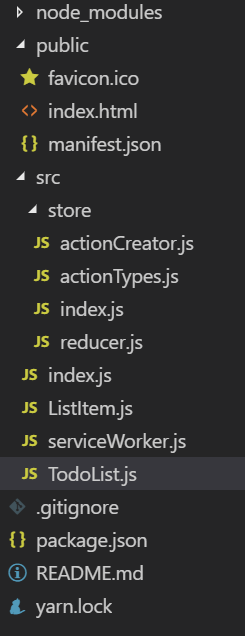
修改index.js 入口文件
import React from 'react';
import ReactDOM from 'react-dom';
import * as serviceWorker from './serviceWorker';
import { Provider } from 'react-redux';
import store from './store/index.js'
import TodoList from './TodoList'
const App = (
    <Provider store={store}>
        <TodoList />
    </Provider>
)
ReactDOM.render(App, document.getElementById('root'));
serviceWorker.unregister();
解释
- 上述Provider 是react-redux的一个核心api,它所包裹的东西都可以共享store数据
TodoList.js的配置
- 先导包
import { connect } from 'react-redux' - 注意最后的导出方式变了
const mapStateToProps = (state) => {
    return {
        inputValue: state.inputValue,
        list: state.list
    }
}
const mapDispatchToProps = (dispatch) => {
    return {
        inputChange(e) {
            dispatch(changeAction(e.target.value));
        },
        add() {
            dispatch(addAction());
        },
        del(index) {
            dispatch(delAction(index));
        }

    }

}
export default connect(mapStateToProps, mapDispatchToProps)(TodoList);
- connect第一个参数配置的是状态到props的映射,第二个参数配置的是分发action到props的映射
actionTypes.js文件
- 统一以常量定义action类型,方便调试
export const CHANGE="change";
export const ADD="add";
export const DEL="del";
actionCreator.js文件
- 抽离action创建过程
import { CHANGE, ADD, DEL } from './actionTypes'
export  const  changeAction = (value) => {
    return {
        type: CHANGE,
        value
    }

}
export const addAction = () => {
    return {
        type: ADD
    }

}
export const delAction = (index) => {
    return {
        type: DEL,
        index
    }

}
store/index.js
import { createStore } from "redux";
import reducer from "./reducer.js"
const store = createStore(reducer);
export default store;
store/reducer.js
const defaultState = {
    inputValue: "",
    list: ["学习react"," 学习vue"]
}
export default (state = defaultState, action) => {

    switch (action.type) {
        case "change": {
            const newState = JSON.parse(JSON.stringify(state));
            newState.inputValue = action.value;
            return newState;
        }
        case "add": {
            const newState = JSON.parse(JSON.stringify(state));
            newState.list.push(newState.inputValue) ;
            newState.inputValue="";
            return newState;
        }
        case "del": {
            const newState = JSON.parse(JSON.stringify(state));
            newState.list.splice(action.index,1) ;
            return newState;
        }

        default: {
            action.type = "change"
        }

    }
    return state;
}
全部代码
- 下载
- 提取码:byrq
来源:CSDN
作者:_冷月心
链接:https://blog.csdn.net/qq_42813491/article/details/104043456