
小程序canvas生成图片并保存在本地,舍己图片的绘制,和权限申请和图片的保存。
官网文档
用到的相关api
| api | 描述 | 示例 |
|---|---|---|
| wx.getSystemInfo | 获取手机的屏幕信息(宽、高等) | wx.getSystemInfo({}) |
| wx.createCanvasContext | 创建canvas上下文对象 | const ctx = wx.createCanvasContext(“my-canvas”, this); |
| ctx.setFillStyle | 设置画笔颜色 | ctx.setFillStyle("#ccc"); |
| ctx.fillRect(0, 0, sWidth, 350) | 填充一个矩形 | ctx.fillRect(0, 0, sWidth, 350); |
| ctx.drawImage | 将一张图片填充进画布 | ctx.drawImage("/test.jpg", 0, 0, 1440, 900, 20, 20, sWidth - 40, 210) |
| ctx.setFontSize | 设置字体颜色 | ctx.setFontSize(16); |
| ctx.draw | 将缓存重的图像画出来(将之前在绘图上下文中的描述(路径、变形、样式)画到 canvas 中) | ctx.draw(); |
| wx.getSetting | 获取用户的授权设置 | wx.getSetting({}) |
| wx.openSetting | 打开用户授权的设置 | wx.openSetting{()} |
| wx.canvasToTempFilePath | 将canvas图片存到本地的临时文件 | wx.canvasToTempFilePath({}) |
| wx.saveImageToPhotosAlbum | 将缓存中的图片保存到手机 | wx.saveImageToPhotosAlbum({}) |
ctx为 canvas上下文对象。
示例代码
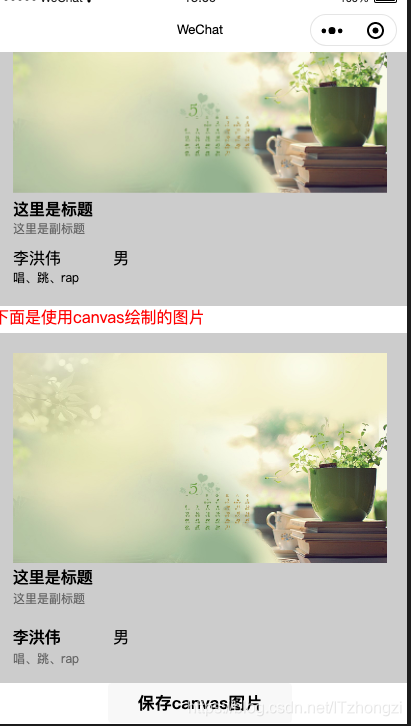
- 效果
上面为wxml写的页面,下面为使用canvas绘制的和上面一模一样的图片。最后一个把图片保存到本地的图片的按钮。
- wxml
<view class="box">
  <image class="showimg" src="/test.jpg" mode="widthFix"></image>
  <view class="intro">
    <view class="title">这里是标题</view>
    <view class="sub-title">这里是副标题</view>
  </view>
  <view class="userinfo">
    <view class="base-info">
      <view class="name">李洪伟</view>
      <view class="sex"> 男</view>
    </view>
    <view class="hobby">唱、跳、rap</view>
  </view>
</view>
<view style="color: red;">
  下面是使用canvas绘制的图片
</view>
<view class="canvas-box" >
  <canvas canvas-id='my-canvas'></canvas>
</view>

<button bindtap="saveImage">保存canvas图片</button>
- wxss样式
page {
  padding-bottom: 20px;
}
.box {
  background: #ccc;
  padding: 20px;
}

.showimg {
  width: 100%;
}

.intro {
}

.title {
  font-weight: bold;
  font-size: 16px;
}

.sub-title {
  font-size: 12px;
  color: #666;
}

.userinfo {
  margin-top: 10px;
}

.base-info {
  display: flex;
}

.name {
  flex-basis: 100px;
}

.sex {
}

.hobby {
  font-size: 12px;
}

.canvas-box {
  width: 100%;
  height: 350px;
  margin-top: 5px;
}

.canvas-box canvas {
  width: 100%;
  height: 100%;
}
- js文件
const app = getApp()

Page({
  data: {
    screenWidth: 0,
    screenHeight: 0
  },
  onLoad: function () {
    let that = this;
    wx.getSystemInfo({
      success: function(res) {
        console.log(res);
        that.setData({
          screenWidth: res.safeArea.width,
          screenHeight: res.safeArea.height - 44, //减去顶部不可使用的标题高度
        });
      },
    })
    const ctx = wx.createCanvasContext("my-canvas", this);
    this.drawImage(ctx);
  },

  drawImage: function(ctx){
    const sWidth = this.data.screenWidth;
    const sHeight = this.data.screenHeight;
    // 设置填充色
    ctx.setFillStyle("#ccc");
    // 填充一个矩形
    ctx.fillRect(0, 0, sWidth, 350);
    // ctx.draw();

    ctx.drawImage("/test.jpg", 0, 0, 1440, 900, 20, 20, sWidth - 40, 210);
    // ctx.draw();

    ctx.setFillStyle("#000");
    ctx.setFontSize(16);
    // 设置字体内容并加粗
    ctx.fillText("这里是标题", 20 ,250, 300);
    //加粗标题
    ctx.fillText("这里是标题", 20 - 0.5, 250 - 0.5, 300);

    //副标题
    ctx.setFillStyle("#666");
    ctx.setFontSize(12);
    ctx.fillText("这里是副标题", 20, 270, 300);

    ctx.setFontSize(16);
    ctx.setFillStyle("#000");
    ctx.fillText("李洪伟", 20, 310, 300);
    //加粗标题
    ctx.fillText("李洪伟", 20 - 0.5, 310 - 0.5, 100);

    ctx.fillText("男", 120, 310, 300);

    ctx.setFillStyle("#666");
    ctx.setFontSize(12);
    ctx.fillText("唱、跳、rap", 20, 330, 100);

    // 绘制缓存中的内容
    ctx.draw();
  },

  getPower: function(){
    let that = this;
    wx.getSetting({
      success(res) {
        if (!res.authSetting['scope.writePhotosAlbum']) {
          wx.authorize({
            scope: 'scope.writePhotosAlbum',
            success() {
              // 用户已经同意小程序使用录音功能,后续调用 wx.startRecord 接口不会弹窗询问
              that.saveImage();
            }
          })
        } else {
          wx.openSetting({
            success(res) {
              console.log(res.authSetting)
              // res.authSetting = {
              //   "scope.userInfo": true,
              //   "scope.userLocation": true
              // }
            }
          })
        }
      }
    })
  },

  saveImage: function(){


    wx.canvasToTempFilePath({
      x: 0,
      y: 365,
      width: this.data.screenWidth,
      height: 350,
      destWidth: this.data.screenWidth,
      destHeight: 350,
      canvasId: "my-canvas",
      fileType: "png",
      success: function(res){
        console.log(res, "临时文件");

        wx.saveImageToPhotosAlbum({
          filePath: res.tempFilePath,
          success(res) { console.log("succ", res)},
          fail(res){ console.log("err", res) }
        })
      },
      fail: function(res){
        console.log("err", res);
      },
      complete: function(){

      }
    }, this);
  }

})
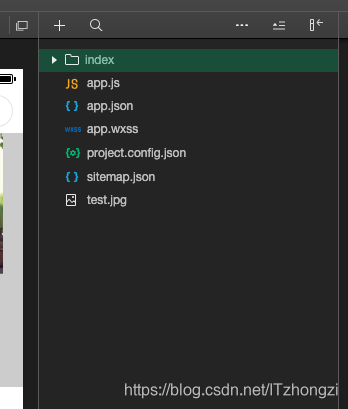
- 项目结构
来源:CSDN
作者:ITzhongzi
链接:https://blog.csdn.net/ITzhongzi/article/details/103989511