
问题
I want to draw this type of circle in my application. I am able to draw circle using Canvas but I can't get any idea about how to make partitioned?
Can anyone suggest me how can I make partitioned of circle?
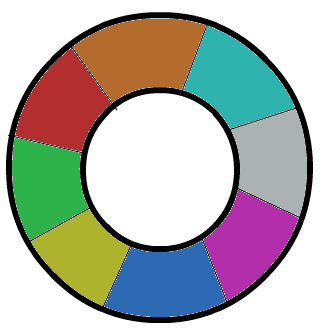
Edit:- I want to draw line that are in inner circle.
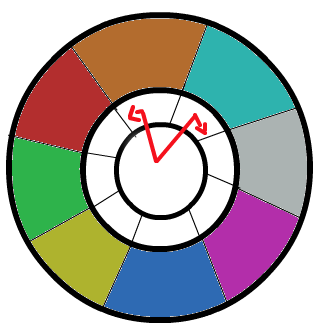
Thanks in advance.
回答1:
Here's the working code for your requirement....
Editing the code:-
    Paint paint1 = new Paint();
        Paint paint2 = new Paint();
        Paint paint3 = new Paint();
        Paint paint4 = new Paint();
        Paint paint5 = new Paint();
        final RectF rect = new RectF();
        int mRadius = 130;
        //Example values
        rect.set(getWidth()/2- mRadius, getHeight()/2 - mRadius, getWidth()/2 + mRadius, getHeight()/2 + mRadius);
        paint1.setColor(Color.GREEN);
        paint1.setStrokeWidth(mRadius/2);
        paint1.setAntiAlias(true);
        paint1.setStrokeCap(Paint.Cap.BUTT);
        paint1.setStyle(Paint.Style.STROKE);
        paint2.setColor(Color.RED);
        paint2.setStrokeWidth(mRadius/2);
        paint2.setAntiAlias(true);
        paint2.setStrokeCap(Paint.Cap.BUTT);
        paint2.setStyle(Paint.Style.STROKE);
        paint3.setColor(Color.BLUE);
        paint3.setStrokeWidth(5);
        paint3.setAntiAlias(true);
        paint3.setStrokeCap(Paint.Cap.BUTT);
        paint3.setStyle(Paint.Style.STROKE);
        canvas.drawArc(rect, 0, 60, false, paint1);
        canvas.drawArc(rect, 60, 60, false, paint2);
        canvas.drawArc(rect, 120, 60, false, paint1);
        canvas.drawArc(rect, 180, 60, false, paint2);
        canvas.drawArc(rect, 240, 60, false, paint1);
        canvas.drawArc(rect, 300, 60, false, paint2);

        canvas.drawLine(getWidth()/2,
                getHeight()/2, getWidth()/2-mRadius/2, getHeight()/2-mRadius/2,paint3);

        canvas.drawLine(getWidth()/2,
                getHeight()/2, getWidth()/2+mRadius/2, getHeight()/2-mRadius/2,paint3);

        canvas.drawLine(getWidth()/2,
                getHeight()/2, getWidth()/2-mRadius/2, getHeight()/2+mRadius/2,paint3);

        canvas.drawLine(getWidth()/2,
                getHeight()/2, getWidth()/2+mRadius/2, getHeight()/2+mRadius/2,paint3);

        canvas.drawLine(getWidth()/2,
                getHeight()/2, getWidth()/2-mRadius/4-mRadius/2, getHeight()/2,paint3);

        canvas.drawLine(getWidth()/2,
                getHeight()/2, getWidth()/2+mRadius/4+mRadius/2, getHeight()/2,paint3);

        paint4.setColor(Color.BLACK);

        canvas.drawCircle(getWidth()/2, getHeight()/2, mRadius/2, paint4);

        paint5.setColor(Color.YELLOW);
        paint5.setStrokeWidth(3);
        paint5.setAntiAlias(true);
        paint5.setStrokeCap(Paint.Cap.BUTT);
        paint5.setStyle(Paint.Style.STROKE);
        canvas.drawCircle(getWidth()/2, getHeight()/2, mRadius/2, paint5);
I hope now you satisfy with my answer....
回答2:
I have an idea first draw inside circle with partition using
can.drawArc(oval, startAngle, sweepAngle, useCenter, paint)
Take angle value like 0 t0 60, and then again draw another arc with same center take angle value from 60 to 120 and so on.Every time set different color in Paint.After completion of inside circle, almost all work done.Now draw white circle with same center but small radius after first circle.So it will create over first
Hope it will help you :)
回答3:
Hey I found the solution of my query,
final RectF rect1 = new RectF();
int mWidth = this.getWidth()/2;
int mHeight = this.getHeight()/2;
int mRadius = 130, mRadius1 = 50;
rect1.set(mWidth -(mRadius-mRadius1), mHeight - (mRadius-mRadius1), mWidth + (mRadius-mRadius1), mHeight + (mRadius-mRadius1));

Paint paintLines = new Paint();
paintLines.setColor(Color.BLACK);
paintLines.setStrokeWidth((mRadius-mRadius1)/2);
paintLines.setAntiAlias(false);
paintLines.setStrokeCap(Paint.Cap.BUTT);
paintLines.setStyle(Paint.Style.STROKE);

canvas.drawArc(rect1, 0, 1, false, paintLines);
canvas.drawArc(rect1, 30, 1, false, paintLines);
canvas.drawArc(rect1, 60, 1, false, paintLines);
canvas.drawArc(rect1, 90, 1, false, paintLines);
canvas.drawArc(rect1, 120, 1, false, paintLines);
canvas.drawArc(rect1, 150, 1, false, paintLines);
来源:https://stackoverflow.com/questions/9205838/how-to-draw-circle-with-partitioned-in-android