
问题
class Bills extends Component {
constructor(props) {
    super(props)
    this.state = {
        productName: '',
        price: 0,
        quantity: 0,
        noOfProductsField: 0
    }
}
handleChange = name => event => {
    this.setState({
        [name]: event.target.value,
    });
};

createFields = () => {
        const { classes } = this.props;
        let children = []
        for (let i = 0; i < this.state.noOfProductsField; i++) {
            children.push(
                <div>
                    <Select
                        className={classes.textField}
                         value = { this.state[i] }
                    onChange={this.handleChange('productName')}
                        displayEmpty
                        SelectProps={{
                            MenuProps: {
                                className: classes.menu,
                            }
                        }}>
                        <MenuItem value="" disabled>
                            Select Product
                           </MenuItem>
                        {this.state.products.map((option, ind) => (
                            <MenuItem key={ind} value={option.productName}>
                                {option.productName}
                            </MenuItem>
                        ))}
                    </Select>
                    <TextField className={classes.textField} placeholder='Price' type='number' onChange={this.handleChange('price')} />
                    <TextField className={classes.textField} placeholder='Quantity' type='number' onChange={this.handleChange('quantity')} />
                </div>
            )
        }
        return children
    }
}
I Have this function which is creating 3 input fields in for loop
- productName
- price
- quantity
For Example if loop is running 2 times it will create 6 fields like image below:
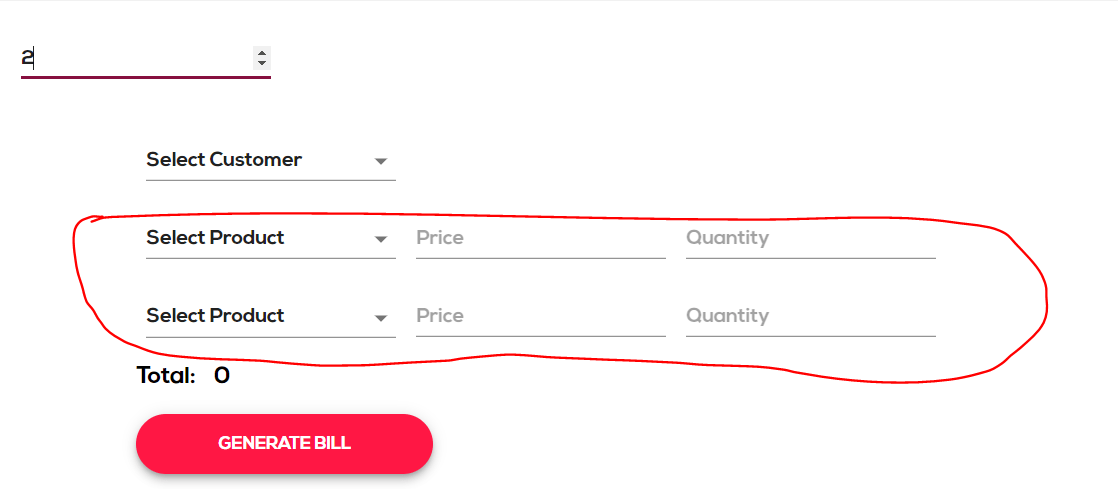
So now i want to manage state for all 6 fields differently How can i do that ?
回答1:
You need to create dynamic form inputs right? So what you can do is you can pass the name of the product to you handler this.handleChange('productName') and then you can do something like following. In your case you will need to use computed property name so as to dynamically set the state(like you are already doing)
handleChange = name => event => {
    //more logic here as per the requirement
    this.setState({
        [name]: event.target.value,
    });
};
Or you can create seperate onChange handlers each for product, price, quantity.
handleProductChange = (name) => (evt) => {
    const newProducts = this.state.products.map((product, pidx) => {
      if (name !== product.productName) return product;
      return { ...product, productName: evt.target.value };
    });

    this.setState({ products: newProducts });
}
Quick flow: When product onChange occurrs you can store the product in the procucts array(in state) and when price change will occure you can send the product name along with it and map the product with price and quantity.
Here you can find a nice JS bin replica with React, of exact same thing you want to achieve.
回答2:
You can add name attribute to each input component and make one handler method which get the name as an argument.
handleInputChange(event) {

  const value = event.target.value;
  const name = event.target.name;

  this.setState({
    [name]: value
  });
}
You can read more about how to handle multiple inputs on React docs.
回答3:
you can create dynamic select field using react js
**Code sample:**

const templates = [
    {'id': 1, 'value': 'JavaScript', 'name': 'JavaScript'},
    {'id': 2, 'value': 'React', 'name': 'React'},
    {'id': 3, 'value': 'Angular', 'name': 'Angular'},
    {'id': 4, 'value': 'Node', 'name': 'Node'},
    {'id': 5, 'value': 'Vue', 'name': 'Vue'},
 ]

class Dynamic extends React.Component {
  state={
    selectedTemplates: ""
  }

 onChange = (e) => {
   console.log(e)
   // selected value store into state
    this.setState({
      selectedTemplates: e.target.value
    });
  };

  render() {
    return (
      <div>
        <h2>Dynamic Select(Options):</h2>
        <select className="form-control"
            value={this.state.value}
            onChange={(e) => this.onChange(e.target.value)}
          >
          {
              templates.map(msgTemplate => {
                  return (
                      <option
                        key={msgTemplate.id}
                        name={msgTemplate.name}
                        value={msgTemplate.text}
                       >
                          {msgTemplate.name}
                      </option>
                  )
              })
          }
       </select>
     </div>
    )
  }
}

React.render(<Dynamic />, document.getElementById('app'));
demo >> codepen
来源:https://stackoverflow.com/questions/53349628/how-to-make-dynamic-state-for-multiple-fields-in-react