
问题
JS Fiddle Demo
HTML
<textarea rows='5'>
sdfasjfalsfjasf;klasdfklaksdfkjlasdfkjlasdjkfadls;fjklasdfjklasdkjlfaskljdfkalsjdfjlkasdfkjlasdkjlfasfkl;ajklsdfjklasdfkjlaskjldfaskjlfkljsadkjlfaskjldfkjlasdfkjlasdjklfaskljdfkjlasfkjlasdkjlfasjklfajklsdfjklasdfjlkadjsdfasjfalsfjasf;klasdfklaksdfkjlasdfkjlasdjkfadls;fjklasdfjklasdkjlfaskljdfkalsjdfjlkasdfkjlasdkjlfasfkl;ajklsdfjklasdfkjlaskjldfaskjlfkljsadkjlfaskjldfkjlasdfkjlasdjklfaskljdfkjlasfkjlasdkjlfasjklfajklsdfjklasdfjlkadjsdfasjfalsfjasf;klasdfklaksdfkjlasdfkjlasdjkfadls;fjklasdfjklasdkjlfaskljdfkalsjdfjlkasdfkjlasdkjlfasfkl;ajklsdfjklasdfkjlaskjldfaskjlfkljsadkjlfaskjldfkjlasdfkjlasdjklfaskljdfkjlasfkjlasdkjlfasjklfajklsdfjklasdfjlkadjsdfasjfalsfjasf;klasdfklaksdfkjlasdfkjlasdjkfadls;fjklasdfjklasdkjlfaskljdfkalsjdfjlkasdfkjlasdkjlfasfkl;ajklsdfjklasdfkjlaskjldfaskjlfkljsadkjlfaskjldfkjlasdfkjlasdjklfaskljdfkjlasfkjlasdkjlfasjklfajklsdfjklasdfjlkadj
</textarea>

<br />
<button id='scroll-to-cursor'>Scroll to Cursor</button>
JavaScript
$('#scroll-to-cursor').on('click', function() {
    // ?
});
Desired Outcome
- Click somewhere in the textarea to place cursor.
- Scroll away so cursor isn't visible.
- Click "Scroll to Cursor" button.
- Textarea scrolls to the position of the cursor
Note: I'm using jQuery.
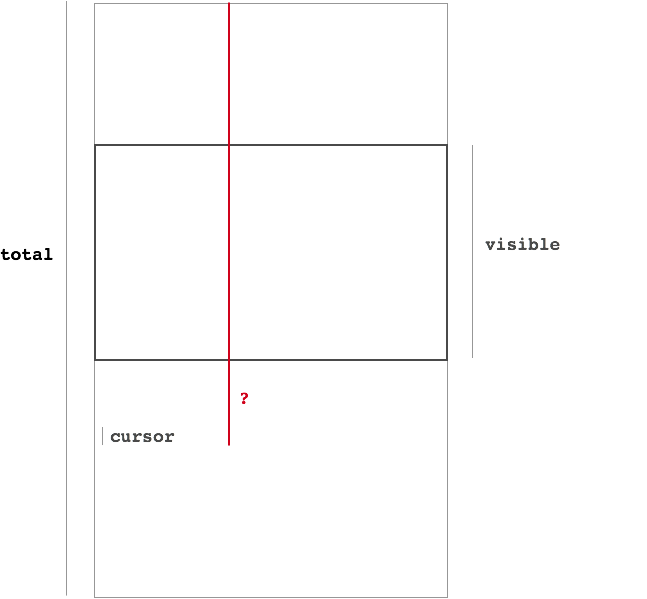
The only way I could figure out how to scroll is to use jQuery's scrollTop function. It sets the scroll position to "the number of pixels that are hidden from view above the scrollable area".
I've diagrammed the problem below. Passing in the length of that red line (in pixels) to scrollTop should do the trick. But I can't figure out how to get the length of the line.
回答1:
textarea.blur()
textarea.focus()
Does the job.
Example: https://jsfiddle.net/syy25x69/
To select a text in IE see: Set textarea selection in Internet Explorer
回答2:
From Jonathan Levine's comment, I realized that this answer works for me.
Fiddle Demo
JavaScript
$('#scroll-to-cursor').on('click', function() {
    $('textarea').focus();
    $.event.trigger({ type : 'keypress' }); // works cross-browser

    // new KeyboardEvent('keypress'); // doesn't work in IE and Safari

    /* var evt = document.createEvent('KeyboardEvent');
    evt.initKeyEvent('keypress', true, true, null, false, false, false, false, 0, 32);
    $textarea.dispatchEvent(evt);

    evt = document.createEvent('KeyboardEvent');
    evt.initKeyEvent('keypress', true, true, null, false, false, false, false, 8, 0);
    $textarea.dispatchEvent(evt); */
});

/*
    To test:
    1) Click somewhere in the textarea to place cursor
    2) Scroll away so cursor isn't visible
    3) Click "Scroll to Cursor" button
*/
Explanation
When the user presses a key, the browser does two things:
- Places the key in the position after the cursor.
- Scrolls to that position.
This solution just simulates that (without actually entering any text).
Edit: The old solution isn't standards compliant. initKeyEvent is deprecated. The update only uses the KeyboardEvent() constructor, which is compliant and works in all browsers except IE (Safari is a question mark).
Edit 2: Using $.event.trigger({ type : 'keypress' }); instead of new KeyboardEvent() works just as well, and works in all browsers.
回答3:
This is my spin on things.
I found that Audi Nugraha’s solution worked when testing, but not when I tried it in an Electron application.
A solution which did work for me was to position the cursor to the beginning and then blur/focus.
textarea.selectionEnd = textarea.selectionStart = position;
textarea.blur();
textarea.focus();
I have incorporated the above into a function:
function scrollTextarea(textarea,position) {
    textarea.selectionEnd = textarea.selectionStart = position;
    textarea.blur();
    textarea.focus();
}
来源:https://stackoverflow.com/questions/29899364/how-do-you-scroll-to-the-position-of-the-cursor-in-a-textarea