
问题
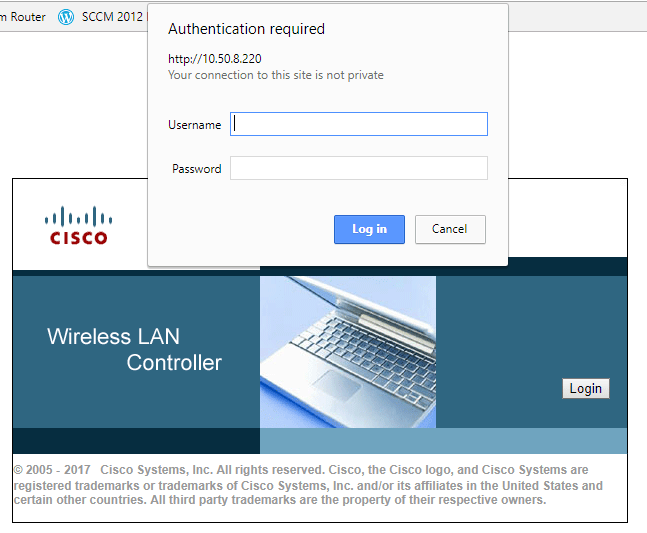
I'm trying to write a script to access a Cisco Wireless LAN controller. I'm using Selenium and Chrome, and I'm stuck on the login page. From what I can tell, clicking the 'login' button on the Cisco splash screen triggers a javascript called loginAction() to prompt the user for a username and password.
The problem I'm getting is that the popup login box has no identifiable elements. When the login box is displayed, the cursor is already active in the username field. It seems that I would be able to use the sendKeys function to simply enter a username in the currently active text box, but it doesn't work. Since I don't know the id of the text boxes, I can't use something like driver.findElement(By.id("authlogin")).sendKeys("username");
Looking at other forum posts, I've seen where a common solution is to embed the username and password in the URL when the browser is loaded, like driver.get('https://username:password@exampleurl.com'). I'm not having any luck with this either; it simply brings up the same splash screen and asks for credentials, just like if I had manually clicked the 'login' button on the splash screen.
Does anyone have any ideas on this? It seems like it would be fairly straightforward since the cursor is already active in the username text box. Thanks for any help and advice!
回答1:
I too faced similar issue while logging into the application. Since the windows authentication popup opened for login is not browser based popup, so selenium cannot interact with it directly. To interact with windows based popup, you have to use third party tool like AutoIT. After doing setup for AutoIT you just have to add one line of code as shown below after your url
driver.get("http://your.url");
Runtime.getRuntime().exec("D:\\AutoIt\\AutoItTest.exe");//path where you kept exe file
For more info on how work on AutoIT, check second approach here or go through this article
回答2:
You can also directly insert the username and password into the Url.
Example: http://username:password@yourUrl.com
So in code you can say (in c#)
string yourUrl = "http://"+username+":"+password+"@yourUrl.com";
driver.Url = yourUrl;
Or java
String yourUrl = "http://"+username+":"+password+"@yourUrl.com";
driver.get(yourUrl);
回答3:
I ended up using AutoIT and writing a simple script for it to handle the login window. This was what I used:
Send("{TAB}{ENTER}")
Sleep(2000)
Send("user{TAB}password{ENTER}")
I called the AutoIT script within Selenium with this Javascript function:
function autoIT() {
    var child_process = require('child_process');
    var workerProcess = child_process.execFile("C:\\Selenium\\autoitscript.exe");
    sleep(4500).then(() => {
siteNavigate();
});
After the AutoIT script runs, you can then move back to using Selenium.
来源:https://stackoverflow.com/questions/47005817/logging-in-using-javascript-and-selenium-webdriver-chrome