
问题
I was working on Project in Xcode 6.1. It was working fine and all of sudden it prompted an error 'Restkit/Restkit.h file not found'. I'm getting error after changing Architectures from $(ARCHS_STANDARD_32_BIT) to Standard architectures (armv7,arm64) - $(ARCHS_STANDARD) which is recommended by Apple Check Link


I have tried following approaches :
1.'Cleaning' project and rebuilding

2. Checked for missing framework in Target -> Build Phases

3. Fixed 'Framework Search Path' of Target

4. I have build Restkit XcodeProject and Targets separately. It builds without error.
I was getting below error while submitting to App Store and hence changed architecture to 'Standard architecture'
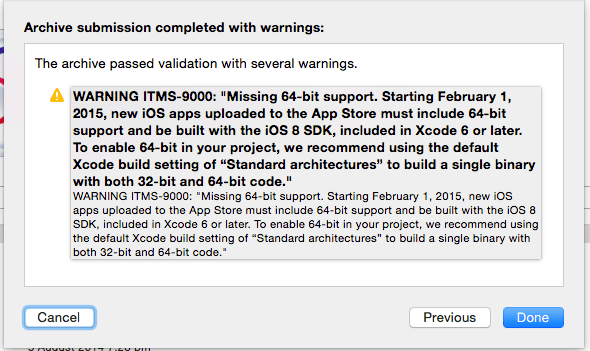
Why did this occur all of sudden? How to fix it?

回答1:
Just to be here. There is similar issue in newest Xcode 7+. You can observe "RestKit/RestKit.h file not found" failure on archive build. You could compile and run apps on emulator but archive would fail.
To fix this you need to add one line to "Header Search Paths" in Build Settings:
"$(BUILD_DIR)/../IntermediateBuildFilesPath/Headers"
Be sure to include the surrounding quotes.
回答2:
You have not properly changed Architecture , if you have done properly than it will show you like this,
Proper Architecture setting:

So again properly change Architecture and try again.
This is your Architecture Setting

回答3:
I had used third-party static library in project named libNuance.a. It seems that this static library works fine for 32-bit architecture but failed for 64-bit architecture.
I downloaded updated version of libNuance.a library from their official site and changed architecture to Standard architectures (armv7,arm64) - $(ARCHS_STANDARD).
Vola! build succeeded without any error.
回答4:
First you can try, look for it in project navigator(left side) and delete if it is red.After that add the RestKit again.Be sure when adding check the copy if needed box and packages contains headers.

Also you may try just #import "RestKit.h"
回答5:
I had solved this in many cases by deleting the contents of DerivedData folder. See the following questions on how to do this:
- Can I safely delete contents of Xcode Derived data folder?
- How can I safely delete in my ~/Library/Developer/Xcode/DerivedData directory?
回答6:
If you have Pods configured then and if you have upgraded recently your Xcode, try reinstalling cocoapod and all the reinstall all required pods.
回答7:
I fixed this issue, to change the Header Search Path
"$(SOURCE_ROOT)/RestKit-RestKit-c19a500/Build"
Note : "RestKit-RestKit-c19a500" this is my RestKit folder name.
来源:https://stackoverflow.com/questions/26971258/restkit-restkit-h-file-not-found-xcode-6-1