说明:
(1)、默认有个Demo001Application类,里面是spring boot的载入函数
(2)、resource目录下有个application.properties文件,这个是Spring boot的配置文件
(3)、test目录下有个测试类Demo001ApplicationTests,这个是spring boot的单元测试
(4)、pom.xml文件
 1 <?xml version="1.0" encoding="UTF-8"?>
 2 <project xmlns="http://maven.apache.org/POM/4.0.0" xmlns:xsi="http://www.w3.org/2001/XMLSchema-instance"
 3     xsi:schemaLocation="http://maven.apache.org/POM/4.0.0 http://maven.apache.org/xsd/maven-4.0.0.xsd">
 4     <modelVersion>4.0.0</modelVersion>
 5     <groupId>com.wf</groupId>
 6     <artifactId>demo001</artifactId>
 7     <version>1.0</version>
 8     <packaging>jar</packaging>
 9
10     <name>demo001</name>
11     <description>Demo project for Spring Boot</description>
12
13     <parent>
14         <groupId>org.springframework.boot</groupId>
15         <artifactId>spring-boot-starter-parent</artifactId>
16         <version>2.0.4.RELEASE</version>
17         <relativePath/> <!-- lookup parent from repository -->
18     </parent>
19
20     <properties>
21         <project.build.sourceEncoding>UTF-8</project.build.sourceEncoding>
22         <project.reporting.outputEncoding>UTF-8</project.reporting.outputEncoding>
23         <java.version>1.8</java.version>
24     </properties>
25
26     <dependencies>
27         <dependency>
28             <groupId>org.springframework.boot</groupId>
29             <artifactId>spring-boot-starter-web</artifactId>
30         </dependency>
31
32         <dependency>
33             <groupId>org.springframework.boot</groupId>
34             <artifactId>spring-boot-starter-test</artifactId>
35             <scope>test</scope>
36         </dependency>
37     </dependencies>
38
39     <build>
40         <plugins>
41             <plugin>
42                 <groupId>org.springframework.boot</groupId>
43                 <artifactId>spring-boot-maven-plugin</artifactId>
44             </plugin>
45         </plugins>
46     </build>
47
48
49 </project>
注意观察
一个继承spring-boot-starter-parent,两个依赖,spring-boot-starter-web web项目依赖必须,spring-boot-starter-test spring boot项目单元测试依赖
注意,很多同学配置的maven远程仓库地址,其中很多配置的阿里云maven镜像,在这会有找不到最新Springboot相关包的问题,请把远程仓库指向华为云:
1 <mirror>
2
3     <id>huaweicloud</id>
4
5     <mirrorOf>*</mirrorOf>
6
7     <url>https://mirrors.huaweicloud.com/repository/maven/</url>
8
9 </mirror>
启动项目
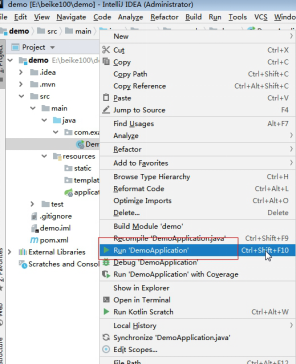
通过spring boot的启动类,这里是Demo001Application,选中类,右键选择-->Run‘DemoApplication’
在控制台出现如下输出:
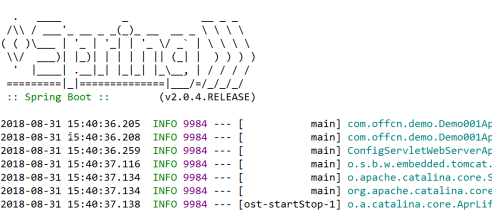
找到如下文字,表明SpringBoot已经成功启动:
tomcat启动在8080端口,http协议,启动花费了1.832秒
打开浏览器,输入地址:http://localhost:8080 ,出现如下画面
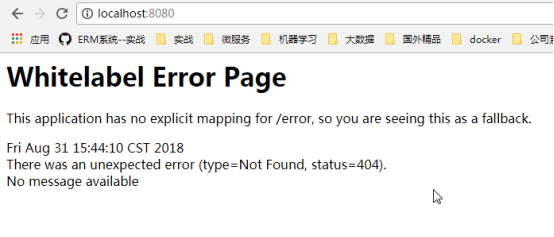
出现上图404错误是正常的,因为我们什么都没写。
编写HelloController
 1 package com.wf.demo.controller;
 2
 3 import org.springframework.stereotype.Controller;
 4 import org.springframework.web.bind.annotation.RequestMapping;
 5 import org.springframework.web.bind.annotation.RequestMethod;
 6 import org.springframework.web.bind.annotation.ResponseBody;
 7
 8 @Controller
 9 public class HelloController {
10
11     @RequestMapping(value="/hello",method=RequestMethod.GET)
12     @ResponseBody
13     public String sayHello() {
14         return "hello spring Boot!";
15     }
16 }
注意HelloController所在包,必须在com.offcn.demo包,或者在主启动类所在包的子包下面。
重启应用,看控制台输出:

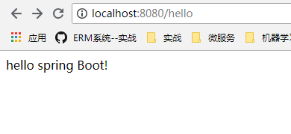
重启发现刚才写的hello已经映射出来了