
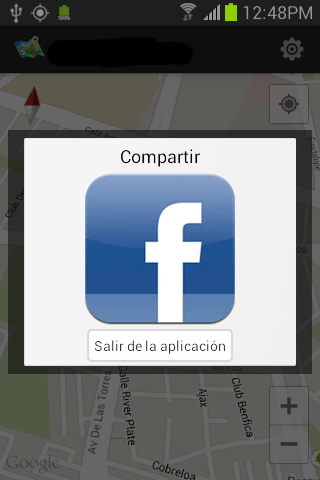
I have a dialog Fragment which look like that.
AlertDialog ad = builder.create();
Drawable d = new ColorDrawable(Color.BLACK);
d.setAlpha(130);
ad.getWindow().setBackgroundDrawable(d);
This code get background semi transparent. But I still got a white part on the bottom. I want to get rid of the white to just have semi transparent background
I already tried a lot of stuff that I saw in other posts.
I don't know what is the object that I must change between the DialogFragment, the AlertDialog and the LinearLayout.
It may not be the LinearLayout, because when I increase margin, nothing is moving.
Here is my code :
@Override
public Dialog onCreateDialog(Bundle savedInstanceState) {
//      setStyle(DialogFragment.STYLE_NORMAL, 0);
//      setStyle(STYLE_NO_FRAME, R.style.CustomDialog);
//      setStyle(STYLE_NO_FRAME, 0);
    AlertDialog.Builder builder = new AlertDialog.Builder(getActivity());
    View view = getActivity().getLayoutInflater().inflate(
            R.layout.share_or_die, null);

    AlertDialog ad = builder.create();
    Drawable d = new ColorDrawable(Color.BLACK);
    d.setAlpha(130);
    ad.getWindow().setBackgroundDrawable(d);
    ad.setCanceledOnTouchOutside(true);
    ad.getWindow().requestFeature(Window.FEATURE_NO_TITLE);

    ad.getWindow().setFlags(WindowManager.LayoutParams.FLAG_FULLSCREEN, WindowManager.LayoutParams.FLAG_FULLSCREEN);

    return ad;

}
I just call it in the mainActivity when user click back button:
@Override
public void onBackPressed() {
        if (isUserConnected && !hasShared) {
        shareOnExitDialog = new ShareOnExitDialog();
            shareOnExitDialog.setCancelable(true);
            shareOnExitDialog.show(getSupportFragmentManager(), "Exit");
        } else {
            finish();
        }


}
Any help would be appreciated !
The issue is in default dialog theme. Based on this and this answers it's much easier to achieve your target.
The Activity should be like the following:
public class MyActivity extends FragmentActivity {

    @Override
    protected void onCreate(Bundle savedInstanceState) {
        super.onCreate(savedInstanceState);
        getWindow().requestFeature(Window.FEATURE_NO_TITLE);
        setContentView(R.layout.main);
    }

    @Override
    public void onBackPressed() {
        MyDialogFragment.newInstance("title title").show(getSupportFragmentManager(), "dialog");
    }
}
And fragment:
public class MyDialogFragment extends android.support.v4.app.DialogFragment {

    /**
     * Create a new instance of MyDialogFragment, providing "title"
     * as an argument.
     */
    static MyDialogFragment newInstance(String title) {
        MyDialogFragment frag = new MyDialogFragment();
        Bundle args = new Bundle();

        args.putString("title", title);
        frag.setArguments(args);
        return frag;
    }

    @Override
    public Dialog onCreateDialog(Bundle savedInstanceState) {
        Dialog dialog = new Dialog(getActivity(),android.R.style.Theme_Translucent_NoTitleBar);
        final View view = getActivity().getLayoutInflater().inflate(R.layout.share_or_die, null);

        final Drawable d = new ColorDrawable(Color.BLACK);
        d.setAlpha(130);

        dialog.getWindow().setBackgroundDrawable(d);
        dialog.getWindow().setContentView(view);

        final WindowManager.LayoutParams params = dialog.getWindow().getAttributes();
        params.width = WindowManager.LayoutParams.WRAP_CONTENT;
        params.height = WindowManager.LayoutParams.WRAP_CONTENT;
        params.gravity = Gravity.CENTER;

        dialog.setCanceledOnTouchOutside(true);

        return dialog;
    }
}
Also, be sure to do the following: before setContentView() in the activity, getWindow().requestFeature(Window.FEATURE_NO_TITLE) should be added in order to use *NoTitleBar style.
The result is (I've used LinearLayout with single TextView inside):

I hope it can help you
@Override
public void onStart() {
    super.onStart();

    Window window = getDialog().getWindow();
    WindowManager.LayoutParams windowParams = window.getAttributes();
    windowParams.dimAmount = 0.0f;

    window.setAttributes(windowParams);
}
None of the above solutions worked for me. What i found to work was to make sure that I had imported android.support.v7.app.AlertDialog instead of the generic app.alertdialog.
Hope this helps others too.
来源:https://stackoverflow.com/questions/20528552/cant-get-transparent-dialogfragment