
个人gitee word count项目地址:https://gitee.com/qq654488767/system_design_and_analysis
1.项目简介
需求简介:
WordCount的需求可以概括为:对程序设计语言源文件统计字符数、单词数、行数,统计结果以指定格式输出到默认文件中,以及其他扩展功能,并能够快速地处理多个文件。
可执行程序命名为:wc.exe,该程序处理用户需求的模式为:
wc.exe [parameter] [input_file_name]
存储统计结果的文件默认为result.txt,放在与wc.exe相同的目录下。
实现的功能:
usage: WordCount.exe [-h] [-c] [-w] [-l] [-s] [-a] [-e [E]] [-o OUTPUT] [-x] infile
positional arguments:infile
optional arguments:
-h, --help show this help message and exit
-c, --character show the number of characters
-w, --word show the number of words
-l, --line show the number of lines
-s, --recursive process files in the current directory recursively
-a, --all count detailed data that includes the amount of code line,
blank line, comment line
-e [E] count words without stop words in a given filename
-o OUTPUT, --output OUTPUT
-x, --interface show the interface of this program
2.PSP2.1表格
|
PSP2.1 |
PSP阶段 |
预估耗时 (分钟) |
实际耗时 (分钟) |
|
Planning |
计划 |
20 |
30 |
|
· Estimate |
· 估计这个任务需要多少时间 |
420 |
840 |
|
Development |
开发 |
240 |
600 |
|
· Analysis |
· 需求分析 (包括学习新技术) |
60 |
100 |
|
· Design Spec |
· 生成设计文档 |
30 |
0 |
|
· Design Review |
· 设计复审 (和同事审核设计文档) |
50 |
0 |
|
· Coding Standard |
· 代码规范 (为目前的开发制定合适的规范) |
30 |
0 |
|
· Design |
· 具体设计 |
60 |
40 |
|
· Coding |
· 具体编码 |
420 |
400 |
|
· Code Review |
· 代码复审 |
30 |
60 |
|
· Test |
· 测试(自我测试,修改代码,提交修改) |
30 |
40 |
|
Reporting |
报告 |
30 |
0 |
|
· Test Report |
· 测试报告 |
30 |
0 |
|
· Size Measurement |
· 计算工作量 |
10 |
10 |
|
· Postmortem & Process Improvement Plan |
· 事后总结, 并提出过程改进计划 |
60 |
0 |
|
|
合计 |
1520 |
580 |
3.设计思路
3.1开发语言选择
因为任务可能涉及到UserInterface的设计,我自身对于C语言的MFC框架也没有太多了解,并且自己也学了很久的Java,希望能通过另一种方式来实现该任务,所以最后我选择python作为我的开发语言。
3.2整体设计
我把整个程序的结构划分为三部分。第一部分是对于命令行参数的解析,第二部分是根据解析的结果选择执行的函数,第三部分是将执行结果汇总并写入到文件。
对于命令行参数的解析,我通过argparse模块来添加参数并解析用户输入的参数,这样自己主体时间就可以放在对各个功能模块的编写上,节省做整个项目的时间。
第二部分可以通过解析的结果调用对应各个命令的方法,将结果添加到一个dict中,传入写入文件的函数。
第三部分就轻松了,通过遍历dict将结果写入到文件。
4.关键代码分析
4.1处理参数
def parse_args(parser): """ parse command line input :param parser: current argument parser :return: arg :type: dict """ # add command arguments, -c,-w,-l... parser.add_argument("-c", "--character", action="store_true", help="show the amount of characters") parser.add_argument("-w", "--word", action="store_true", help="show the amount of words") parser.add_argument("-l", "--line", action="store_true", help="show the amount of lines") parser.add_argument("-s", "--recursive", action="store_true", help="process files in current directory recursively") parser.add_argument("-a", "--all", action="store_true", help="count detailed data that includes amount of code line, blank line, comment line") parser.add_argument("-e", nargs="?", default="stopword.txt", help="count words without stop words in given name") parser.add_argument("infile") parser.add_argument("-o", "--output") parser.add_argument("-x", "--interface", action="store_true", help="show the interface of this program") # here does all the processing work args = parser.parse_args() return args
因为我选择通过第三方库来实现命令行的解析,所以整体过程较为轻松,代码较为简洁明了。
4.2调用函数
def handle_parameters(args):
    """do different works according to the result of args

    :param args: the parsed argument dict
    :return: dict
    """
    # check if input filename type is file we can handle
    if not is_valid_file_name(args.infile):
        print("error:{} is not a valid file name!".format(args.infile))
        return

    result_dic = {}

    # if -x is inside command line option, exit after finishing
    if args.interface:
        app = wx.App()
        frm = MyFrame1(None)
        frm.Show()
        app.MainLoop()
        return

    # if we need to handle valid files recursively, we should void checking input filename,
    # for example, *.cpp, we can‘t open this file, we should get it suffix instead.
    if args.recursive:
        # get each filename and check whether it's the file we should handle.
        for each_file in list(get_file_recursively(os.getcwd())):
            if not is_valid_file_name(each_file):
                continue
            # split filename to compare it's suffix
            if not each_file.split(".")[1] == args.infile.split(".")[1]:
                continue
            # set default output filename
            cur_file_result_dic = {OUTPUT_FILENAME: "result.txt"}
            # read file content
            with open(each_file, 'r', encoding="utf-8") as f:
                file_content = f.read()
            # args is a dict itself, and all the actions have been set to store_true,
            # so we can just get this item to check whether it's true and do the corresponding function.
            if args.character:
                cur_file_result_dic[CHARACTER_COUNT_RESULT] = count_character(file_content)
            if args.word:
                cur_file_result_dic[WORD_COUNT_RESULT] = count_word(file_content, args.e)
            if args.line:
                cur_file_result_dic[LINE_COUNT_RESULT] = count_line(file_content)
            if args.output:
                cur_file_result_dic[OUTPUT_FILENAME] = args.output
            if args.all:
                cur_file_result_dic[CODE_LINE_COUNT] = count_code_line(file_content)
                cur_file_result_dic[BLANK_LINE_COUNT] = count_blank_line(file_content)
                cur_file_result_dic[COMMENT_LINE_COUNT] = count_comment_line(file_content)
            # record to result_dic of each file
            result_dic[each_file] = cur_file_result_dic
    # if not recursive mode
    else:
        # same process
        cur_file_result_dic = {OUTPUT_FILENAME: "result.txt"}
        file_content = is_valid_file(args.infile).read()
        if args.character:
            cur_file_result_dic[CHARACTER_COUNT_RESULT] = count_character(file_content)
        if args.word:
            cur_file_result_dic[WORD_COUNT_RESULT] = count_word(file_content, args.e)
        if args.line:
            cur_file_result_dic[LINE_COUNT_RESULT] = count_line(file_content)
        if args.output:
            cur_file_result_dic[OUTPUT_FILENAME] = args.output
        if args.all:
            cur_file_result_dic[CODE_LINE_COUNT] = count_code_line(file_content)
            cur_file_result_dic[BLANK_LINE_COUNT] = count_blank_line(file_content)
            cur_file_result_dic[COMMENT_LINE_COUNT] = count_comment_line(file_content)
        # os.getcwd is to keep the same format of input files
        # so that we can handle it same way in write to file function.
        result_dic[os.getcwd() + args.infile] = cur_file_result_dic

    return result_dic
这里我们通过获取argparse解析过了的args来获得对应的命令。解析过后的args是一个字典,通过设定的参数获取,之前在add_argument方法中我们设置action为store_true,这里直接判断特定命令是否存在来调用相对应的方法。这里要注意的是必须得先判断是否显示User interface,如果是,后面的命令就不用再执行了,可以直接通过界面来操作。
4.3写入文件
def write_to_file(result_dic, mode="w"):
    """write or append data to file

    :param result_dic: result dict
    :param mode: file process mode
    :return: none
    """
    # Cause I store output file path inside of each input filename dict,
    # so we have to go inside the dict to get output file path.
    # bad design of data structure leads to bad code.

    result_file_path = ""
    if result_dic is None:
        return
    for each_key in result_dic.keys():
        result_file_path = result_dic[each_key].get(OUTPUT_FILENAME)
        break
    if result_file_path == "" or result_file_path is None:
        return
    # if output file path is valid
    # start writing
    with open(result_file_path, mode, encoding="utf-8") as f:
        for each_key in result_dic.keys():
            # remove prefix
            f.write(each_key[len(os.getcwd()) + 1:] + ",")
            f.write("字符数," + str(result_dic[each_key].get(CHARACTER_COUNT_RESULT)) + ",") if result_dic[each_key].get(
                CHARACTER_COUNT_RESULT) is not None else None
            f.write("单词数," + str(result_dic[each_key].get(WORD_COUNT_RESULT)) + ",") if result_dic[each_key].get(
                WORD_COUNT_RESULT) is not None else None
            f.write("行数," + str(result_dic[each_key].get(LINE_COUNT_RESULT)) + ",") if result_dic[each_key].get(
                LINE_COUNT_RESULT) is not None else None
            f.write("代码行数," + str(result_dic[each_key].get(CODE_LINE_COUNT)) + ",") if result_dic[each_key].get(
                COMMENT_LINE_COUNT) is not None else None
            f.write("注释行数," + str(result_dic[each_key].get(COMMENT_LINE_COUNT)) + ",") if result_dic[each_key].get(
                COMMENT_LINE_COUNT) is not None else None
            f.write("空白行数," + str(result_dic[each_key].get(BLANK_LINE_COUNT)) + ",") if result_dic[each_key].get(
                BLANK_LINE_COUNT) is not None else None
            f.write("\n")
一开始写代码的时候数据结构没有设计好,导致必须得先解析字典获取输出文件名。
5.测试设计
5.1测试用例
WordCount -o
WordCount test.cpp
WordCount -o test.cpp
WordCount -x test.cpp
WordCount -l -c -w test.cpp
WordCount -l -c -a -o result_test.cpp test.cpp
WordCount -l -c -a -w -s *.cppWordCount -l -c -a -w -s -e stop_word.txt *.cppWordCount -l -c -a -w -s *.cpp
5.2测试结果
WordCount -o

WordCount test.cpp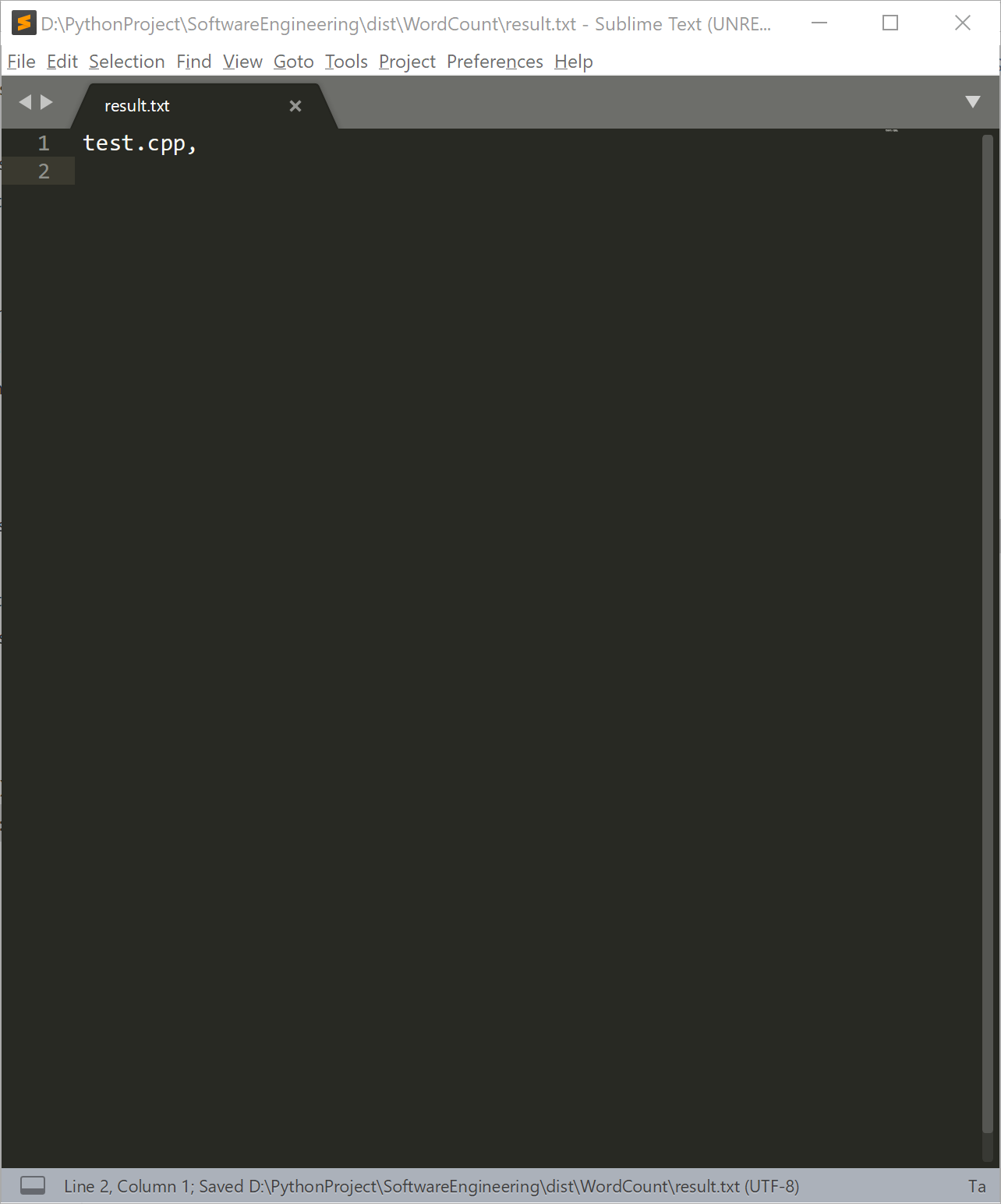
WordCount -o test.cpp

WordCount -x test.cpp
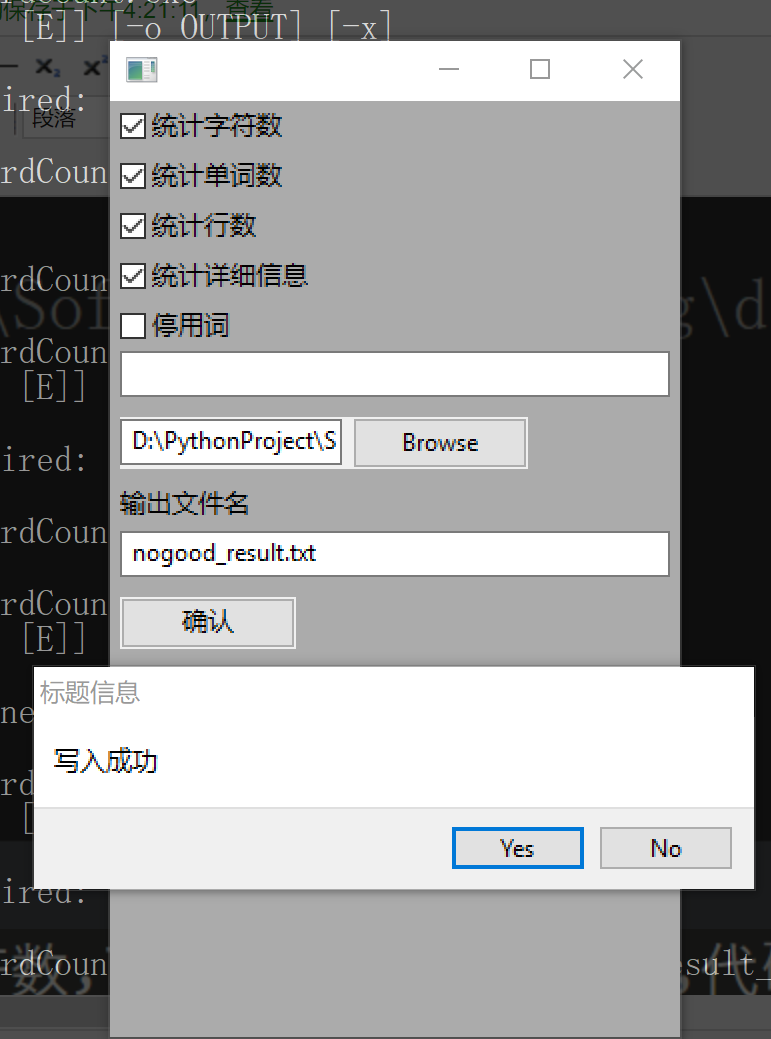

WordCount -l -c -w test.cpp

WordCount -l -c -a -o result_test.cpp test.cpp
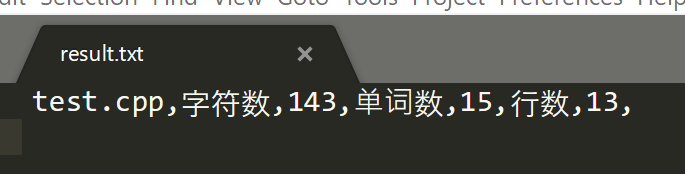
pycharm测试所得数据:
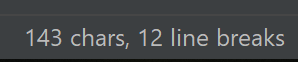
#include<stdio.h>
// hello this is comment


int main(){
    printf("Hello world!");
    return 0;
    /*
        //
    this is test
    */
}
WordCount -l -c -a -w -s -e stop_word.txt *.cpp

WordCount -l -c -a -w -s *.cpp


stop word 为include
6.参考文献
《构建之法--现代软件工程》 --邹新 [第三版]
7.个人总结
    本次项目做下来感触颇深,看完项目需求之后本以为自己能在四个小时之内把代码的工作全
部做完,然而整个项目前前后后大概花了十五-二十个小时才粗糙地完成所有的项目需求,远远
超出我的预期。一开始以为耗时最多的会使实现功能上面,实际做项目的过程中发现耗时最多的
是学习第三方模块的使用方式和各个命令的逻辑顺序。之前对argparse有所耳闻,但自己从来
没有动手写过命令行项目,所以也并没有特意去了解argparse模块的用法。这次项目在刚开始
使用的这一模块的时候碰到了很多问题,当时对inplace command和optional command的
区别没有什么了解,也不知道该怎么添加一个带参数的optional command,所以就花了很多
时间在看文档上面。这次项目做完过后,我也算是初步掌握了argparse模块的使用方法,希望
能在以后的项目上用上这一模块。

    在这次项目里面,有一个需求是对单词的匹配,使用常规的方法固然可以做到这一需求,然
而很早之前了解了部分正则表达式的相关内容,这里也刚好是匹配需求,所以我就思考能不能用
正则表达式来做到对单词的匹配。之前看过很多正则表达式,但从来没有亲手写过,这次的正则
表达式虽说简单,我也犯了很多错误,最后才终于实现了单词的匹配。总体来说,这次项目难度
中等,耗时较长,代码不够规范,注释添加的很少,这是我下次编码的时候需要注意的,不能每
次都等代码写完了再回头写注释,而应该在写代码的过程中就添加好注释。

    孔子曾经说过:“吾听吾忘,吾见吾记,吾做吾悟”,我应该秉承这种学习态度,在实践中感
悟,在实践中成长。
来源:https://www.cnblogs.com/hollin/p/9695831.html