
Exceptionless 是一个开源的实时的日志收集框架,它可以应用在基于 ASP.NET,ASP.NET Core,Web Api,Web Forms,WPF,Console,MVC 等技术栈的应用程序中,并且提供了Rest接口可以应用在 Javascript,Node.js 中。它将日志收集变得简单易用并且不需要了解太多的相关技术细节及配置。
在以前,我们做日志收集大多使用 Log4net,Nlog 等框架,在应用程序变得复杂并且集群的时候,可能传统的方式已经不是很好的适用了,因为收集各个日志并且分析他们将变得麻烦而且浪费时间。
现在Exceptionless团队给我们提供了一个更好的框架来做这件事情。
使用方式
1、可以使用官方的服务,但是试用版有限制,每天最多3000条错误日志,如需更多使只能购买付费。
2、所以一般我们都是自己搭建exceptionless服务;
具体搭建方式可以见 https://github.com/exceptionless/Exceptionless
服务搭建完毕就可以在客户端调用,这里我们结合nlog来实现;
1、新建项目,引用
<Project Sdk="Microsoft.NET.Sdk.Web"><PropertyGroup><TargetFramework>netcoreapp3.1</TargetFramework></PropertyGroup><ItemGroup><PackageReference Include="LogDashboard" Version="1.4.5" /><PackageReference Include="NLog.Web.AspNetCore" Version="4.9.2" /><PackageReference Include="NLog" Version="4.7.2" /><PackageReference Include="Exceptionless.AspNetCore" Version="4.4.0" /><PackageReference Include="Exceptionless.NLog" Version="4.4.0" /></ItemGroup><ItemGroup><Content Update="nlog.config"><CopyToOutputDirectory>Always</CopyToOutputDirectory></Content></ItemGroup></Project>
2、在服务端申请key,在appsettings.json配置
{"Logging": {"IncludeScopes": false,"LogLevel": {"Default": "Trace","Microsoft": "Warning","Microsoft.Hosting.Lifetime": "Information"}},"AllowedHosts": "*","Exceptionless": {"ApiKey": "xxxxxxxxxxxxxxxxxxxxxxxx","ServerUrl": "http://localhost:50000"}}
3、Program.cs配置
using Microsoft.AspNetCore.Hosting;using Microsoft.Extensions.Hosting;using Microsoft.Extensions.Logging;using NLog.Web;using System;namespace WebApplicationnlog{public class Program{public static void Main(string[] args){//https://github.com/NLog/NLog/wiki/Getting-started-with-ASP.NET-Core-3//https://blog.csdn.net/sD7O95O/article/details/78097249var logger = NLog.Web.NLogBuilder.ConfigureNLog("nlog.config").GetCurrentClassLogger();try{logger.Debug("init main");CreateHostBuilder(args).Build().Run();}catch (Exception exception){//NLog: catch setup errorslogger.Error(exception, "Stopped program because of exception");throw;}finally{// Ensure to flush and stop internal timers/threads before application-exit (Avoid segmentation fault on Linux)NLog.LogManager.Shutdown();}}public static IHostBuilder CreateHostBuilder(string[] args) =>Host.CreateDefaultBuilder(args).ConfigureWebHostDefaults(webBuilder =>{webBuilder.UseStartup<Startup>();}).ConfigureLogging(logging =>{logging.ClearProviders();logging.SetMinimumLevel(Microsoft.Extensions.Logging.LogLevel.Trace);}).UseNLog(); // NLog: Setup NLog for Dependency injection}}
4、Startup.cs 配置
using Exceptionless;using LogDashboard;using LogDashboard.Models;using Microsoft.AspNetCore.Builder;using Microsoft.AspNetCore.Hosting;using Microsoft.Extensions.Configuration;using Microsoft.Extensions.DependencyInjection;using Microsoft.Extensions.Hosting;namespace WebApplicationnlog{public class Startup{public Startup(IConfiguration configuration){Configuration = configuration;}public IConfiguration Configuration { get; }// This method gets called by the runtime. Use this method to add services to the container.public void ConfigureServices(IServiceCollection services){services.AddControllersWithViews();//services.AddLogDashboard();services.AddLogDashboard(opt =>{opt.CustomLogModel<RequestTraceLogModel>();});}// This method gets called by the runtime. Use this method to configure the HTTP request pipeline.public void Configure(IApplicationBuilder app, IWebHostEnvironment env){if (env.IsDevelopment()){app.UseDeveloperExceptionPage();}else{app.UseExceptionHandler("/Home/Error");}app.UseStaticFiles();app.UseRouting();app.UseAuthorization();app.UseLogDashboard();app.UseEndpoints(endpoints =>{endpoints.MapControllerRoute(name: "default",pattern: "{controller=Home}/{action=Index}/{id?}");});ExceptionlessClient.Default.Configuration.ApiKey = Configuration.GetSection("Exceptionless:ApiKey").Value;// ExceptionlessClient.Default.Configuration.ServerUrl = Configuration.GetSection("Exceptionless:ServerUrl").Value;app.UseExceptionless();}}}
5、nlog.config配置
<nlog xmlns="http://www.nlog-project.org/schemas/NLog.xsd"xmlns:xsi="http://www.w3.org/2001/XMLSchema-instance"autoReload="true"throwConfigExceptions="true"internalLogLevel="Debug"internalLogToTrace="true"><extensions><add assembly="Exceptionless.NLog" /></extensions><targets><!--<target xsi:type="file" name="logdashboardTraceLog" fileName="${basedir}/logs/${shortdate}.log"layout="${longdate}||${level}||${logger}||${message}||${exception:format=ToString:innerFormat=ToString:maxInnerExceptionLevel=10:separator=\r\n} || ${aspnet-traceidentifier} ||end" />--><target xsi:type="file" name="logdashboardFile" fileName="${basedir}/logs/${shortdate}.log"layout="${longdate}||${level}||${logger}||${message}||${exception:format=ToString:innerFormat=ToString:maxInnerExceptionLevel=10:separator=\r\n}||end" /><target xsi:type="File" name="logfile" fileName="${basedir}/logs/${shortdate}/${level}/${callsite:className=true:methodName=true:skipFrames=1}.log"layout="${longdate} [${level:uppercase=true}] ${callsite:className=true:methodName=true:skipFrames=1} ${message} ${exception} @${callsite:fileName=true:includeSourcePath=true}"maxArchiveFiles="10"archiveAboveSize="10240"archiveEvery="Day" /><target xsi:type="File" name="sqllogfile" fileName="${basedir}/logs/${shortdate}/${level}.log"layout="${longdate} [${level:uppercase=true}] ${callsite:className=true:methodName=true:skipFrames=1} ${stacktrace} ${message} ${exception} @${callsite:fileName=true:includeSourcePath=true}"maxArchiveFiles="10"archiveAboveSize="10240000"archiveEvery="Day" /><target xsi:type="ColoredConsole" name="console"layout="${longdate} [${level:uppercase=true}] ${callsite:className=true:methodName=true:skipFrames=1} ${message} ${exception} @${callsite:fileName=true:includeSourcePath=true}" /><target xsi:type="Null" name="blackhole" /><target xsi:type="Exceptionless" name="exceptionless"><field name="host" layout="${machinename}" /><field name="identity" layout="${identity}" /><!-- <field name="windows-identity" layout="${windows-identity:userName=True:domain=False}" />--><field name="process" layout="${processname}" /></target></targets><rules><!--<logger name="*" minlevel="Debug" writeTo="logdashboardTraceLog" />--><logger name="*" minlevel="ERROR" writeTo="logdashboardFile" /><!-- 除非调试需要,把 .NET Core 程序集的 Debug 输出都屏蔽 Trace -》Debug-》 Information -》Warning-》 Error-》 Critical--><logger name="Microsoft.*" minLevel="Trace" writeTo="blackhole" final="true" /><!-- 除非调试需要,把系统的 Debug 输出都屏蔽 --><logger name="System.*" minLevel="Trace" writeTo="blackhole" final="true" /><logger name="*" minlevel="Info" writeTo="logfile,console" /><logger name="*" minlevel="Debug" maxlevel="Debug" writeTo="sqllogfile" /><logger name="*" minlevel="ERROR" writeTo="exceptionless" /></rules></nlog>
6、最后测试产生日志
using Microsoft.AspNetCore.Mvc;using Microsoft.Extensions.Logging;using System;using System.Diagnostics;using System.Net.Http;using System.Threading.Tasks;using WebApplicationnlog.Models;namespace WebApplicationnlog.Controllers{//https://github.com/liangshiw/LogDashboardpublic class HomeController : Controller{private readonly ILogger<HomeController> _logger;public HomeController(ILogger<HomeController> logger){_logger = logger;_logger.LogDebug(1, "NLog injected into HomeController");}public async Task<IActionResult> Index(){_logger.LogInformation("Hello, this is the index!");_logger.LogError(exception: new Exception("test"), message: "");var client = new HttpClient();await client.GetStringAsync("https://www.cnblogs.com/");return View();}public IActionResult Privacy(){return View();}[]public IActionResult Error(){return View(new ErrorViewModel { RequestId = Activity.Current?.Id ?? HttpContext.TraceIdentifier });}}}
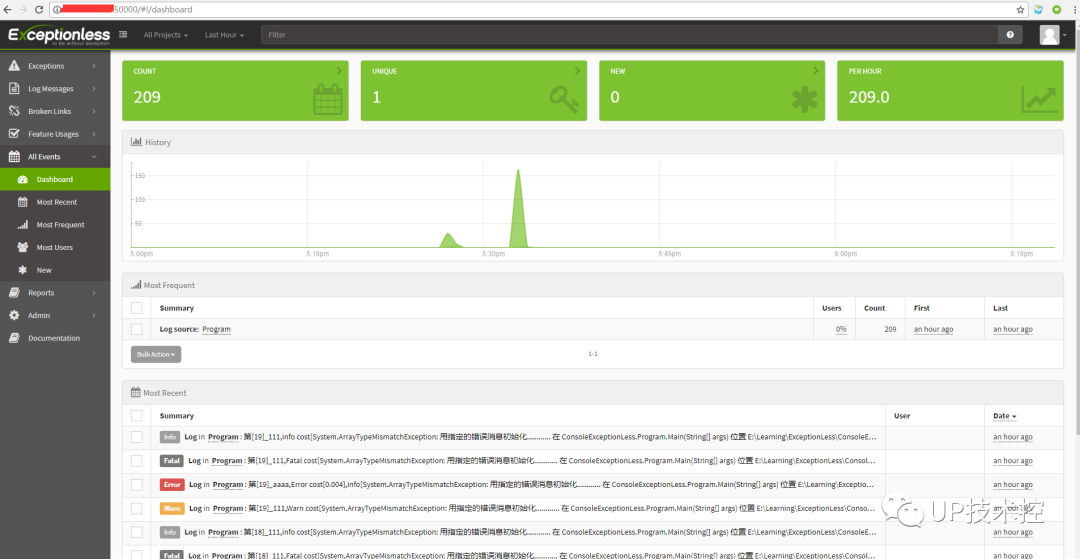
代码地址:
https://github.com/conanl5566/mydemo/tree/master/log/Exceptionless.NLog.Demo
本文分享自微信公众号 - 一线码农聊技术(dotnetfly)。
如有侵权,请联系 support@oschina.cn 删除。
本文参与“OSC源创计划”,欢迎正在阅读的你也加入,一起分享。
来源:oschina
链接:https://my.oschina.net/u/135083/blog/4768419