
1、申请钉钉机器人
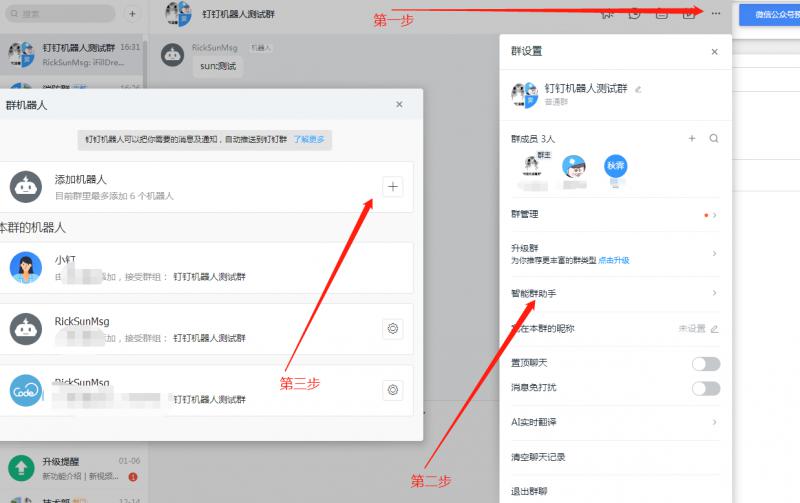
首先打开钉钉,随便创建一个群,也可以是统一的工作群 点击群设置-智能群助手-添加机器人
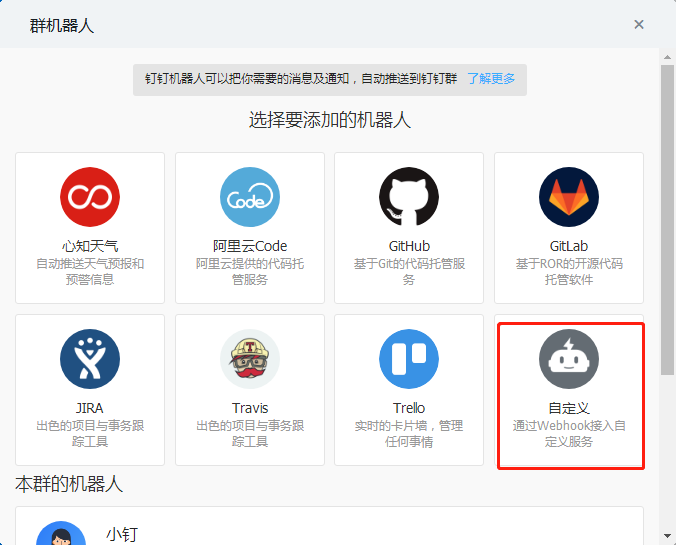
选择一款机器人,这里选择自定义机器人
设置你的机器人名称和安全设置,Webhook即后面需要的url
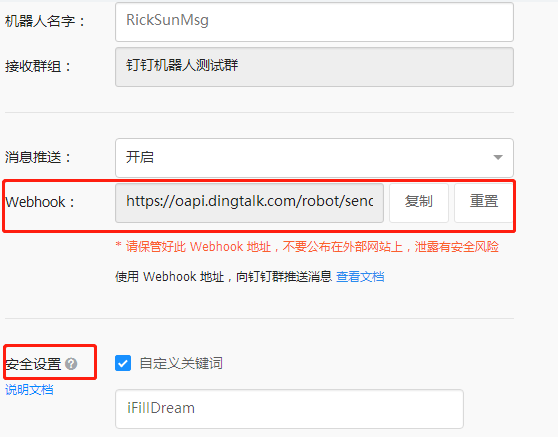
这里以关键字和text类型举例,继续往下看~~
2、创建工具
package com.ifilldream.rocketmq_lean.util;

import com.aliyun.openservices.shade.com.alibaba.fastjson.JSON;
import org.slf4j.Logger;
import org.slf4j.LoggerFactory;

import java.io.BufferedReader;
import java.io.IOException;
import java.io.InputStreamReader;
import java.io.PrintWriter;
import java.net.URL;
import java.net.URLConnection;
import java.util.HashMap;
import java.util.Map;

/**
 * @ClassName DDErrorUtil
 * @Description TODO
 * @Author RickSun
 * @Date 2020/1/18 15:04
 * @Version 1.0
 * https://ding-doc.dingtalk.com/doc#/serverapi2/qf2nxq
 */
public class DDErrorUtil {

    private static Logger logger = LoggerFactory.getLogger(DDErrorUtil.class);

    public static void directSend(String exceptionMsg) {
        //钉钉地址
        String url = "https://oapi.dingtalk.com/robot/send?access_token=367c29d0411a2b9fb0e7a089972ef474f28aeb07d239aed7014057641d0b0fe8";

        //内容
        Map<String,Object> contentMap = new HashMap();
        contentMap.put("content","iFillDream:"+exceptionMsg);

        //其他参数
        Map<String,Object> paramMap = new HashMap();
        paramMap.put("msgtype","text");
        paramMap.put("text",contentMap);
        sendPostByMap(url, paramMap);
    }

    /**
     * 发送POST请求,参数是Map, contentType=x-www-form-urlencoded
     * @param url   钉钉Webhook地址
     * @param paramMap  报错参数
     * @return
     */
    public static String sendPostByMap(String url, Map<String, Object> paramMap) {
        Map<String, String> headParam = new HashMap();
        headParam.put("Content-type", "application/json;charset=UTF-8");
        return sendPost(url, paramMap, headParam);
    }


    /**
     * 发送POST请求
     * @param url 请求地址
     * @param paramMap 参数
     * @param headParam 头部参数
     * @return
     */
    public static String sendPost(String url, Map<String, Object> paramMap, Map<String, String> headParam) {
        PrintWriter out = null;
        BufferedReader in = null;
        String result = "";
        try {
            URL realUrl = new URL(url);
            // 打开和URL之间的连接
            URLConnection conn = realUrl.openConnection();
            // 设置通用的请求属性 请求头
            conn.setRequestProperty("accept", "*/*");
            conn.setRequestProperty("connection", "Keep-Alive");
            conn.setRequestProperty("user-agent","Fiddler");

            if (headParam != null) {
                for (Map.Entry<String, String> entry : headParam.entrySet()) {
                    conn.setRequestProperty(entry.getKey(), entry.getValue());
                }
            }
            //发送POST请求必须设置如下两行
            conn.setDoOutput(true);
            conn.setDoInput(true);
            //获取URLConnection对象对应的输出流
            out = new PrintWriter(conn.getOutputStream());
            //发送请求参数
            out.print(JSON.toJSONString(paramMap));
            //flush输出流的缓冲
            out.flush();
            //定义BufferedReader输入流来读取URL的响应
            in = new BufferedReader(
                    new InputStreamReader(conn.getInputStream()));
            String line;
            while ((line = in.readLine()) != null) {
                result += line;
            }
        } catch (Exception e) {
            logger.info("钉钉机器人发送POST请求出现异常!" + e);
            e.printStackTrace();
        }
        //使用finally块来关闭输出流、输入流
        finally {
            try {
                if (out != null) {
                    out.close();
                }
                if (in != null) {
                    in.close();
                }
            } catch (IOException ex) {
                ex.printStackTrace();
            }
        }
        return result;
    }
}
3、统一拦截错误
package com.ifilldream.rocketmq_lean.filter;

import com.ifilldream.rocketmq_lean.util.DDErrorUtil;
import org.springframework.web.bind.annotation.ControllerAdvice;
import org.springframework.web.bind.annotation.ExceptionHandler;
import org.springframework.web.bind.annotation.ResponseBody;

/**
 * @author RickSun  && iFilldream
 */
@ControllerAdvice
@ResponseBody
public class ErrorHandler {
    @ExceptionHandler(Exception.class)
    public String handleExption(Exception e){
        String msg = e.getMessage();;
        DDErrorUtil.directSend(msg);
        return msg;
    }
}
4、测试
package com.ifilldream.rocketmq_lean.test;
import com.ifilldream.rocketmq_lean.manager.Producer;
import org.springframework.web.bind.annotation.GetMapping;
import org.springframework.web.bind.annotation.RequestMapping;
import org.springframework.web.bind.annotation.RestController;

import javax.annotation.Resource;

/**
 * @ClassName Test
 * @Description TODO
 * @Author RickSun && iFillDream
 * @Date 2020/1/18 16:24
 * @Version 1.0
 */
@RestController
@RequestMapping("/ifilldream/test")
public class Test {

    @Resource
    private Producer producer;

    @GetMapping("/testDingding")
    public String test(String content) {
        int i = 1/ 0 ;
        return "ok.";
    }
}
来看看效果吧~~~
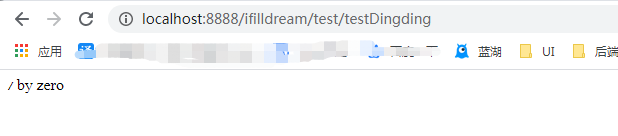
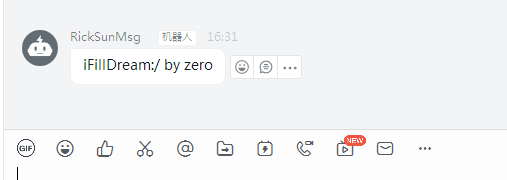
发送类型不仅仅只有text还有link,markdown等等格式
更多请参考钉钉文档:https://ding-doc.dingtalk.com/doc#/serverapi2/qf2nxq

统一首发平台为-微|信-***公|*众-号"轻梦致新",搜索关注-**公|**众-***号,第一时间阅读最新内容。
来源:oschina
链接:https://my.oschina.net/u/4442011/blog/3162160