
摘要:
一个WordCount单词统计程序为实例,详细演示了如何编写MapReduce程序代码以及如何打包运行程序。
参考资料:
Api 文档地址:http://hadoop.apache.org/docs/current/api/index.html
maven资源库:https://mvnrepository.com/repos/central 用于配置pom的时候查询资源
1.创建maven项目
创建maven项目,项目名hdfs ##这里我用的文章“java操作hdfs”的项目hdfs
pom.xml文件: //与文章“java操作hdfs”的项目一样。
2.编写WordCount类
在该项目包com.scitc.hdfs中新建WordCount.java类,代码如下:
package com.scitc.hdfs;

import java.io.IOException;
import org.apache.hadoop.conf.Configuration;
import org.apache.hadoop.fs.Path;
import org.apache.hadoop.io.IntWritable;
import org.apache.hadoop.io.LongWritable;
import org.apache.hadoop.io.Text;
import org.apache.hadoop.mapreduce.Job;
import org.apache.hadoop.mapreduce.Mapper;
import org.apache.hadoop.mapreduce.Reducer;
import org.apache.hadoop.mapreduce.lib.input.FileInputFormat;
import org.apache.hadoop.mapreduce.lib.output.FileOutputFormat;

public class WordCount {
    /**
     * @author he
     *参数LongWritable:读取行的偏移量,知道下一行从哪儿开始读取
     *Text:正在读取的行的内容
     *后两个参数构成<k,v>输出类型  例如<hadoop,1>
     */
    static class Maps extends Mapper<LongWritable, Text, Text, IntWritable> {

        private final static IntWritable one = new IntWritable(1);  //等价于java中 int one = 1;

        @Override
        protected void map(LongWritable key, Text value, Context context) throws IOException, InterruptedException {
        // 将读入的每行数据按空格切分
        String[] dataArr = value.toString().split(" ");
        if(dataArr.length>0){
        // 将每个单词作为map的key的value设置为1
        for (String word : dataArr) {
        context.write(new Text(word), one); //context是mapreduce的上下文
        }
      }
    }
  }
    /**
     * @author he
     *前两个参数构成<text,IntWritable>,正式map的输出,例如<hadoop,1>,<spark,1>,<hadoop,1>...
     */
    static class Reduces extends Reducer<Text, IntWritable, Text, IntWritable> {

         /**
          * 参数key:例如词频统计,单词hadoop
          * 参数values:是一个迭代器,例如<hadoop,<1,1>>,<spark,1>
          */
        @Override
            public void reduce(Text key, Iterable<IntWritable> values, Context context)
                    throws IOException, InterruptedException {
                int sum = 0;
                for (IntWritable value : values) {
                    sum += value.get();   //获取IntWritable的值,这里实际都是1
                }
                IntWritable result = new IntWritable();
                result.set(sum);
                context.write(key, result);
            }
        }

    public static void main(String[] args) throws ClassNotFoundException, IOException, InterruptedException {

                    // 1:实例化Configuration类、新建一个任务
                    Configuration conf = new Configuration();
                    Job job = Job.getInstance(conf, "word-count");  //名字可以自己取

                    //2:设置jar加载的路径,这个测试正确
                    job.setJarByClass(WordCount.class);

                    //3:设置Map类和reduce类
                    job.setMapperClass(Maps.class);
                    job.setReducerClass(Reduces.class);

                    //4:设置Map输出
                    job.setMapOutputKeyClass(Text.class);
                    job.setMapOutputValueClass(IntWritable.class);

                    //5:设置最终输出kv类型
                    job.setOutputKeyClass(Text.class);
                    job.setOutputValueClass(IntWritable.class);

                    //6:设置输入和输出路径
                    //方法1:直接提供输入、输出默认参数
                    //输入文件地址,可以是本地,或者hdfs地址;                    //输出文件地址可以本地文件夹或hdfs文件夹,wordcount不能提前在hdfs中创建
                    String inputPath = "hdfs://master:9000/he/input/wordcount.txt";
                    String outPath = "hdfs://master:9000/he/output/wordcount/";
                    // 如果有传入文件地址,接收参数为输入文件地址
                    if(args != null && args.length > 0){
                        inputPath = args[0];
                    }
                    FileInputFormat.addInputPath(job, new Path(inputPath));
                    FileOutputFormat.setOutputPath(job, new Path(outPath));

                    // 方法2:执行jar时,外部提供输入、输出参数
                    //FileInputFormat.addInputPath(job, new Path(args[0]));
                    //FileOutputFormat.setOutputPath(job, new Path(args[1]));

                    //7:提交任务
                    boolean result = job.waitForCompletion(true);
                    System.exit(result?0:1);
    }
}
3:HDFS准备工作
1.启动hadoop集群
2.在hdfs中新建/he/input/ 目录,从本地导入wordcount.txt文件到该目录下
新建/he/output/ 目录
##说明:代码中输出路径/he/output/wordcount/中wordcount文件夹不能提前创建,代码执行的时候自己会创建。
4:maven项目打包和运行
1.打包
项目名hdfs上右键>>Run As>>Maven install
2.上传
项目根目录下的target文件夹中找到hdfs-0.0.1-SNAPSHOT.jar,改文件名为hdfs.jar,上传到master的/opt/data/目录中
3.用hadoop jar 命令运行hd.jar包
cd /opt/data
hadoop jar hdfs.jar com.scitc.hdfs.WordCount ##命令语法:hadoop jar jar包 类的全名称
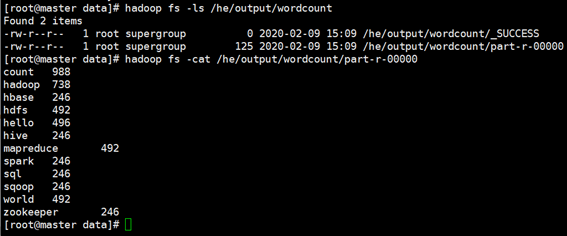
5:查看结果
方法1:通过hdfs shell 查看结果
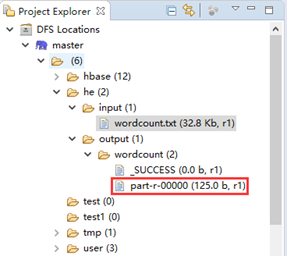
方法2:eclipse中查看
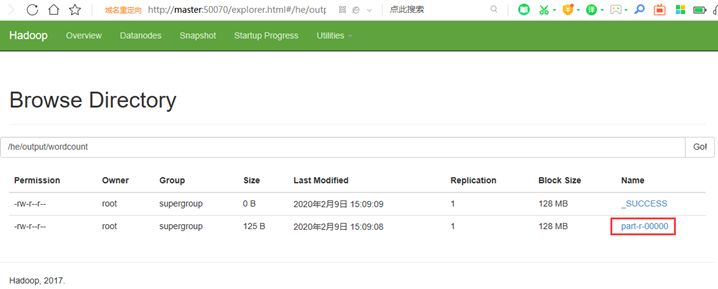
方法3:http://master:50070/explorer.html#/he/output/wordcount 网页查看
来源:https://www.cnblogs.com/hemomo/p/12288516.html