
问题
I have a python script running on an EC2 instance (ubuntu) on AWS. It uses selenium. It was working perfectly for weeks, and then all of the sudden, today, it stopped working with the following error:
selenium.common.exceptions.SessionNotCreatedException: Message: session not created: This version of ChromeDriver only supports Chrome version 79
Here is my python script, which I'm running on ubuntu:
#install dependencies
from selenium import webdriver
from selenium.webdriver.chrome.options import Options
from selenium.common.exceptions import ElementNotVisibleException
from selenium.common.exceptions import NoSuchElementException
from selenium.common.exceptions import TimeoutException

from selenium.webdriver.common.by import By
from selenium.webdriver.support.ui import WebDriverWait
from selenium.webdriver.support import expected_conditions as EC

#Set up chromedriver
options = Options()
options.add_argument('--no-sandbox')
options.add_argument('--window-size=1420,1080')
options.add_argument('--headless')
options.add_argument('--disable-dev-shm-usage')
options.add_argument('--disable-gpu')
options.add_argument("--disable-notifications")

driver = webdriver.Chrome(chrome_options=options)
What is odd is that chromedriver and chromium-browser appear to be compatible.
Upon running chromedriver -v I see the version is:
ChromeDriver 79.0.3945.79 (29f75ce3f42b007bd80361b0dfcfee3a13ff90b8-refs/branch-heads/3945@{#916})
And, running chromium-browser --version I get:
Chromium 79.0.3945.79 Built on Ubuntu , running on Ubuntu 18.04
Upon running chromium-browser -v I see :
(chromium-browser:2901): Gtk-WARNING **: 17:28:14.613: cannot open display:
Two questions I'm hoping to answer :
How could work for weeks, and then all of the sudden, chromedriver and chrome decide not to cooperate with each other? Could it be that either chromedriver or chrome was updated without the other being updated? I did not change anything, with the exception of updating the time from which the script was run from crontab.
Why is this error happening when my chromedriver and chrome browser are the exact same version? It was an extremely long process to get chromedriver to work with chrome (headless) on ubuntu and I'd like to "set it and forget it" if possible. Looking for away to better understand this problem so I can avoid it happening again and again.
Thanks.
回答1:
This error message...
selenium.common.exceptions.SessionNotCreatedException: Message: session not created: This version of ChromeDriver only supports Chrome version 79
...implies that the ChromeDriver was unable to initiate/spawn a new Browsing Context i.e. Chrome Browser v79 session.
Your main issue is the incompatibility between the version of the binaries you are using as follows:
- You mentioned about using chromedriver=79.0.3945.79. Though the released versions of ChromeDriver v79.x are ChromeDriver 79.0.3945.16 (2019-10-30) and ChromeDriver 79.0.3945.36 (2019-11-18), however both the release notes of chromedriver=79.0.3945.79 clearly mentions the following :
Supports Chrome v79
- You are using chromium-browser v79.0.3945.79 browser.
- ChromeDriver supports
google-chromewhen installed at the default location with respect to the underlying os:
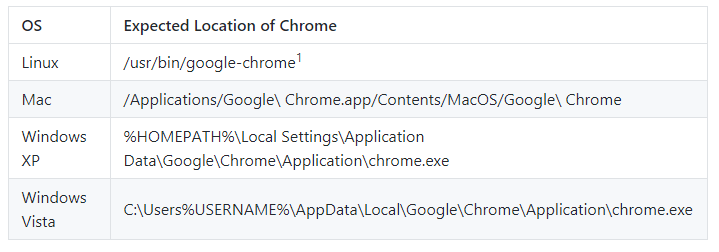
1For Linux systems, the ChromeDriver expects /usr/bin/google-chrome to be a symlink to the actual Chrome binary.
Solution
There are two solutions:
- Either you upgrade
google-chromeinstalled at the default location to current Chrome Version 79.0 level. (as per ChromeDriver v79.0 release notes) Or you can override the default Chrome binary location i.e.
/usr/bin/google-chromewith thechromium-browserbinary location following the documentation Using a Chrome executable in a non-standard location as follows:from selenium import webdriver from selenium.webdriver.chrome.options import Options options = Options() options.binary_location='/path/to/chromium-browser.exe' driver = webdriver.Chrome(executable_path=r'C:\Utility\BrowserDrivers\chromedriver.exe', options=options) driver.get('http://google.com/')
You can find a detailed discussion in How to run a Chromium Browser with Selenium?
- Clean your Project Workspace through your IDE and Rebuild your project with required dependencies only.
- If your base Web Client version is too old, then uninstall it and install a recent GA and released version of Web Client.
- Take a System Reboot.
- Execute your
@Testas non-root user. - Always invoke
driver.quit()withintearDown(){}method to close & destroy the WebDriver and Web Client instances gracefully.
回答2:
By default, webdriver.Chrome runs /usr/bin/google-chrome if available, not chromium-browser (see Default location of ChromeDriver binary and Chrome binary on windows 7). Check google-chrome --version.
来源:https://stackoverflow.com/questions/59438332/ubuntu-selenium-common-exceptions-session-not-created-this-version-of-chromed