
相信你肯定看了 ElementUI 官方文档了,没看的话先去看下表格各个属性的意义,方便下文阅读:传送门
但你会发现此例过于简单,死数据,但我们开发的时候往往都是后台传递过来的数据,导致我们 rowspan 的参数需要自己做判断,根据数据的相同行(或列)进行合并;
我们先看下结果:
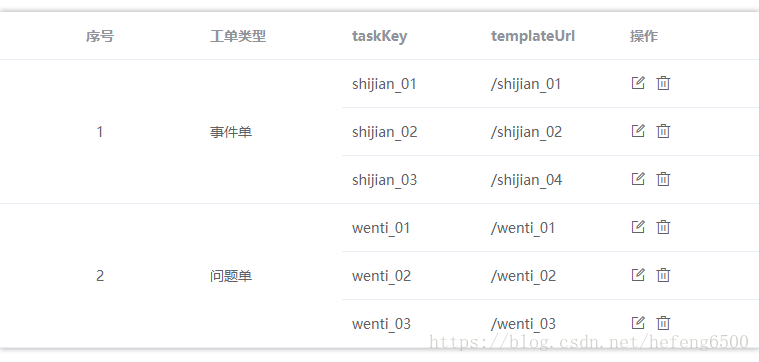
代码附上:
  1 <template>
  2   <div class="">
  3     <el-table
  4         :data="listData"
  5         :span-method="objectSpanMethod"
  6         class="tableArea"
  7         style="width: 100%">
  8         <el-table-column
  9           prop="type"
 10           label="序号"
 11           align="center"
 12           width="200"/>
 13         <el-table-column
 14           prop="sheetType"
 15           label="工单类型"
 16           />
 17         <el-table-column
 18           prop="taskKey"
 19           label="taskKey"
 20           />
 21         <el-table-column
 22           prop="templateUrl"
 23           label="templateUrl"
 24           />
 25         <el-table-column
 26           label="操作"
 27           >
 28           <template slot-scope="scope">
 29               <el-tooltip class="item" effect="dark" content="修改" placement="top-start">
 30                       <i class="el-icon-edit-outline"  @click="modify(scope)" />
 31                     </el-tooltip>
 32                     <el-tooltip class="item" effect="dark" content="删除" placement="top-start">
 33             <i class="el-icon-delete" @click="deleteData(scope)" />
 34                     </el-tooltip>
 35           </template>
 36         </el-table-column >
 37       </el-table>
 38   </div>
 39 </template>
 40 <script>
 41
 42 export default {
 43   name: 'myNeedDeal',
 44   data() {
 45     return {
 46       rowList: [],
 47       spanArr: [],
 48       position: 0,
 49       listData: []
 50     }
 51   },
 52
 53   methods: {
 54       queryData(){//查询操作
 55           this.listData = [
 56               {
 57             id:1,
 58           type:1,
 59           sheetType: "事件单",
 60           taskKey: "shijian_01",
 61           templateUrl: "/shijian_01"
 62         },
 63         {
 64             id:2,
 65           type:1,
 66           sheetType: "事件单",
 67           taskKey: "shijian_02",
 68           templateUrl: "/shijian_02"
 69         },
 70         {
 71             id:3,
 72           type:1,
 73           sheetType: "事件单",
 74           taskKey: "shijian_03",
 75           templateUrl: "/shijian_04"
 76         },
 77         {
 78             id:4,
 79           type:2,
 80           sheetType: "问题单",
 81           taskKey: "wenti_01",
 82           templateUrl: "/wenti_01"
 83         },
 84         {
 85             id:5,
 86           type:2,
 87           sheetType: "问题单",
 88           taskKey: "wenti_02",
 89           templateUrl: "/wenti_02"
 90         },
 91         {
 92             id:6,
 93           type:2,
 94           sheetType: "问题单",
 95           taskKey: "wenti_03",
 96           templateUrl: "/wenti_03"
 97         }
 98           ];
 99           this.rowspan()
100       },
101       rowspan() {
102           this.listData.forEach((item,index) => {
103             if( index === 0){
104                 this.spanArr.push(1);
105                 this.position = 0;
106             }else{
107                 if(this.listData[index].type === this.listData[index-1].type ){
108                     this.spanArr[this.position] += 1;
109                     this.spanArr.push(0);
110                 }else{
111                     this.spanArr.push(1);
112                     this.position = index;
113                 }
114             }
115         })
116       },
117     objectSpanMethod({ row, column, rowIndex, columnIndex }) {  //表格合并行
118         if (columnIndex === 0) {
119             const _row = this.spanArr[rowIndex];
120             const _col = _row>0 ? 1 : 0;
121             return {
122                 rowspan: _row,
123                 colspan: _col
124             }
125         }
126         if(columnIndex === 1){
127             const _row = this.spanArr[rowIndex];
128             const _col = _row>0 ? 1 : 0;
129             return {
130                 rowspan: _row,
131                 colspan: _col
132             }
133         }
134     }
135   },
136   mounted() {
137     this.queryData();
138   }
139 }
140 </script>
141 <style lang="scss" scoped>
142 .el-select {
143   margin-right: 15px;
144 }
145 .el-input {
146   margin-right: 15px;
147   width: 200px;
148 }
149 .tableArea {
150   margin-top: 20px;
151   box-shadow: 0 0 8px 0 #aaa;
152 }
153 i[class^="el-icon"] {
154   margin-right: 5px;
155   font-size: 16px;
156   cursor: pointer;
157 }
158 .modify_table{
159     td{
160         padding: 10px ;
161     }
162 }
163 .item_title{
164     text-align: right;
165 }
166 </style>
167
详细说明:
:span-method="objectSpanMethod"
这个是官方给定的绑定属性和对应的方法,objectSpanMethod 传入了 { row, column, rowIndex, columnIndex }
row: 当前行
column: 当前列
rowIndex:当前行号
columnIndex :当前列号
该函数可以返回一个包含两个元素的数组,第一个元素代表rowspan,第二个元素代表colspan。 也可以返回一个键名为rowspan和colspan的对象。
this.spanArr 数组 ,返回的是相对应的行合并行数
这个示例打印出的this.spanArr为 [3, 0, 0, 3, 0, 0],比如,第一个元素为3,表示第一行应该向下合并3行(即第一行的rowspan为3),第二个元素的rowspan为0,就让它“消失”。
rowspan()这个函数就是用来返回 this.spanArr 数组的,定义每一行的 rowspan
rowspan()函数,if( index === 0),第一行,直接先给数组push进一个1,表示自己先占一行,this.position是数组元素的位置(此时是从数组元素的第一个开始,所以this.position为0), this.position为0意思表示的就是数组的第一个元素。
当到了index为2的时候,if(this.listData[index].type === this.listData[index-1].type ),让第二行与第一行作比较,
如果第二行与第一行相等的话,this.position就+1,当有n行第一行相同,this.position就为n,表示向下合并n行;第二行自己就this.spanArr.push(0),表示第二行“消失”,因为第一行和第二行合并了啊。
如果第二行与第一行不相等的话,那么this.spanArr.push(1);就让第二行自己独占一行;this.position = index意思就是把指针拿到index这行来,表示设置数组this.spanArr[this.position]的元素值,然后定义从此行开始向下合并几行(可能这句话我表述的不是很清楚你可以根据我这个示例研究下,当index为3时,this.position为3,当index为4时,第四行与第三行需要合并,那么在数组的this.position元素就要+1了,也就是this.spanArr[this.position] += 1)
还有最后一句话
const _col = _row>0 ? 1 : 0;
定义的这一个单元格列的合并,我们项目只合并行,不合并列;
_row:代表合并行的行数,_row的值要么是1,或者更大的自然正整数,要么是0。
1代表:独占一行
更大的自然数:代表合并了若干行
0:代表“消失”的哪那一个单元格,后面的单元格向前推一格
来源:https://www.cnblogs.com/yuwenjing0727/p/10110721.html