
webapi的操作还是很简单的,建议使用postman配合使用。
项目结构如下:
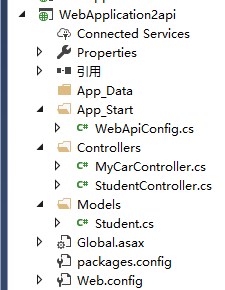
在Models文件夹中建立了Student类,如果有数据库的话,其实EF也是很好用的。
控制器中建立了MyCar和Student两个控制器。
   public class MyCarController : ApiController
    {
        [HttpGet]
        public List<string> GetMyCar()
        {
            List<string> res = new List<string>();
            res.Add("Benz");
            res.Add("BMW");
            res.Add("Audi");
            return res;
        }
    }
   public class StudentController : ApiController
    {
        public List<Student> GetStudentsInfo()
        {
            Student s1 = new Student() { ID = 1, Name = "Lee", Age = 12 };
            Student s2 = new Student() { ID = 2, Name = "Tom", Age = 22 };
            Student s3 = new Student() { ID = 3, Name = "Han", Age = 34 };
            Student s4 = new Student() { ID = 4, Name = "Keven", Age = 14 };
            Student s5 = new Student() { ID = 5, Name = "Loce", Age = 43 };
            Student s6 = new Student() { ID = 6, Name = "KAka", Age = 54 };
            List<Student> res = new List<Student>() { s1, s2, s3, s4, s5,s6 };
            return res;
        }
    }
客户端访问方式:
 1 string apiUrl = "http://localhost:3120/";
 2 HttpWebRequest req = (HttpWebRequest)WebRequest.Create(apiUrl+ @"api/Student");
 3 req.Method = "GET";
 4 //req.ContentType = "application/json";
 5
 6 HttpWebResponse res = (HttpWebResponse)req.GetResponse();
 7 Stream resStream = res.GetResponseStream();
 8 StreamReader strReader = new StreamReader(resStream, Encoding.UTF8);
 9 string data = strReader.ReadToEnd();
10 List<Student> listData = JsonConvert.DeserializeObject<List<Student>>(data);//反序列化
注意:本地访问之前先编译项目,不要犯低级错误。
来源:https://www.cnblogs.com/LeeSki/p/12153183.html