
问题
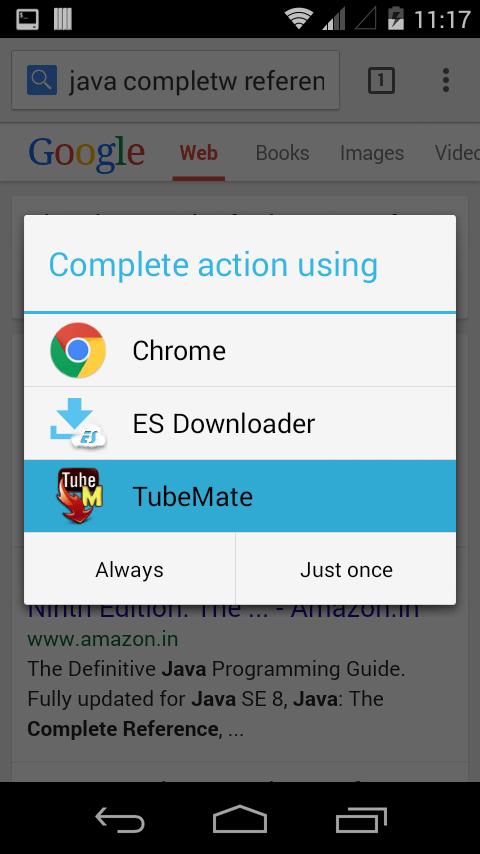
I want to download files from browser through my application. I am trying to list my app in complete action using dialog. It shows for other action like view files, etc but in case of download files it doesn't show in dialog. how can i list my app like in the image?
I have used these filters in my activity
<intent-filter> <action android:name="android.intent.action.SEND" /> <action android:name="android.intent.action.VIEW"/> <category android:name="android.intent.category.OPENABLE"/> <category android:name="android.intent.category.BROWSABLE"/> <category android:name="android.intent.category.DEFAULT"/> <data android:mimeType="*/*"/>
回答1:
I have done this by adding these filters and now it's working for all cases.
 <intent-filter>
            <action
                android:name="android.intent.action.MAIN"/>
            <category
                android:name="android.intent.category.DEFAULT"/>
            <category
                android:name="android.intent.category.LAUNCHER"/>
            <category
                android:name="android.intent.category.BROWSABLE"/>
            <category
                android:name="android.intent.category.APP_BROWSER"/>
            <category
                android:name="android.intent.category.NOTIFICATION_PREFERENCES"/>
        </intent-filter>
        <intent-filter>
            <action
                android:name="android.intent.action.VIEW"/>
            <category
                android:name="android.intent.category.DEFAULT"/>
            <category
                android:name="android.intent.category.BROWSABLE"/>
            <data
                android:scheme="googlechrome"/>
            <data
                android:scheme="http"/>
            <data
                android:scheme="https"/>
            <data
                android:scheme="about"/>
            <data
                android:scheme="javascript"/>
        </intent-filter>
        <intent-filter>
            <action
                android:name="android.intent.action.VIEW"/>
            <category
                android:name="android.intent.category.DEFAULT"/>
            <category
                android:name="android.intent.category.BROWSABLE"/>
            <data
                android:scheme="googlechrome"/>
            <data
                android:scheme="http"/>
            <data
                android:scheme="https"/>
            <data
                android:scheme="about"/>
            <data
                android:scheme="content"/>
            <data
                android:scheme="javascript"/>
            <data
                android:mimeType="text/html"/>
            <data
                android:mimeType="text/plain"/>
            <data
                android:mimeType="application/xhtml+xml"/>
        </intent-filter>
        <intent-filter>
            <action
                android:name="android.intent.action.VIEW"/>
            <category
                android:name="android.intent.category.DEFAULT"/>
            <data
                android:mimeType="multipart/related"
                android:scheme="file"/>
        </intent-filter>
        <intent-filter>
            <action
                android:name="android.intent.action.MEDIA_SEARCH"/>
            <category
                android:name="android.intent.category.DEFAULT"/>
        </intent-filter>
        <intent-filter>
            <action
                android:name="android.speech.action.VOICE_SEARCH_RESULTS"/>
            <category
                android:name="android.intent.category.DEFAULT"/>
        </intent-filter>
        <intent-filter
            android:priority="-101">
            <action
                android:name="android.nfc.action.NDEF_DISCOVERED"/>
            <category
                android:name="android.intent.category.DEFAULT"/>
            <data
                android:scheme="http"/>
            <data
                android:scheme="https"/>
        </intent-filter>
        <intent-filter>
            <action
                android:name="android.intent.action.SEARCH"/>
        </intent-filter>
        <intent-filter>
            <action
                android:name="com.sec.android.airview.HOVER"/>
        </intent-filter>
回答2:
add these two tags inside your <intent-filter> tag
<action android:name="android.intent.action.VIEW" />
<category android:name="android.intent.category.BROWSABLE" />
回答3:
add this code in your manifest inside your launcher activity tag.
  <activity
    android:name=".YourActivity"
    android:theme="@style/AppTheme.NoActionBar">

    <intent-filter>
        <action android:name="android.intent.action.VIEW" />
        <category android:name="android.intent.category.DEFAULT" />
        <category android:name="android.intent.category.BROWSABLE" />
    </intent-filter>

    <action android:name="android.intent.action.MAIN" />
    <category android:name="android.intent.category.LAUNCHER" />

    </activity>
回答4:
Try downloading the files using the API http://developer.android.com/reference/android/app/DownloadManager.html
来源:https://stackoverflow.com/questions/30611898/how-can-i-list-my-app-for-download-files