
问题
I've searched here in SO and all around but no properly solutions founded for this issue. With jQueryUI DatePicker I need to select a recursive date for all years, so I don't wanna show year selection, 'cause it doesn't make sense.
How can I obtain this inside the call like the following?
$('#myInput').datepicker({ dateFormat: "dd/mm" });
Note: I can't use css solution as suggested here .ui-datepicker-year{
display:none;
} because there are other datepickers in the same page.
Any help will be appreciated.
Thanks in advance.
回答1:
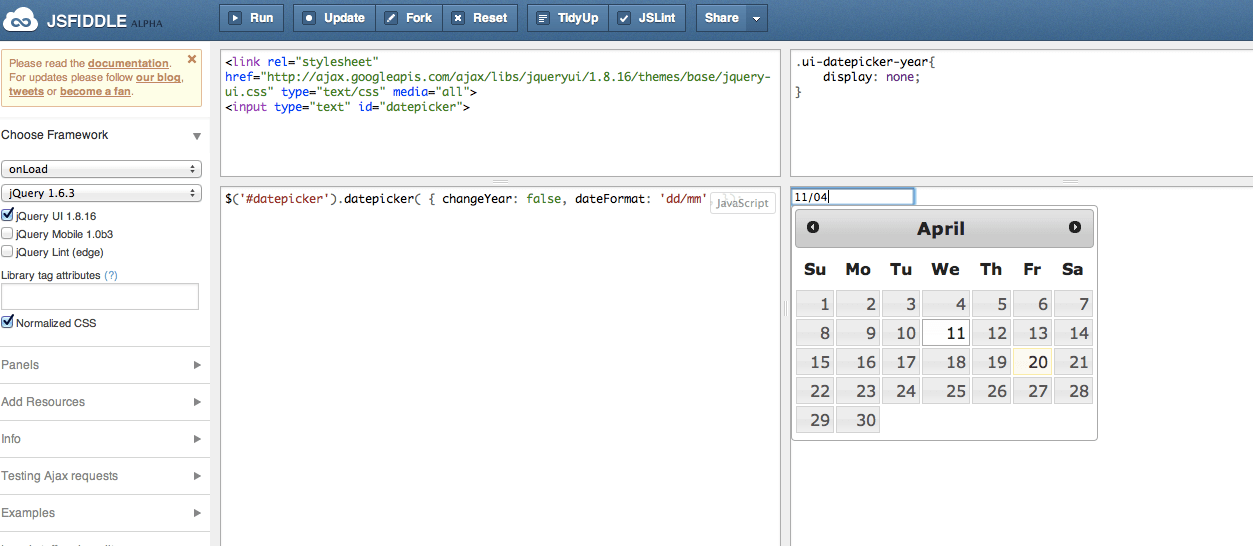
Try this demo: http://jsfiddle.net/rAdV6/20/
Also see both screenshots below.
To elaborate further, this fix will allow to have multiple date pickers with or without year on top appear on the top of the calendar.
jQuery code:
$('.DateTextBox.NoYear').datepicker({
    beforeShow: function (input, inst) {
        inst.dpDiv.addClass('NoYearDatePicker');
    },
    onClose: function(dateText, inst){
        inst.dpDiv.removeClass('NoYearDatePicker');
    }
});

$('#datepicker').datepicker( { changeYear: false, dateFormat: 'dd/mm',});
$('#datepicker1').datepicker( { changeYear: true, dateFormat: 'dd/mm', });
$('#datepicker2').datepicker( { changeYear: false, dateFormat: 'dd/mm', });
CSS:
.NoYearDatePicker .ui-datepicker-year
{
   display:none;
}
HTML:
<link rel="stylesheet" href="http://ajax.googleapis.com/ajax/libs/jqueryui/1.8.16/themes/base/jquery-ui.css" type="text/css" media="all">
date (without year) <input type="text" id="datepicker" class="DateTextBox NoYear">
<br />
date 1: (With year) <input type="text" id="datepicker1" >
<br />
date 2: (Without year) <input type="text" id="datepicker2" class="DateTextBox NoYear">
How it appears in my lappy OSX:
回答2:
Building upon the answer from Tats_innit, here is a solution which solves a couple of its problems.
$(function() {
  $('.dp').datepicker({
    dateFormat: 'd MM yy',
    beforeShow: function(inp, inst) {
      if (inp.classList.contains("Birthday")) {
        inst.dpDiv.addClass('BirthdayDatePicker');
        return {
          dateFormat: 'MM d',
          defaultDate: new Date(1904, 0, 1),
          minDate: new Date(1904, 0, 1),
          maxDate: new Date(1904, 11, 31),
        };
      }
    },
    onClose: function(dateText, inst) {
      inst.dpDiv.removeClass('BirthdayDatePicker');
    }
  });
});
.BirthdayDatePicker .ui-datepicker-year {
display: none;
}<script src="https://ajax.googleapis.com/ajax/libs/jquery/1.11.1/jquery.min.js"></script>
<link rel="stylesheet" href="https://ajax.googleapis.com/ajax/libs/jqueryui/1.12.1/themes/smoothness/jquery-ui.css">
<script src="https://ajax.googleapis.com/ajax/libs/jqueryui/1.12.1/jquery-ui.min.js"></script>
Birthday: <input type='text' class='dp Birthday' placeholder='Month day'>
<div style="height: 12px" class="spacer"></div>
Defaults: <input type='text' class='dp' placeholder='day Month year'>I find that using a class on the input is a simpler way to specify which behavior we want out of the datepicker.
If the Birthday class is found, we use the year 1904 rather than whatever the current year is because 1904 is a leap year which insures that February 29th is available. Also we limit the widget to one 12-month period with the minDate/MaxDate options. You could also include numberOfMonths: [ 3, 4 ] in the return'd object to display the whole year at once if you like.
回答3:
Couldn't you do
#myInput .ui-datepicker-year{ display:none; }
to restrict it to just the datepicker you're concerned about?
回答4:
Try this:
$("#myInput").datepicker();
$("#myInput").datepicker("option", "dateFormat", "dd/mm");
As jQuery UI DatePicker Documentaion,
http://docs.jquery.com/UI/Datepicker#option-dateFormat
You have to call below function in Initialization.
$("#myInput").datepicker({ dateFormat: "dd/mm" });
It will not work if you call it after init method.
回答5:
Simple solution for this :
$(".daypicker").datepicker( {
    changeYear: false,
    dateFormat: 'MM-dd',
}).focus(function () {
    $(".ui-datepicker-year").hide();
});
It wont affect to other datepickers in same page.
回答6:
I know it's a pretty old quesion, but maybe it will be helpful for someone. If you set the option changeYear: false you can see a <span> with an year value, but if you set changeYear: true you can see a <select>. We can use this difference like this:
$(function() {
  $("#year-datepicker").datepicker({
    changeMonth: true,
    changeYear: true
  });

  $("#no-year-datepicker").datepicker({
    dateFormat: "MM d",
    changeMonth: true,
    changeYear: false
  });
});
span.ui-datepicker-year {
display: none;
}<script src="https://ajax.googleapis.com/ajax/libs/jquery/2.1.1/jquery.min.js"></script>
<script src="https://code.jquery.com/ui/1.12.1/jquery-ui.js"></script>
<link rel="stylesheet" href="https://code.jquery.com/ui/1.12.1/themes/base/jquery-ui.css" />
<p>With year: <input type="text" id="year-datepicker"></p>
<p>Without year: <input type="text" id="no-year-datepicker"></p>来源:https://stackoverflow.com/questions/10242886/jquery-ui-datepicker-day-month-only-not-year-selection