
问题
I have a problem I am hoping someone is able to help with.
Using this JSFIDDLE I am able to press a button to add new canvases to the screen...
var next = 4

    function addCanvas() {
        // create a new canvas element
        var newCanvas = document.createElement("canvas");
        newCanvas.id = "addedcanvases" + next; //added this to give each new canvas a unique id
        next++;
        newCanvas.width = canvasWidth;
        newCanvas.height = canvasHeight;
        // add a context for the new canvas to the contexts[] array
        contexts.push(newCanvas.getContext("2d"));
        // link the new canvas to its context in the contexts[] array
        newCanvas.contextIndex = contexts.length;
        // wire up the click handler
        newCanvas.onclick = function (e) {
            handleClick(e, this.contextIndex);
        };
        // wire up the mousemove handler
        newCanvas.onmousemove = function (e) {
            handleMousemove(e, this.contextIndex);
        };
        // add the new canvas to the page
        document.body.appendChild(newCanvas);
    }
The problem:
What is the best way to go about grouping / attaching a static image to the top of a canvas (as shown in the image below) so that whenever a new canvas is created in JSFIDDLE an image is automatically created with it that is grouped / attached to the top of the new canvas.
This is so that where-ever a new canvas is dynamically created on the page an image is put above that canvas?
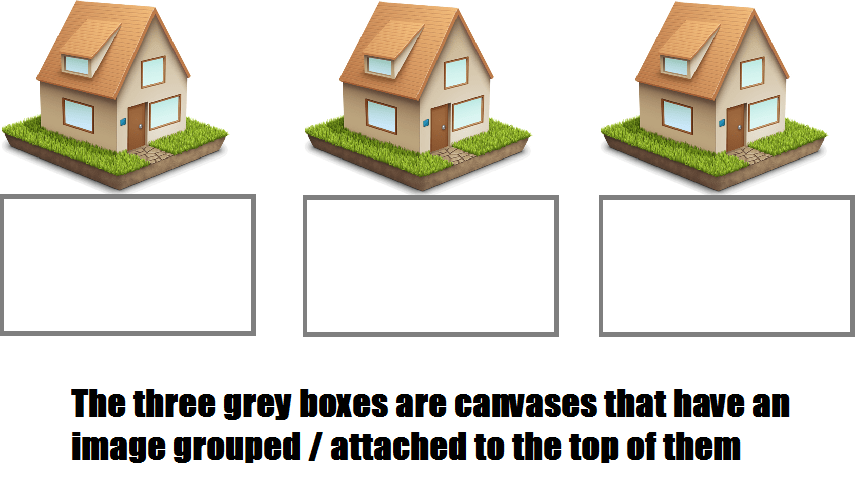
There may be an obvious way to do this that I am overlooking? but googling has not thrown up much as all 'image' and 'canvas' searches inevitably relate to actually adding an image to the canvas - which is not what I want to do in this instance.
Your help with this is much appreciated, thanks
回答1:
Here's taking @KaliedaRik's answer and creating your groups using javascript:
http://jsfiddle.net/m1erickson/3EUnc/
The code to create a new group could be something like this:
function newGroup(){

    // create a new wrapper div
    var div=document.createElement("div");
    div.className="wrapper";

    // create an img and a canvas element

    var img=document.createElement("img");
    var br=document.createElement("br");
    img.style.width="50px";
    img.src="houseicon.png";
    var canvas=document.createElement("canvas");
    canvas.width=300;
    canvas.height=55;

    // add the img and canvas elements to the wrapper div

    div.appendChild(img);
    div.appendChild(br);
    div.appendChild(canvas);

    // add the wrapper div with its contained img + canvas to the page

    document.body.appendChild(div);

}
回答2:
One possible solution: when you create the canvas element, create a new div at the same time and put the canvas and img tags inside it. By making the div position style relative and the contained canvas and img position styles absolute, you'll be able to place the image wherever it needs to go.
<div style="position: relative">
    <canvas style="position: absolute; top: 0px; left: 0px;"></canvas>
    <img src="whatever" alt="whatever" style="position: absolute; top: -20px; left: 0px" />
</div>
来源:https://stackoverflow.com/questions/20177273/html5-canvas-grouping-attaching-an-image-to-a-canvas