
问题
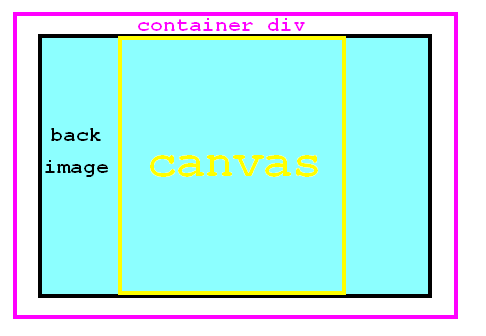
I have an image that I want to use as a document background, and place on top of it a canvas element.
The reason is that the background is large (2048x1024) and if I place it inside the canvas it will be redrawn on every frame wasting resources.
<div id="container">
    <image class = "img1" src = "./assets/game.jpg" id= "backk"/>
    <canvas id="canvas" width="1366" height="1024">No Canvas support!</canvas>
</div>

        container {
        position: relative;
        width:100%;
            margin : auto;

        }
    canvas{
        display:block;
        margin: auto;
        position: absolute;
        top: 0;
        left: 0;
        z-index:1;
        }
    img1{
        position: absolute;
        top: 0;
        left: 0;
        z-index:0;
    }
Using the above markup, what should my CSS be in order to get the result seen also in the following picture:
回答1:
Solution with absolute positions:
#container {
  border: 2px solid red;
  width: 350px; height: 250px;
  position: relative;
  padding: 10px;
}
#container .img1 {
  position: absolute;
  width: 350px; height: 250px;
}
#container #canvas {
  position: absolute;
  outline: 2px solid black;
  top: 10px; left: 60px;
}
<div id="container">
<image class="img1" src="https://placeholdit.imgix.net/~text?txtsize=63&bg=FF6347&txtclr=ffffff&txt=Image-1&w=350&h=250" id="back"/>
<canvas id="canvas" width="250" height="250">No Canvas support!</canvas></div>You can also achieve this without absolute positions using margin: 0 auto,
or display: inline-block and text-align:center, or with flex positions, or with transform: translate(...)
Ex:
#container {
  border: 2px solid red;
  width: 350px; height: 250px;
  position: relative;
  padding: 10px;
}
#container .img1 {
  display: block;
  width: 350px; height: 250px;
}
#container #canvas {
  outline: 2px solid black;
  transform: translate(50px, -250px);
}
来源:https://stackoverflow.com/questions/31247078/how-to-center-a-canvas-on-top-of-a-background-image