
I am using UICollectionView in my UIViewController.
My collectionview properties are set as below.

Now I would like cell to be Centre on screen after scroll! Option 1:

Option 2:
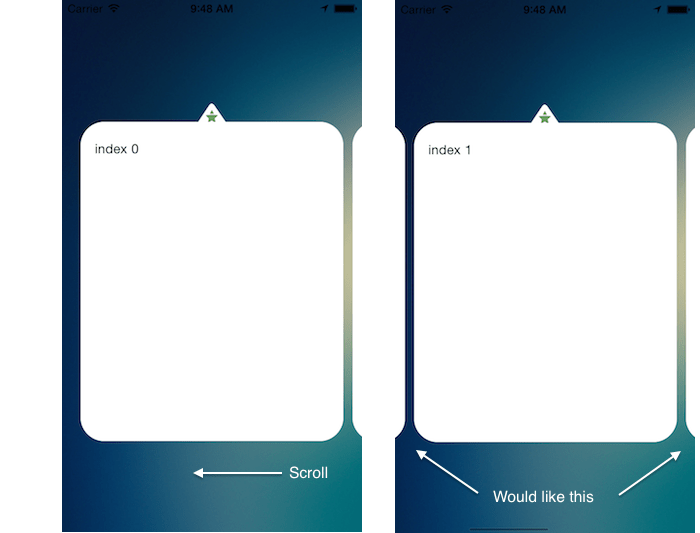
What would I have to do achieve option 2?
UPDATE:
In the end I have used following code as scrolling with other answer is not smooth.
  - (CGPoint)targetContentOffsetForProposedContentOffset:(CGPoint)proposedContentOffset withScrollingVelocity:(CGPoint)velocity
{    CGFloat offsetAdjustment = MAXFLOAT;
    CGFloat horizontalCenter = proposedContentOffset.x + (CGRectGetWidth(self.collectionView.bounds) / 2.0);

    CGRect targetRect = CGRectMake(proposedContentOffset.x, 0.0, self.collectionView.bounds.size.width, self.collectionView.bounds.size.height);
    NSArray* array = [super layoutAttributesForElementsInRect:targetRect];

    for (UICollectionViewLayoutAttributes* layoutAttributes in array) {
        CGFloat itemHorizontalCenter = layoutAttributes.center.x;

        if (ABS(itemHorizontalCenter - horizontalCenter) < ABS(offsetAdjustment)) {
            offsetAdjustment = itemHorizontalCenter - horizontalCenter;
        }
    }
    return CGPointMake(proposedContentOffset.x + offsetAdjustment, proposedContentOffset.y);
}
You can override targetContentOffsetForProposedContentOffset:withScrollingVelocity: method in your UICollectionViewLayout subclass and calculate your offset there like this:
@property (nonatomic, assign) CGFloat previousOffset;
@property (nonatomic, assign) NSInteger currentPage;

...

- (CGPoint)targetContentOffsetForProposedContentOffset:(CGPoint)proposedContentOffset withScrollingVelocity:(CGPoint)velocity {
    NSInteger itemsCount = [self.collectionView.dataSource collectionView:self.collectionView numberOfItemsInSection:0];

    // Imitating paging behaviour
    // Check previous offset and scroll direction
    if ((self.previousOffset > self.collectionView.contentOffset.x) && (velocity.x < 0.0f)) {
        self.currentPage = MAX(self.currentPage - 1, 0);
    } else if ((self.previousOffset < self.collectionView.contentOffset.x) && (velocity.x > 0.0f)) {
        self.currentPage = MIN(self.currentPage + 1, itemsCount - 1);
    }

    // Update offset by using item size + spacing
    CGFloat updatedOffset = (self.itemSize.width + self.minimumInteritemSpacing) * self.currentPage;
    self.previousOffset = updatedOffset;

    return CGPointMake(updatedOffset, proposedContentOffset.y);
}
EDIT: thanks for pointing this out, forgot to say that you have to disable paging first:
self.collectionView.pagingEnabled = NO;
UPDATE: attaching Swift 4.2 version
...
collectionView.isPagingEnabled = false
...

class YourCollectionLayoutSubclass: UICollectionViewFlowLayout {

    private var previousOffset: CGFloat = 0
    private var currentPage: Int = 0

    override func targetContentOffset(forProposedContentOffset proposedContentOffset: CGPoint, withScrollingVelocity velocity: CGPoint) -> CGPoint {
        guard let collectionView = collectionView else {
            return super.targetContentOffset(forProposedContentOffset: proposedContentOffset, withScrollingVelocity: velocity)
        }

        let itemsCount = collectionView.numberOfItems(inSection: 0)

        // Imitating paging behaviour
        // Check previous offset and scroll direction
        if previousOffset > collectionView.contentOffset.x && velocity.x < 0 {
            currentPage = max(currentPage - 1, 0)
        } else if previousOffset < collectionView.contentOffset.x && velocity.x > 0 {
            currentPage = min(currentPage + 1, itemsCount - 1)
        }

        // Update offset by using item size + spacing
        let updatedOffset = (itemSize.width + minimumInteritemSpacing) * CGFloat(currentPage)
        previousOffset = updatedOffset

        return CGPoint(x: updatedOffset, y: proposedContentOffset.y)
    }
}
you can use code
self.collectionView.scrollToItem(at: indexPath, at: .centeredHorizontally, animated: true)
Here's a Swift 3 version of @dmitry-zhukov (thanks btw!)
class PagedCollectionLayout : UICollectionViewFlowLayout {

    var previousOffset : CGFloat = 0
    var currentPage : CGFloat = 0

    override func targetContentOffset(forProposedContentOffset proposedContentOffset: CGPoint, withScrollingVelocity velocity: CGPoint) -> CGPoint {

        let sup = super.targetContentOffset(forProposedContentOffset: proposedContentOffset, withScrollingVelocity: velocity)

        guard
            let validCollection = collectionView,
            let dataSource = validCollection.dataSource
            else { return sup }

        let itemsCount = dataSource.collectionView(validCollection, numberOfItemsInSection: 0)

        // Imitating paging behaviour
        // Check previous offset and scroll direction
        if  (previousOffset > validCollection.contentOffset.x) && (velocity.x < 0) {
            currentPage = max(currentPage - 1, 0)
        }
        else if (previousOffset < validCollection.contentOffset.x) && (velocity.x > 0) {
            currentPage = min(currentPage + 1, CGFloat(itemsCount - 1))
        }

        // Update offset by using item size + spacing
        let updatedOffset = ((itemSize.width + minimumInteritemSpacing) * currentPage)
        self.previousOffset = updatedOffset

        let updatedPoint = CGPoint(x: updatedOffset, y: proposedContentOffset.y)

        return updatedPoint
    }
}
I have found a lot of information and solutions.
now, I use this.
on UICollectionViewFlowLayout override:
override public func targetContentOffset(forProposedContentOffset proposedContentOffset: CGPoint, withScrollingVelocity velocity: CGPoint) -> CGPoint {

    if display != .inline {
        return super.targetContentOffset(forProposedContentOffset: proposedContentOffset, withScrollingVelocity: velocity)
    }

    guard let collectionView = collectionView else {
        return super.targetContentOffset(forProposedContentOffset: proposedContentOffset, withScrollingVelocity: velocity)
    }

    let willtoNextX: CGFloat

    if proposedContentOffset.x <= 0 || collectionView.contentOffset == proposedContentOffset {
        willtoNextX = proposedContentOffset.x
    } else {

        let width = collectionView.bounds.size.width
        willtoNextX = collectionView.contentOffset.x + (velocity.x > 0 ?  width : -width)
    }

    let targetRect = CGRect(x: willtoNextX, y: 0, width: collectionView.bounds.size.width, height: collectionView.bounds.size.height)

    var offsetAdjustCoefficient = CGFloat.greatestFiniteMagnitude

    let horizontalOffset = proposedContentOffset.x + collectionView.contentInset.left

    let layoutAttributesArray = super.layoutAttributesForElements(in: targetRect)

    layoutAttributesArray?.forEach({ (layoutAttributes) in
        let itemOffset = layoutAttributes.frame.origin.x
        if fabsf(Float(itemOffset - horizontalOffset)) < fabsf(Float(offsetAdjustCoefficient)) {
            offsetAdjustCoefficient = itemOffset - horizontalOffset
        }
    })

    return CGPoint(x: proposedContentOffset.x + offsetAdjustCoefficient, y: proposedContentOffset.y)
}
and on UICollectionViewController:
collectionView.decelerationRate = .fast
collectionView.isPagingEnabled = false
collectionView.contentInset = UIEdgeInsets.init(top: 0, left: 16, bottom: 0, right: 16)
now, cell is in center!!

I don't know why everybody's answer is so complicated, I simply turn on Paging enabled in Interface Builder and it works perfectly.
After setting proper itemSize, left and right insets I prefer doing this rather than subclassing layout
//Setting decelerationRate to fast gives a nice experience
collectionView.decelerationRate = .fast

//Add this to your view anywhere
func centerCell () {
    let centerPoint = CGPoint(x: collectionView.contentOffset.x + collectionView.frame.midX, y: 100)
    if let path = collectionView.indexPathForItem(at: centerPoint) {
        collectionView.scrollToItem(at: path, at: .centeredHorizontally, animated: true)
    }
}

//Set collectionView.delegate = self then add below funcs
func scrollViewDidEndDecelerating(_ scrollView: UIScrollView) {
   centerCell()
}
func scrollViewDidEndScrollingAnimation(_ scrollView: UIScrollView) {
    centerCell()
}
func scrollViewDidEndDragging(_ scrollView: UIScrollView, willDecelerate decelerate: Bool) {
    if !decelerate {
        centerCell()
    }
}
来源:https://stackoverflow.com/questions/23990863/uicollectionview-cell-scroll-to-centre