
1.pom.xml引入
demo-base引入
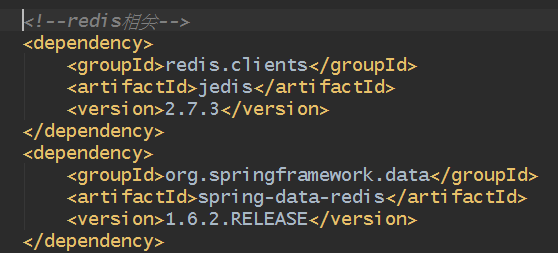
说明:
jedis:redis官网对java语言提供支持。可单独使用。
spring-data-redis:spring对jedis集成。
2.配置
在配置在demo-web下
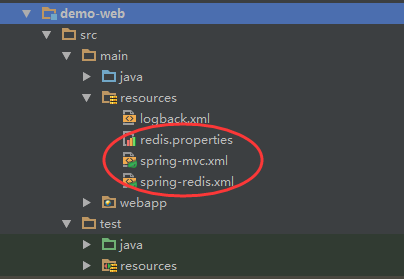
redis.properties:
redis.host=127.0.0.1
redis.port=6379
redis.timeout=15000
redis.password=
redis.database=2
spring-mvc.xml
<!--spring最多加载一个context:property-placeholder-->
<!--如果去掉jdbc.properties加载,demo-web启动会提示找不对应变量值-->
<context:property-placeholder location="classpath:redis.properties,classpath*:jdbc.properties"/>

<!--将spring-redis引入spring中-->
<import resource="spring-redis.xml"/>
spring-redis.xml
<?xml version="1.0" encoding="UTF-8"?>
<beans xmlns="http://www.springframework.org/schema/beans"
       xmlns:xsi="http://www.w3.org/2001/XMLSchema-instance"
       xmlns:p="http://www.springframework.org/schema/p"
       xsi:schemaLocation="http://www.springframework.org/schema/beans
       http://www.springframework.org/schema/beans/spring-beans-4.0.xsd">

    <bean id="redisPoolConfig" class="redis.clients.jedis.JedisPoolConfig">
        <!--最大连接数-->
        <property name="maxTotal" value="30"/>
        <!--最大空闲数-->
        <property name="maxIdle" value="5"/>
        <!--最小空闲数-->
        <property name="minIdle" value="0"/>
        <!--达到最大连接数是否阻塞-->
        <property name="blockWhenExhausted" value="true"/>
        <!--最大连接数后最长阻塞时间-->
        <property name="maxWaitMillis" value="15000"/>
        <!--连接空闲的最小时间,可能被移除-->
        <property name="minEvictableIdleTimeMillis" value="60000"/>
        <!--连接空闲的最小时间,多余最小空闲连接的将被移除-->
        <property name="softMinEvictableIdleTimeMillis" value="30000"/>
        <!--对于“空闲链接”检测线程而言,每次检测的链接资源的个数。默认为3.-->
        <property name="numTestsPerEvictionRun" value="3"/>
        <!--空闲连接的检测周期-->
        <property name="timeBetweenEvictionRunsMillis" value="60000"/>
        <!--当连接给调用者使用时,是否检测空间超时-->
        <property name="testWhileIdle" value="false"/>
        <!--当连接给调用者使用时,是否检测其有效性-->
        <property name="testOnBorrow" value="false"/>
        <!--归还连接时,是否检测其有效性-->
        <property name="testOnReturn" value="false"/>

    </bean>

    <bean id="connectionFactory"
          class="org.springframework.data.redis.connection.jedis.JedisConnectionFactory"
          p:hostName="${redis.host}"
          p:port="${redis.port}"
          p:password="${redis.password}"
          p:database="${redis.database}"
          p:timeout="${redis.timeout}"
          p:poolConfig-ref="redisPoolConfig"/>

    <!--关于class说明-->
    <!--RedisTemplate:可操作对象,最终会将对象转化为字节(所以对象需支持序列化和反序列化)-->
    <!--StringRedisTemplate:操作对象是String类型-->
    <bean id="redisTemplate" class="org.springframework.data.redis.core.StringRedisTemplate">
        <property name="connectionFactory" ref="connectionFactory"/>
        <!--是否开启事务,支持@Transactional-->
        <property name="enableTransactionSupport" value="true"/>
    </bean>

</beans>
3.实例运行
RedisController
@Controller
@RequestMapping("redis")
public class RedisController {
    @Resource(name = "redisTemplate")
    private ValueOperations<String,String> stringOperations;

    //@Autowired
    //private StringRedisTemplate redisTemplate;

    @RequestMapping("setKeyValue")
    @ResponseBody
    public String setKeyValue(String key ,String value){
        //ValueOperations<String,String> stringOperations = redisTemplate.opsForValue();
        stringOperations.set(key,value);
        return stringOperations.get(key);
    }
}
说明:
- 示例代码使用@Resource(name="redisTemplate")进行redis数据类型-String操作类ValueOperations进行注入。
- 如果使用StringRedisTemplate,将代码中注释放开即可
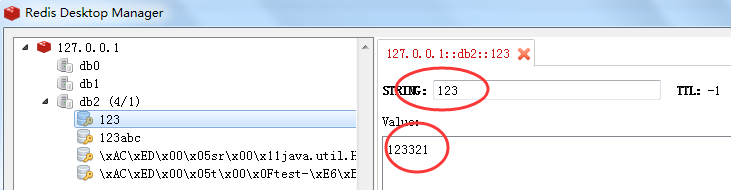
运行结果:
浏览器输入http://localhost:8080/demo-web/redis/setKeyValue.do?key=123&value=123321

Redis查看
4.补充说明
1)redis五种数据类型以及对应操作接口
- String=>ValueOperations:常用的字符串,数字。
- Hash=>HashOperations:相等于HashMap。
- List=>ListOperations:链表。
- Set=>SetOperations:集合。
- ZSet=>ZSetOperations:有序集合。相比集合,多一个score数值。
2)参考文章
http://www.cnblogs.com/luochengqiuse/category/710406.html
来源:oschina
链接:https://my.oschina.net/u/2526015/blog/749281