
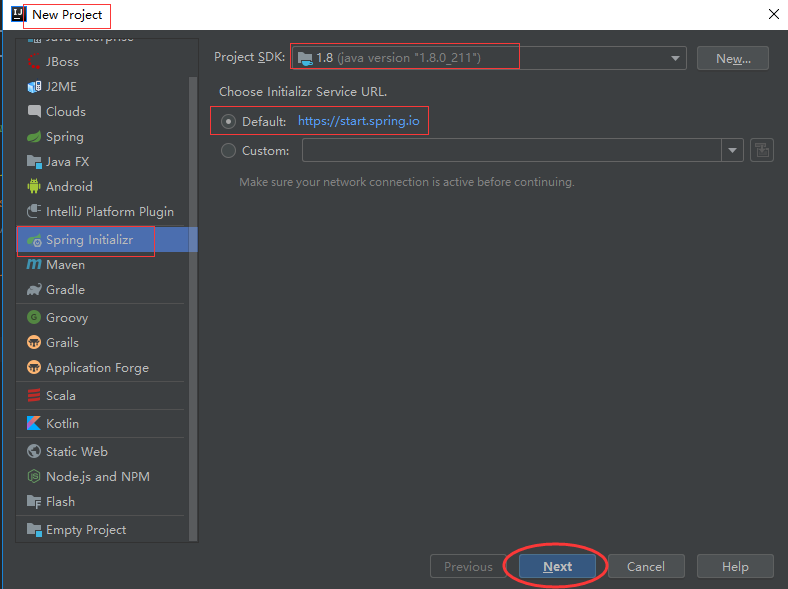
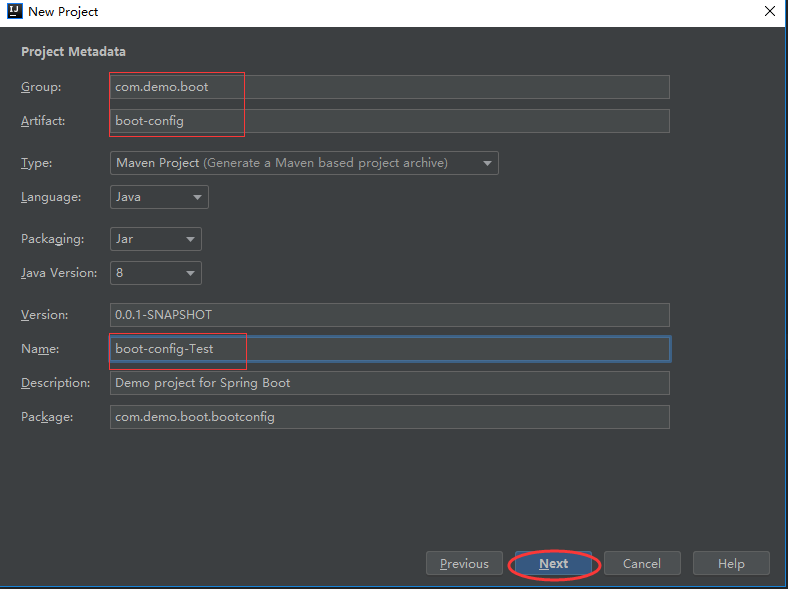
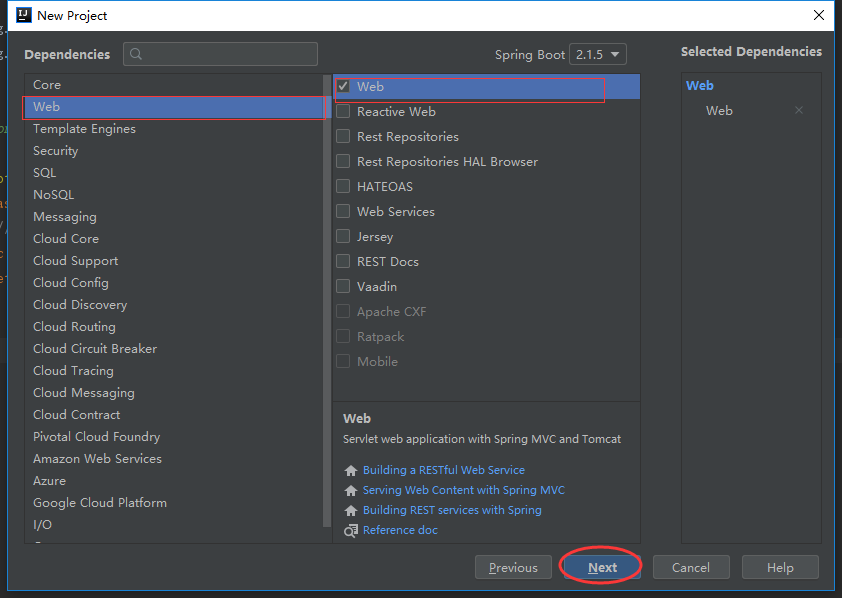
1、添加新项目,选择Spring Initializr方式创建项目
2、默认配置读取顺序 -- /config/路径下优先,properties 比 yml 优先
注意:默认读取的配置文件必须命名为:application,否者读取不到
2.1 通过Environment方式读取
/resources/application.properties文件
1 local.ip.addr=192.168.3.110-pro
1 package com.demo.boot.bootconfig; 2 3 import org.springframework.boot.SpringApplication; 4 import org.springframework.boot.autoconfigure.SpringBootApplication; 5 import org.springframework.context.ConfigurableApplicationContext; 6 import org.springframework.core.env.Environment; 7 8 @SpringBootApplication 9 public class BootConfigApplication { 10 11 public static void main(String[] args) { 12 ConfigurableApplicationContext context = SpringApplication.run(BootConfigApplication.class, args); 13 Environment env = context.getEnvironment(); 14 String ip = env.getProperty("local.ip.addr"); 15 String currentDir = env.getProperty("user.dir"); 16 System.out.println(ip + "," + currentDir); 17 context.close(); 18 } 19 20 } 2.2 通过@value方式读取配置
==>application.properties配置
1 redis.port=9966 2 redis.host:192.168.3.145 3 redis.auth:redis-01
RedisConfig
1 package com.demo.boot.bootconfig; 2 3 import org.springframework.beans.factory.annotation.Value; 4 import org.springframework.stereotype.Component; 5 6 @Component 7 public class RedisConfig { 8 @Value("${redis.port:80}")//默认值:80 9 private int port; 10 11 @Value("${redis.host:127.0.0.1}")//默认值:127.0.0.1 12 private String host; 13 14 @Value("${redis.auth:321}")//默认值:321 15 private String auth; 16 17 public int getPort() { 18 return port; 19 } 20 21 public void setPort(int port) { 22 this.port = port; 23 } 24 25 public String getHost() { 26 return host; 27 } 28 29 public void setHost(String host) { 30 this.host = host; 31 } 32 33 public String getAuth() { 34 return auth; 35 } 36 37 public void setAuth(String auth) { 38 this.auth = auth; 39 } 40 41 public void showConfig() { 42 System.out.print(host + ":" + port + "," + auth + "\n"); 43 } 44 45 } 1 public static void main(String[] args) { 2 ConfigurableApplicationContext context = SpringApplication.run(BootConfigApplication.class, args); 3 4 //通过@Value方式读取配置 5 RedisConfig redisConfig = context.getBean(RedisConfig.class); 6 redisConfig.showConfig(); 7 context.close(); 8 } 输出:192.168.3.145:9966,redis-01
2.3 通过@ConfigurationProperties方式读取配置
==>application.properties文件添加以下内容
1 boot.datasource.driverClassName = com.mysql.jdbc.Driver 2 boot.datasource.url = jdbc:mysql:///db 3 boot.datasource.username = root 4 boot.datasource.password = 456
==>创建实体类:DatasourceProperties.java
1 package com.demo.boot.bootconfig; 2 3 import org.springframework.boot.context.properties.ConfigurationProperties; 4 import org.springframework.stereotype.Component; 5 6 @Component 7 @ConfigurationProperties(prefix = "boot.datasource") 8 public class DatasourceProperties { 9 private String driverClassName; 10 private String url; 11 private String userName; 12 private String password; 13 14 public String getDriverClassName() { 15 return driverClassName; 16 } 17 18 public void setDriverClassName(String driverClassName) { 19 this.driverClassName = driverClassName; 20 } 21 22 public String getUrl() { 23 return url; 24 } 25 26 public void setUrl(String url) { 27 this.url = url; 28 } 29 30 public String getUserName() { 31 return userName; 32 } 33 34 public void setUserName(String userName) { 35 this.userName = userName; 36 } 37 38 public String getPassword() { 39 return password; 40 } 41 42 public void setPassword(String password) { 43 this.password = password; 44 } 45 46 @Override 47 public String toString() { 48 return "DatasourceProperties{" + 49 "driverClassName='" + driverClassName + '\'' + 50 ", url='" + url + '\'' + 51 ", userName='" + userName + '\'' + 52 ", password='" + password + '\'' + 53 '}'; 54 } 55 } ==>main方法调用
1 public static void main(String[] args) { 2 ConfigurableApplicationContext context = SpringApplication.run(BootConfigApplication.class, args); 3 4 //通过@ConfigurationProperties方式 5 DatasourceProperties dbConfig = context.getBean(DatasourceProperties.class); 6 System.out.println(dbConfig); 7 8 context.close(); 9 } 输出:DatasourceProperties{driverClassName='com.mysql.jdbc.Driver', url='jdbc:mysql:///db', userName='root', password='456'}
3、指定配置文件(.properties > .yml)
资源文件结构
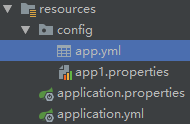
/config/app.yml文件添加一下内容
1 redis: 2 auth: redis-02 3 host: 192.168.3.150 4 port: 6680
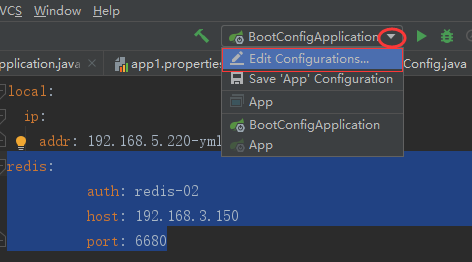
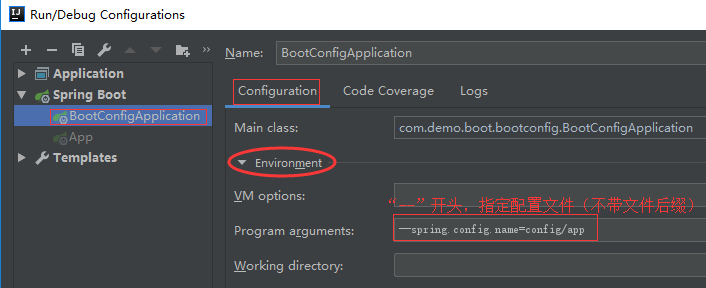
运行上面的main方法
输出结果:192.168.3.150:6680,redis-02
3、指定多个配置文件
3.1 设置指定配置文件
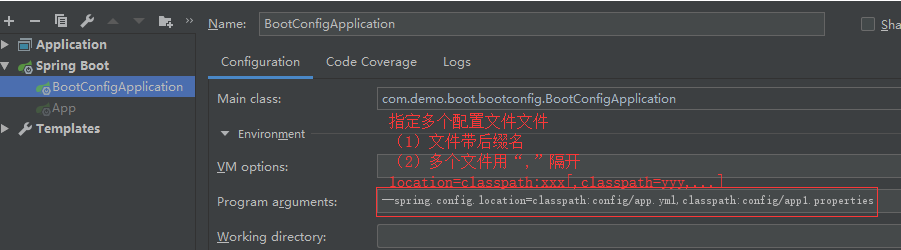
3.2 config/app.yml文件添加以下内容
1 redis: 2 auth: redis-03 3 host: 192.168.3.450 4 port: 6880
1 redis.appName=springBoot
1 public static void main(String[] args) { 2 ConfigurableApplicationContext context = SpringApplication.run(BootConfigApplication.class, args); 3 //通过Evironment方式读取配置 4 Environment env = context.getEnvironment(); 5 6 String port = env.getProperty("redis.port"); 7 String host = env.getProperty("redis.host"); 8 String auth = env.getProperty("redis.auth"); 9 String appName = env.getProperty("redis.appName"); 10 11 System.out.println(appName + "-->" + host + ":" + port + "," + auth); 12 context.close(); 13 } 输出结果:springBoot-->192.168.3.450:6880,redis-03