
actuator是spring boot项目中非常强大一个功能,有助于对应用程序进行监视和管理,通过 restful api 请求来监管、审计、收集应用的运行情况,针对微服务而言它是必不可少的一个环节,本文只介绍如何集成actuator,及actuator最最简单的使用,对于自定义endPoint及actuator的实现原理后续单独介绍。
1、导入依赖包
        <dependency>
            <groupId>org.springframework.boot</groupId>
            <artifactId>spring-boot-starter-actuator</artifactId>
        </dependency>
如果要访问info接口访问maven中配置的内容,需要配置如下插件
            <plugin>
                <groupId>org.springframework.boot</groupId>
                <artifactId>spring-boot-maven-plugin</artifactId>
                <executions>
                    <execution>
                        <goals>
                            <goal>build-info</goal>
                        </goals>
                    </execution>
                </executions>
            </plugin>
2、增加相关配置
# 描述信息
info:
  blog-url: http://lcl.com
  author: lcl
  version: @project.version@

# 加载所有的端点/默认只加载了 info / health
management:
  endpoints:
    web:
      exposure:
        include: '*'
  endpoint:
    health:
      show-details: always

# 可以关闭制定的端点
    shutdown:
      enabled: false

# 路径映射,将 health 路径映射成 rest_health 那么在访问 health 路径将为404,因为原路径已经变成 rest_health 了,一般情况下不建议使用
# management.endpoints.web.path-mapping.health=rest_health
此处注意一点,如果使用的是properties配置文件,使用星号时,不需要加单引号,但是使用yml配置文件时,必须要加单引号,否则启动报错。
3、测试
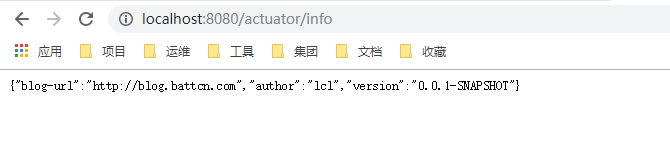
输入http://localhost:8080/actuator/info进行测试
4、自定义检测
虽然actuator拥有强大的功能,但是仍可能不满足我们的需求,就需要自定义端点进行测试,自定义端点测试主要有两种实现方式,实现HealthIndicator接口或继承
AbstractHealthIndicator类,话不多说,直接上代码。(1)实现HealthIndicator接口:
package com.example.demo.health;

import org.springframework.boot.actuate.health.Health;
import org.springframework.boot.actuate.health.HealthIndicator;
import org.springframework.stereotype.Component;

@Component("myhealth1")
public class MyHealth implements HealthIndicator {

    private static final String VERSION = "v1.0.0";

    @Override
    public Health health() {
        int code = check();
        if(code != 0){
            Health.down().withDetail("code",code).withDetail("version", VERSION).build();
        }
        return Health.up().withDetail("code",code).withDetail("version", VERSION).up().build();
    }

    private int check() {
        return 0;
    }
}
测试:http://localhost:8080/actuator/health

(2)继承AbstractHealthIndicator类
package com.example.demo.health;

import org.springframework.boot.actuate.health.AbstractHealthIndicator;
import org.springframework.boot.actuate.health.Health;
import org.springframework.stereotype.Component;

@Component("myhealth2")
public class MyHealth2 extends AbstractHealthIndicator {

    private static final String VERSION = "v1.0.0";

    @Override
    protected void doHealthCheck(Health.Builder builder) throws Exception {
        int code = check();
        if (code != 0) {
            builder.down().withDetail("code", code).withDetail("version", VERSION).build();
        }
        builder.withDetail("code", code)
                .withDetail("version", VERSION).up().build();
    }

    private int check() {
        return 0;
    }
}
测试:http://localhost:8080/actuator/health

由上可以查看系统集成了redis、mysql和rabbitMQ,其中redis和mysql连接正常,rabbitMQ连接异常。
下列是依赖spring-boot-xxx-starter后相关HealthIndicator的实现(通过management.health.defaults.enabled 属性可以禁用它们),但想要获取一些额外的信息时,自定义的作用就体现出来了…
| 名称 | 描述 |
|---|---|
| CassandraHealthIndicator | 检查 Cassandra 数据库是否启动。 |
| DiskSpaceHealthIndicator | 检查磁盘空间不足。 |
| DataSourceHealthIndicator | 检查是否可以获得连接 DataSource。 |
| ElasticsearchHealthIndicator | 检查 Elasticsearch 集群是否启动。 |
| InfluxDbHealthIndicator | 检查 InfluxDB 服务器是否启动。 |
| JmsHealthIndicator | 检查 JMS 代理是否启动。 |
| MailHealthIndicator | 检查邮件服务器是否启动。 |
| MongoHealthIndicator | 检查 Mongo 数据库是否启动。 |
| Neo4jHealthIndicator | 检查 Neo4j 服务器是否启动。 |
| RabbitHealthIndicator | 检查 Rabbit 服务器是否启动。 |
| RedisHealthIndicator | 检查 Redis 服务器是否启动。 |
| SolrHealthIndicator | 检查 Solr 服务器是否已启动。 |