
转载:http://www.voidcn.com/relative/p-fwdkigvh-bro.html
pcm 文件存储的是 原始的声音波型二进制流,没有文件头。
(1)首先要确认 pcm文件的每个采样数据 采样位数,一般为8bit或16bit。
(2)然后确定是双声道还是单声道,双声道是两个声道的数据交互排列,需要单独提取出每个声道的数据。
(3)然后确定有没有符号位,如采样点位16bit有符号位的的范围为-32768~32767
(4)确定当前操作系统的内存方式是大端,还是小端存储。具体看http://blog.csdn.net/u013378306/article/details/78904238
(5)根据以上四条对pcm文件进行解析,转化为10进制文件
注意:对于1-3可以在windows使用cooledit 工具设置参数播放pcm文件来确定具体参数,也可以使用以下java代码进行测试:
本例子的语音为: 静默1秒,然后说 “你好”,然后静默两秒。pcm文件下载路径:http://download.csdn.net/download/u013378306/10175068
package test;
import java.io.File;
import java.io.FileInputStream;
import java.io.FileNotFoundException;
import java.io.IOException;
import java.io.InputStream;

import javax.sound.sampled.AudioFormat;
import javax.sound.sampled.AudioSystem;
import javax.sound.sampled.DataLine;
import javax.sound.sampled.LineUnavailableException;
import javax.sound.sampled.SourceDataLine;

public class test {

    /**
     * @param args
     * @throws Exception
     */
    public static void main(String[] args) throws Exception {
        // TODO Auto-generated method stub

            File file = new File("3.pcm");
            System.out.println(file.length());
            int offset = 0;
            int bufferSize = Integer.valueOf(String.valueOf(file.length())) ;
            byte[] audioData = new byte[bufferSize];
            InputStream in = new FileInputStream(file);
            in.read(audioData);


            float sampleRate = 20000;
            int sampleSizeInBits = 16;
            int channels = 1;
            boolean signed = true;
            boolean bigEndian = false;
            // sampleRate - 每秒的样本数
            // sampleSizeInBits - 每个样本中的位数
            // channels - 声道数(单声道 1 个,立体声 2 个)
            // signed - 指示数据是有符号的,还是无符号的
            // bigEndian -是否为大端存储, 指示是否以 big-endian 字节顺序存储单个样本中的数据(false 意味着
            // little-endian)。
            AudioFormat af = new AudioFormat(sampleRate, sampleSizeInBits, channels, signed, bigEndian);
            SourceDataLine.Info info = new DataLine.Info(SourceDataLine.class, af, bufferSize);
            SourceDataLine sdl = (SourceDataLine) AudioSystem.getLine(info);
            sdl.open(af);
            sdl.start();
                        for(int i=0;i<audioData.length;i++)
                            audioData[i]*=1;
            while (offset < audioData.length) {
                offset += sdl.write(audioData, offset, bufferSize);
            }
    }


}
如果测试通过确定了参数就可以对pcm文件进行解析,如下java代码对每个采样数据为16bits,单声道的pcm,在操作系统内存为小端存储下解析为10进制文件。
package test;

import java.io.File;
import java.io.FileInputStream;
import java.io.FileWriter;
import java.io.InputStream;
import java.math.BigInteger;

public class ffff {

    /**
     * 采样位为16bits,小端存储,单声道解析为10进制文件
     * @param args
     */
    public static void main(String[] args) {
        try {
            File file = new File("3.pcm");
            System.out.println(file.length());
            System.out.println(file.length());
            int bufferSize = Integer.valueOf(String.valueOf(file.length()));
            byte[] buffers = new byte[bufferSize];
            InputStream in = new FileInputStream(file);
            in.read(buffers);
            String rs = "";
            for (int i = 0; i < buffers.length; i++) {
                byte[] bs = new byte[2];
                bs[0]=buffers[i+1];//小端存储,
                bs[1]=buffers[i];
                int s = Integer.valueOf(binary(bs, 10));
                i = i + 1;
                rs += " " + s;

            }
            writeFile(rs);
            in.close();

        } catch (Exception e) {
            e.printStackTrace();

        }
    }

    public static void writeFile(String s) {
        try {

            FileWriter fw = new FileWriter("hello3.txt");

            fw.write(s, 0, s.length());
            fw.flush();
            fw.close();

        } catch (Exception e) {
            e.printStackTrace();
        }

    }

    public static String binary(byte[] bytes, int radix) {
        return new BigInteger(bytes).toString(radix);// 这里的1代表正数
    }
}
执行完可以查看hello.txt ,可以看到一开始振幅很小,如下,基本不超过100:
-15 -12 -18 -24 -17 -8 -8 -17 -22 -14 -5 -18 -47 -67 -60 -41 -28 -28 -23 -12 -6 -9 -13 -8 0 6 21 49 68 48 -2 -43 -47 -32 -22 -10 22 56
但说你好的时候,振幅变得很大:
-2507 -2585 -2600 -2596 -2620 -2670 -2703 -2674 -2581 -2468 -2378 -2305 -2200 -2018 -1774 -1523 -1307 -1127 -962 -806 -652 -505 -384 -313 -281 -241 -163
然后静默两秒,振幅又变的很小:
5 3 0 -4 -5 -6 -6 -7 -7 -8 -9 -8 -10 -10 -11 -10 -11 -11 -11 -11 -11 -11 -10 -9 -7 -6 -3 -2 -2 -3 -3 -3 -1 2 4 4
具体波形图可以使用python代码显示:
import numpy as np
import pylab as pl
import math
import codecs
file=codecs.open("hello3.txt","r") //原文代码file=codecs.open("hello3.txt","rb"),b是binary,以二进制方式读取,是错误的。
lines=" "
for line in file.readlines():
    lines=lines+line
ys=lines.split(" ")
yss=[]
ays=list()
axs=list()
i=0
max1=pow(2,16)-1
for y in ys:
    if y.strip()=="":
        continue
    yss.append(y)

for index in range(len(yss)):

    y1=yss[index]

    i+=1;
    y=int(y1)

    ays.append(y)
    axs.append(i)
#print  i
file.close()
pl.plot(axs, ays,"ro")# use pylab to plot x and y
pl.show()# show the plot on the screen
得到波形图
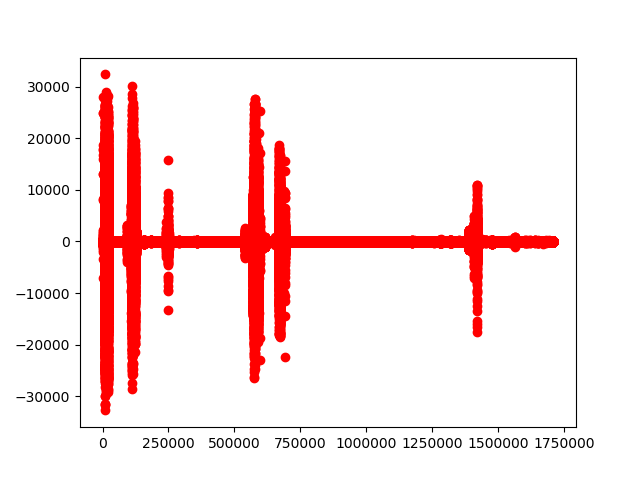
这里音频振幅与audacity中呈现的结果吻合,只是这里把振幅放大以便用肉眼去观察。
