
一、Navicat使用
链接:https://pan.baidu.com/s/15SEMLk-oUSZgGRi6JJAEdA
提取码:m9ra
下载后,将破解补丁放入你Navicat的安装目录,就破解成功了。
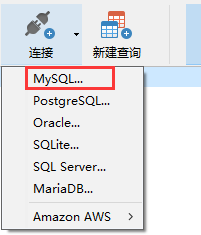
1.进入后点击“连接”

2.点击“MySQL”
3.连接名可以选填,端口号填写3306,用户名root,如果你设置了密码,就填写你设置的密码,如果没有直接跳过。

二、查询练习
导入sql语句代码:


/*
 数据导入:
 Navicat Premium Data Transfer

 Source Server         : localhost
 Source Server Type    : MySQL
 Source Server Version : 50624
 Source Host           : localhost
 Source Database       : sqlexam

 Target Server Type    : MySQL
 Target Server Version : 50624
 File Encoding         : utf-8

 Date: 10/21/2016 06:46:46 AM
*/

SET NAMES utf8;
SET FOREIGN_KEY_CHECKS = 0;

-- ----------------------------
--  Table structure for `class`
-- ----------------------------
DROP TABLE IF EXISTS `class`;
CREATE TABLE `class` (
  `cid` int(11) NOT NULL AUTO_INCREMENT,
  `caption` varchar(32) NOT NULL,
  PRIMARY KEY (`cid`)
) ENGINE=InnoDB AUTO_INCREMENT=5 DEFAULT CHARSET=utf8;

-- ----------------------------
--  Records of `class`
-- ----------------------------
BEGIN;
INSERT INTO `class` VALUES ('1', '三年二班'), ('2', '三年三班'), ('3', '一年二班'), ('4', '二年九班');
COMMIT;

-- ----------------------------
--  Table structure for `course`
-- ----------------------------
DROP TABLE IF EXISTS `course`;
CREATE TABLE `course` (
  `cid` int(11) NOT NULL AUTO_INCREMENT,
  `cname` varchar(32) NOT NULL,
  `teacher_id` int(11) NOT NULL,
  PRIMARY KEY (`cid`),
  KEY `fk_course_teacher` (`teacher_id`),
  CONSTRAINT `fk_course_teacher` FOREIGN KEY (`teacher_id`) REFERENCES `teacher` (`tid`)
) ENGINE=InnoDB AUTO_INCREMENT=5 DEFAULT CHARSET=utf8;

-- ----------------------------
--  Records of `course`
-- ----------------------------
BEGIN;
INSERT INTO `course` VALUES ('1', '生物', '1'), ('2', '物理', '2'), ('3', '体育', '3'), ('4', '美术', '2');
COMMIT;

-- ----------------------------
--  Table structure for `score`
-- ----------------------------
DROP TABLE IF EXISTS `score`;
CREATE TABLE `score` (
  `sid` int(11) NOT NULL AUTO_INCREMENT,
  `student_id` int(11) NOT NULL,
  `course_id` int(11) NOT NULL,
  `num` int(11) NOT NULL,
  PRIMARY KEY (`sid`),
  KEY `fk_score_student` (`student_id`),
  KEY `fk_score_course` (`course_id`),
  CONSTRAINT `fk_score_course` FOREIGN KEY (`course_id`) REFERENCES `course` (`cid`),
  CONSTRAINT `fk_score_student` FOREIGN KEY (`student_id`) REFERENCES `student` (`sid`)
) ENGINE=InnoDB AUTO_INCREMENT=53 DEFAULT CHARSET=utf8;

-- ----------------------------
--  Records of `score`
-- ----------------------------
BEGIN;
INSERT INTO `score` VALUES ('1', '1', '1', '10'), ('2', '1', '2', '9'), ('5', '1', '4', '66'), ('6', '2', '1', '8'), ('8', '2', '3', '68'), ('9', '2', '4', '99'), ('10', '3', '1', '77'), ('11', '3', '2', '66'), ('12', '3', '3', '87'), ('13', '3', '4', '99'), ('14', '4', '1', '79'), ('15', '4', '2', '11'), ('16', '4', '3', '67'), ('17', '4', '4', '100'), ('18', '5', '1', '79'), ('19', '5', '2', '11'), ('20', '5', '3', '67'), ('21', '5', '4', '100'), ('22', '6', '1', '9'), ('23', '6', '2', '100'), ('24', '6', '3', '67'), ('25', '6', '4', '100'), ('26', '7', '1', '9'), ('27', '7', '2', '100'), ('28', '7', '3', '67'), ('29', '7', '4', '88'), ('30', '8', '1', '9'), ('31', '8', '2', '100'), ('32', '8', '3', '67'), ('33', '8', '4', '88'), ('34', '9', '1', '91'), ('35', '9', '2', '88'), ('36', '9', '3', '67'), ('37', '9', '4', '22'), ('38', '10', '1', '90'), ('39', '10', '2', '77'), ('40', '10', '3', '43'), ('41', '10', '4', '87'), ('42', '11', '1', '90'), ('43', '11', '2', '77'), ('44', '11', '3', '43'), ('45', '11', '4', '87'), ('46', '12', '1', '90'), ('47', '12', '2', '77'), ('48', '12', '3', '43'), ('49', '12', '4', '87'), ('52', '13', '3', '87');
COMMIT;

-- ----------------------------
--  Table structure for `student`
-- ----------------------------
DROP TABLE IF EXISTS `student`;
CREATE TABLE `student` (
  `sid` int(11) NOT NULL AUTO_INCREMENT,
  `gender` char(1) NOT NULL,
  `class_id` int(11) NOT NULL,
  `sname` varchar(32) NOT NULL,
  PRIMARY KEY (`sid`),
  KEY `fk_class` (`class_id`),
  CONSTRAINT `fk_class` FOREIGN KEY (`class_id`) REFERENCES `class` (`cid`)
) ENGINE=InnoDB AUTO_INCREMENT=17 DEFAULT CHARSET=utf8;

-- ----------------------------
--  Records of `student`
-- ----------------------------
BEGIN;
INSERT INTO `student` VALUES ('1', '男', '1', '理解'), ('2', '女', '1', '钢蛋'), ('3', '男', '1', '张三'), ('4', '男', '1', '张一'), ('5', '女', '1', '张二'), ('6', '男', '1', '张四'), ('7', '女', '2', '铁锤'), ('8', '男', '2', '李三'), ('9', '男', '2', '李一'), ('10', '女', '2', '李二'), ('11', '男', '2', '李四'), ('12', '女', '3', '如花'), ('13', '男', '3', '刘三'), ('14', '男', '3', '刘一'), ('15', '女', '3', '刘二'), ('16', '男', '3', '刘四');
COMMIT;

-- ----------------------------
--  Table structure for `teacher`
-- ----------------------------
DROP TABLE IF EXISTS `teacher`;
CREATE TABLE `teacher` (
  `tid` int(11) NOT NULL AUTO_INCREMENT,
  `tname` varchar(32) NOT NULL,
  PRIMARY KEY (`tid`)
) ENGINE=InnoDB AUTO_INCREMENT=6 DEFAULT CHARSET=utf8;

-- ----------------------------
--  Records of `teacher`
-- ----------------------------
BEGIN;
INSERT INTO `teacher` VALUES ('1', '张磊老师'), ('2', '李平老师'), ('3', '刘海燕老师'), ('4', '朱云海老师'), ('5', '李杰老师');
COMMIT;

SET FOREIGN_KEY_CHECKS = 1;
2.打开navicat新建数据库day41,选中新建的数据库鼠标右键选择运行SQL文件
3.弹出文件框,选中刚刚保存到桌面的.sql文件即可
练习题:
'''
1、查询所有的课程的名称以及对应的任课老师姓名
2、查询平均成绩大于八十分的同学的姓名和平均成绩
3、 查询没有报李平老师课的学生姓名
4、 查询没有同时选修物理课程和体育课程的学生姓名
5、 查询挂科超过两门(包括两门)的学生姓名和班级
'''
参考答案:
#1、查询所有的课程的名称以及对应的任课老师姓名
SELECT
    course.cname,
    teacher.tname
FROM
    teacher
    INNER JOIN course ON course.teacher_id = teacher.tid

#2、查询平均成绩大于八十分的同学的姓名和平均成绩
SELECT
    student.sname,
    t1.平均成绩
FROM
    student
    INNER JOIN ( SELECT student_id, avg( num ) AS 平均成绩 FROM score GROUP BY student_id HAVING avg( num ) > 80 ) AS t1 ON student.sid = t1.student_id

#3.查询没有报李平老师课的学生姓名
select student.sname from student where student.sid not in
(
SELECT DISTINCT
    student_id
FROM
    score
WHERE
    score.course_id IN (
SELECT
    course.cid
FROM
    course
    INNER JOIN teacher ON course.teacher_id = teacher.tid
WHERE
    teacher.tname = '李平老师'
    )
)

#4.查询没有同时选修物理课程和体育课程的学生姓名
SELECT
    student.sname
FROM
    student
WHERE
    student.sid IN (
SELECT
    score.student_id
FROM
    score
    INNER JOIN course ON score.course_id = course.cid
WHERE
    cname IN ( '物理', '体育' )
GROUP BY
    student_id
HAVING
    count( course_id ) < 2
    )

#5.查询挂科超过两门的(包括两门)的学生姓名和班级
SELECT
    student.sname,
    class.caption
FROM
    student
    INNER JOIN class ON student.class_id = class.cid
WHERE
    student.sid IN ( SELECT student_id FROM score WHERE num < 60 GROUP BY student_id HAVING count( course_id ) >= 2 )
三、python中的pymysql模块
#1.安装:pymysql

#2.代码连接
import pymysql
#链接
conn = pymysql.connect(
    host = '127.0.0.1',
    port = 3306,
    user = 'root',
    password = '123',
    database = 'day38',
    charset = 'utf8'
)
#cursor = conn.cursor() 默认是返回一个元组
cursor = conn.cursor(pymysql.cursors.DictCursor) # 产生一个游标对象,以字典的形式返回查询出来的数据
键是表的字段 值是表的字段对应的信息
sql = 'select * from teacher'
cursor.execute(sql) # 执行传入的sql语句
# print(cursor.execute(sql)) 执行语句返回的是数据条数
print(cursor.fetchone()) # 只获取一条数据
print(cursor.fetchone())
print(cursor.fetchone())
cursor.scroll(1,'absolute') # 控制光标移动 absolute相对于起始位置往后移动几位
cursor.scroll(2,'relative') # relative相对于当前位置 往后移动几位
print(cursor.fetchall()) # 获取所有数据 返回的结果是一个列表
四、注入问题
# 记住不要手动去拼接查询的sql语句
username = input('username>>>:').strip()
password = input('password>>>:').strip()

# 错误!会导致注入问题!
sql = "select * from user where name = ’%s‘ and password = ’%s‘“%(username,password)

#注入问题 导致的现象:
username>>>: jason' -- asdakjshdkjsds

#不知道用户名和密码的情况下:
username>>> xxx' or 1=1 --askjfkjhfjaljfha
password = ''

#正确操作
cursor.execute(sql,(username,password)) #能够自动帮你过滤特殊符号, 避免sql注入问题
五、增删改
#增
sql = 'insert into user values("jerry","666")'

cursor.execute(sql)

conn.commit()

#改
sql = 'update user set password = "456"'

cursor.execute(sql)

conn.commit()

#删

sql = "delete from user where name ='jerry'"

cursor.execute(sql)

conn.commit()