
作者
本文由 张舫 童鞋投稿
同时也欢迎更多的小伙伴投稿
开发需求
PHP >= 7.0.0
OpenSSL PHP Extension
PDO PHP Extension
Mbstring PHP Extension
Tokenizer PHP Extension
XML PHP Extension
Apache/Nginx
MySQl
Composer
NodeJs with NPM
提示
.
.                代表代码省略
.
1创建laravel项目
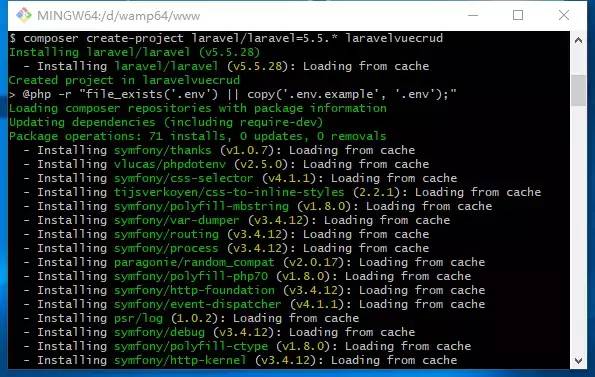
composer create-project laravel/laravel=5.5.* laravelvuecrud #指定laravel版本为5.5.*如果需要最高版本可以去掉版本约束,指定项目名称
image
image
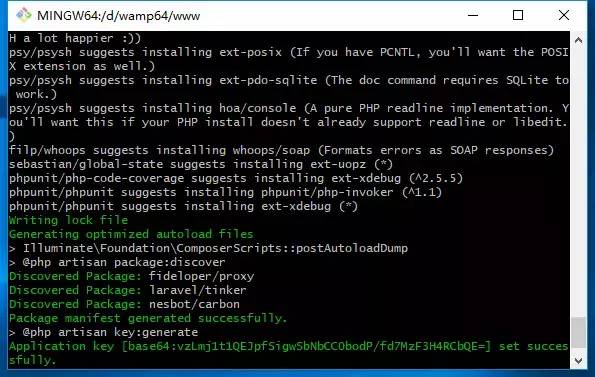
看到successfully代表laravel安装成功,如果没有成功请换淘宝镜像重写安装.
如果你composer下载速度过慢可以指定淘宝镜像
composer config -g repo.packagist composer https://packagist.phpcomposer.com

image
查看镜像是否替换成功
composer config -gl #查看全局配置文件

image
2创建迁移文件
cd laravelvuecrud        #进入项项目目录
php artisan make:migration create_tasks_table --create=tasks     #创建数据迁移文件

image
打开迁移文件并且开始编辑\database\migrations\<time>_create_tasks_table.php
<?php

use Illuminate\Support\Facades\Schema;
use Illuminate\Database\Schema\Blueprint;
use Illuminate\Database\Migrations\Migration;

class CreateTasksTable extends Migration
{
/**
     * Run the migrations.
     *
     * @return void
     */
public function up()
{
        Schema::create('tasks', function (Blueprint $table) {
            $table->increments('id');
            $table->string('name');
            $table->unsignedInteger('user_id');
            $table->text('description');
            $table->timestamps();
        });
    }

/**
     * Reverse the migrations.
     *
     * @return void
     */
public function down()
{
        Schema::dropIfExists('tasks');
    }
}
配置数据库连接打开/.env文件,找到这段根据自己的数据库自行配置
DB_CONNECTION=mysql
DB_HOST=127.0.0.1
DB_PORT=3306
DB_DATABASE=laravelvuecrud
DB_USERNAME=homestead
DB_PASSWORD=secret
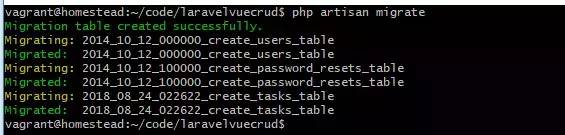
执行数据迁移命令,
php artisan migrate
image
如果执行迁移文件报错SQLSTATE[42000]: Syntax error or access violation: 1071 Specified key was too long; max key length is 1000 bytes,说明数据库版本太低
打开\app\Providers\AppServiceProvider.php文件,修改内容
use Illuminate\Support\Facades\Schema;   //引入
.
.
.
public function boot()
{
    Schema::defaultStringLength(191); //设置长度
}
.
.
.
然后删除数据库里面的所有表文件,重新执行迁移命令就可以了.
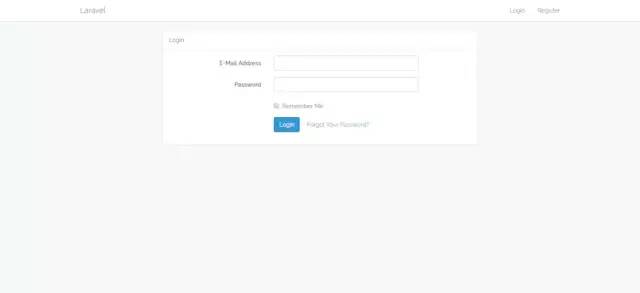
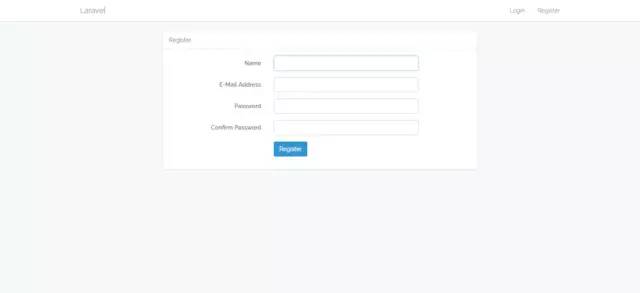
3.自动生成登陆注册
php artisan make:auth

image
image
image
image
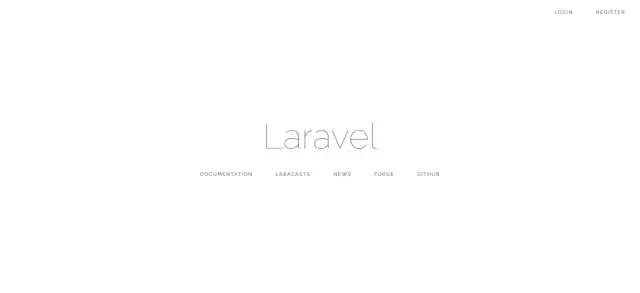
打开浏览器输入配置好的域名,可以看到有了登陆注册
4.创建模型和控制器
php artisan make:model Task -r
开始编辑模型\app\Task.php
<?php

namespace App;

use Illuminate\Database\Eloquent\Model;

class Task extends Model
{
/**设置可填写的字段
     * @var array
     */
protected $fillable = [
'name',
'user_id',
'description',
    ];
}
5创建路由设置权限
打开\routes\web.php文件在最后添加代码
Route::resource('/task', 'TaskController') ->middleware('auth'); #资源路由指定必须登陆才能访问
6编写vue组件了
在\resources\assets\js\components\里创建 Task.vue文件打开并且编辑
<template>
<div class="container">
<div class="row">
<div class="col-md-12">
<div class="panel panel-default">
<div class="panel-heading">My Tasks</div>

<div class="panel-body">

</div>
</div>
</div>
</div>
</div>
</template>

<script>
export default {
        mounted() {

        }
    }
</script>
打开\resources\assets\js\app.js注册组件
/**
 * First we will load all of this project's JavaScript dependencies which
 * includes Vue and other libraries. It is a great starting point when
 * building robust, powerful web applications using Vue and Laravel.
 */

require('./bootstrap');                                                             //引入bootstrap

window.Vue = require('vue');                                                        //引入vue

/**
 * Next, we will create a fresh Vue application instance and attach it to
 * the page. Then, you may begin adding components to this application
 * or customize the JavaScript scaffolding to fit your unique needs.
 */

Vue.component('example-component', require('./components/ExampleComponent.vue'));       //这个组件是laravel自带,就是一个例子,没有用可以删除
Vue.component('task', require('./components/Task.vue'));                                //注册组件

const app = new Vue({
el: '#app'                  //页面上已有的元素
});
7.安装npm依赖包
npm install
这个安装的过程比较漫长,建议使用npm淘宝镜像,或者使用yarn软件进行安装,安装的过程中如有报错,删除'/node_modules'这个文件多次尝试即可.
8.编译资源使用Task控制器
npm run dev #编译资源
打开 \resources\views\home.blade.php 文件复制代码
@extends('layouts.app')

@section('content')
    {{--使用app.js文件中注册的组件--}}
    <task></task>
@endsection
打开浏览器输入http://自己设置的域名/home 就可以看见,之前编写\resources\assets\js\components\Task.vue的代码了
9.增
编辑\resources\assets\js\components\Task.vue 复制代码
<template>
<div class="container">
<div class="row">
<div class="col-md-12">
<div class="panel panel-default">
<div class="panel-heading">
<button @click="initAddTask()" class="btn btn-primary btn-xs pull-right">
+ Add New Task
</button>
My Tasks
</div>
<div class="panel-body">
</div>
</div>
</div>
</div>
<div class="modal fade" tabindex="-1" role="dialog" id="add_task_model">
<div class="modal-dialog" role="document">
<div class="modal-content">
<div class="modal-header">
<button type="button" class="close" data-dismiss="modal" aria-label="Close"><span
aria-hidden="true">×</span></button>
<h4 class="modal-title">Add New Task</h4>
</div>
<div class="modal-body">
<div class="alert alert-danger" v-if="errors.length > 0">
<ul>
<li v-for="error in errors">{{ error }}</li>
</ul>
</div>
<div class="form-group">
<label for="name">Name:</label>
<input type="text" name="name" id="name" placeholder="Task Name" class="form-control"
v-model="task.name">
</div>
<div class="form-group">
<label for="description">Description:</label>
<textarea name="description" id="description" cols="30" rows="5" class="form-control"
placeholder="Task Description" v-model="task.description"></textarea>
</div>
</div>
<div class="modal-footer">
<button type="button" class="btn btn-default" data-dismiss="modal">Close</button>
<button type="button" @click="createTask" class="btn btn-primary">Submit</button>
</div>
</div>
</div>
</div>
</div>
</template>
<script>
export default {
data() {
return {
task: {
name: '',
description: ''
},
errors: []
}
},
methods: {
initAddTask() {
this.errors = [];
$("#add_task_model").modal("show");
},
createTask() {
axios.post('/task', { //这里使用axios作为ajax请求这个axios这个包是在\resources\assets\js\bootstrap.js 第22行引入的laravel官方自带,vue官方推荐使用
name: this.task.name,
description: this.task.description,
})
.then(response => {
this.reset();
$("#add_task_model").modal("hide");
})
.catch(error => {
this.errors = [];
if (error.response.data.errors.name) {
this.errors.push(error.response.data.errors.name[0]);
}
if (error.response.data.errors.description) {
this.errors.push(error.response.data.errors.description[0]);
}
});
},
reset() {
this.task.name = '';
this.task.description = '';
},
}
}
</script>
编辑\app\Http\Controllers\TaskController.php控制器
use Illuminate\Support\Facades\Auth;       #别忘了引入它
.
.
.
public function store(Request $request)
{
$this->validate($request, ['name' => 'required|max:255', 'description' => 'required',]);                        #数据验证
    $task = Task::create(['name' => request('name'), 'description' => request('description'), 'user_id' => Auth::user()->id]);      #创建数据
return response()->json(['task' => $task, 'message' => 'Success'], 200);            #返回消息

}
.
.
.
编译资源
npm run dev
打开浏览器查看结果
10 获取数据
编辑\resources\assets\js\components\Task.vue 复制代码
<template>
<div class="container">
<div class="row">
<div class="col-md-12">
<div class="panel panel-default">
<div class="panel-heading">
<button @click="initAddTask()" class="btn btn-primary btn-xs pull-right">
+ Add New Task
</button>
My Tasks
</div>
<div class="panel-body">
<table class="table table-bordered table-striped table-responsive" v-if="tasks.length > 0">
<tbody>
<tr>
<th>
No.
</th>
<th>
Name
</th>
<th>
Description
</th>
<th>
Action
</th>
</tr>
<tr v-for="(task, index) in tasks">
<td>{{ index + 1 }}</td>
<td>
{{ task.name }}
</td>
<td>
{{ task.description }}
</td>
<td>
<button class="btn btn-success btn-xs">Edit</button>
<button class="btn btn-danger btn-xs">Delete</button>
</td>
</tr>
</tbody>
</table>
</div>
</div>
</div>
</div>
<div class="modal fade" tabindex="-1" role="dialog" id="add_task_model">
<div class="modal-dialog" role="document">
<div class="modal-content">
<div class="modal-header">
<button type="button" class="close" data-dismiss="modal" aria-label="Close"><span
aria-hidden="true">×</span></button>
<h4 class="modal-title">Add New Task</h4>
</div>
<div class="modal-body">
<div class="alert alert-danger" v-if="errors.length > 0">
<ul>
<li v-for="error in errors">{{ error }}</li>
</ul>
</div>
<div class="form-group">
<label for="name">Name:</label>
<input type="text" name="name" id="name" placeholder="Task Name" class="form-control"
v-model="task.name">
</div>
<div class="form-group">
<label for="description">Description:</label>
<textarea name="description" id="description" cols="30" rows="5" class="form-control"
placeholder="Task Description" v-model="task.description"></textarea>
</div>
</div>
<div class="modal-footer">
<button type="button" class="btn btn-default" data-dismiss="modal">Close</button>
<button type="button" @click="createTask" class="btn btn-primary">Submit</button>
</div>
</div>
</div>
</div>
</div>
</template>
<script>
export default {
data() {
return {
task: {
name: '',
description: ''
},
errors: [],
tasks: []
}
},
mounted() {
this.readTasks();
},
methods: {
initAddTask() {
$("#add_task_model").modal("show");
},
createTask() {
axios.post('/task', {
name: this.task.name,
description: this.task.description,
})
.then(response => {
this.reset();
this.tasks.push(response.data.task);
$("#add_task_model").modal("hide");
})
.catch(error => {
this.errors = [];
if (error.response.data.errors.name) {
this.errors.push(error.response.data.errors.name[0]);
}
if (error.response.data.errors.description) {
this.errors.push(error.response.data.errors.description[0]);
}
});
},
reset() {
this.task.name = '';
this.task.description = '';
},
readTasks() {
axios.get('/task')
.then(response => {
this.tasks = response.data.tasks;
});
}
}
}
</script>
编辑\app\Http\Controllers\TaskController.php控制器
.
.
.
public function index()
{
    $tasks = Task::where(['user_id' => Auth::user()->id])->get();
return response()->json(['tasks' => $tasks,], 200);
}
.
.
.
资源编译
npm run dev
打开浏览器查看
11更新
编辑\resources\assets\js\components\Task.vue 复制代码
<template>
<div class="container">
<div class="row">
<div class="col-md-12">
<div class="panel panel-default">
<div class="panel-heading">
<button @click="initAddTask()" class="btn btn-primary btn-xs pull-right">
+ Add New Task
</button>
My Tasks
</div>
<div class="panel-body">
<table class="table table-bordered table-striped table-responsive" v-if="tasks.length > 0">
<tbody>
<tr>
<th>
No.
</th>
<th>
Name
</th>
<th>
Description
</th>
<th>
Action
</th>
</tr>
<tr v-for="(task, index) in tasks">
<td>{{ index + 1 }}</td>
<td>
{{ task.name }}
</td>
<td>
{{ task.description }}
</td>
<td>
<button @click="initUpdate(index)" class="btn btn-success btn-xs">Edit</button>
<button class="btn btn-danger btn-xs">Delete</button>
</td>
</tr>
</tbody>
</table>
</div>
</div>
</div>
</div>
<div class="modal fade" tabindex="-1" role="dialog" id="add_task_model">
<div class="modal-dialog" role="document">
<div class="modal-content">
<div class="modal-header">
<button type="button" class="close" data-dismiss="modal" aria-label="Close"><span
aria-hidden="true">×</span></button>
<h4 class="modal-title">Add New Task</h4>
</div>
<div class="modal-body">
<div class="alert alert-danger" v-if="errors.length > 0">
<ul>
<li v-for="error in errors">{{ error }}</li>
</ul>
</div>
<div class="form-group">
<label for="name">Name:</label>
<input type="text" name="name" id="name" placeholder="Task Name" class="form-control"
v-model="task.name">
</div>
<div class="form-group">
<label for="description">Description:</label>
<textarea name="description" id="description" cols="30" rows="5" class="form-control"
placeholder="Task Description" v-model="task.description"></textarea>
</div>
</div>
<div class="modal-footer">
<button type="button" class="btn btn-default" data-dismiss="modal">Close</button>
<button type="button" @click="createTask" class="btn btn-primary">Submit</button>
</div>
</div>
</div>
</div>
<div class="modal fade" tabindex="-1" role="dialog" id="update_task_model">
<div class="modal-dialog" role="document">
<div class="modal-content">
<div class="modal-header">
<button type="button" class="close" data-dismiss="modal" aria-label="Close"><span
aria-hidden="true">×</span></button>
<h4 class="modal-title">Update Task</h4>
</div>
<div class="modal-body">
<div class="alert alert-danger" v-if="errors.length > 0">
<ul>
<li v-for="error in errors">{{ error }}</li>
</ul>
</div>
<div class="form-group">
<label>Name:</label>
<input type="text" placeholder="Task Name" class="form-control"
v-model="update_task.name">
</div>
<div class="form-group">
<label for="description">Description:</label>
<textarea cols="30" rows="5" class="form-control"
placeholder="Task Description" v-model="update_task.description"></textarea>
</div>
</div>
<div class="modal-footer">
<button type="button" class="btn btn-default" data-dismiss="modal">Close</button>
<button type="button" @click="updateTask" class="btn btn-primary">Submit</button>
</div>
</div>
</div>
</div>
</div>
</template>
<script>
export default {
data() {
return {
task: {
name: '',
description: ''
},
errors: [],
tasks: [],
update_task: {}
}
},
mounted() {
this.readTasks();
},
methods: {
initAddTask() {
$("#add_task_model").modal("show");
},
createTask() {
axios.post('/task', {
name: this.task.name,
description: this.task.description,
})
.then(response => {
this.reset();
this.tasks.push(response.data.task);
$("#add_task_model").modal("hide");
})
.catch(error => {
this.errors = [];
if (error.response.data.errors.name) {
this.errors.push(error.response.data.errors.name[0]);
}
if (error.response.data.errors.description) {
this.errors.push(error.response.data.errors.description[0]);
}
});
},
reset() {
this.task.name = '';
this.task.description = '';
},
readTasks() {
axios.get('/task')
.then(response => {
this.tasks = response.data.tasks;
});
},
initUpdate(index) {
this.errors = [];
$("#update_task_model").modal("show");
this.update_task = this.tasks[index];
},
updateTask() {
axios.patch('/task/' + this.update_task.id, {
name: this.update_task.name,
description: this.update_task.description,
})
.then(response => {
$("#update_task_model").modal("hide");
})
.catch(error => {
this.errors = [];
if (error.response.data.errors.name) {
this.errors.push(error.response.data.errors.name[0]);
}
if (error.response.data.errors.description) {
this.errors.push(error.response.data.errors.description[0]);
}
});
}
}
}
</script>
编辑\app\Http\Controllers\TaskController.php控制器
$this->validate($request, ['name' => 'required|max:255', 'description' => 'required',]);
$task->name        = request('name');
$task->description = request('description');
$task->save();
return response()->json(['message' => 'Task updated successfully!'], 200);
编译资源
npm run dev
浏览器查看结果
12 删除
编辑\resources\assets\js\components\Task.vue修改代码
给删除按钮添加脚本
<button @click="deleteTask(index)" class="btn btn-danger btn-xs">Delete</button>
编写删除方法在methods里面添加
.
.
.
methods: {
.
.
.
    deleteTask(index)
    {
let conf = confirm("Do you ready want to delete this task?");
if (conf === true) {

            axios.delete('/task/' + this.tasks[index].id)
                .then(response => {

this.tasks.splice(index, 1);

                })
                .catch(error => {

                });
        }
    }
}
.
.
.
编辑\app\Http\Controllers\TaskController.php控制器
.
.
.
public function destroy(Task $task)
{
    $task->delete();
return response()->json(['message' => 'Task deleted successfully!'], 200);
}
.
.
.
编译资源
npm run dev
打开浏览器查看
后记
再次感谢张舫童鞋给大家分享的内容,同时也欢迎小伙伴们多多投稿呦,喜欢的小伙伴记得收藏、转发、点击右下角按钮在看,推荐给更多小伙伴呦,欢迎多多留言交流...
胡哥有话说,一个有技术,有情怀的胡哥!京东开放平台首席前端攻城狮。与你一起聊聊大前端,分享前端系统架构,框架实现原理,最新最高效的技术实践!
长按扫码关注,更帅更漂亮呦!关注胡哥有话说公众号,可与胡哥继续深入交流呦!

本文分享自微信公众号 - 胡哥有话说(hugeyouhuashuo)。
如有侵权,请联系 support@oschina.cn 删除。
本文参与“OSC源创计划”,欢迎正在阅读的你也加入,一起分享。
来源:oschina
链接:https://my.oschina.net/u/4188011/blog/4373487