
问题
i am learning actionbar and created an actionbar with tabs .the following image shows the view !
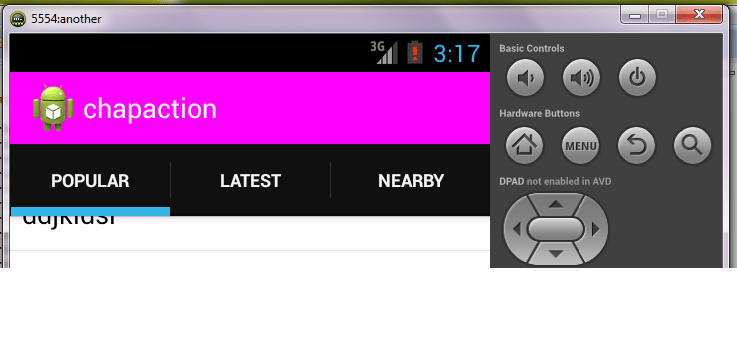
requestWindowFeature(Window.FEATURE_ACTION_MODE_OVERLAY);
    ActionBar ab=getActionBar();
    ab.setNavigationMode(ActionBar.NAVIGATION_MODE_TABS);
    ab.setBackgroundDrawable(new ColorDrawable(Color.MAGENTA));
    ab.addTab(ab.newTab().setText("Popular").setTabListener(this));
    ab.addTab(ab.newTab().setText("Latest").setTabListener(this));
    ab.addTab(ab.newTab().setText("Nearby").setTabListener(this));
They following are my queries :
the tabs have shifted to a bar below the magenta color bar. is it due to space constraints of mobile.if a wish to add any item to this magenta bar with the tabs below how can add to it and then show the same pattern whether it is mobile or tablet.
i want to make this tabs bar transparent so that i can see the text move behind it.i have tried to set its
drawableas per code above but it has only changed of top bar but not the tabs bar.what is way to have a button on the magenta bar
onclickingi have this screen shift to left and show another screen which has some links show up in a way that partly this current screen is also visible.i hope i am able to explain my point.
kindly clarify
回答1:
Question 1: It's down to device space constraints. The first paragraph in the Android documentation for tabs in the action bar show that if there isn't room it will split the tabs to a separate bar.
http://developer.android.com/guide/topics/ui/actionbar.html#Tabs
Question 2: You need to set the drawable for the background and the stacked background of the action bar to your transparent drawable. (Edit: Links in Ye Lin Aung's comment show how to do that).
Question 3: It sounds like you are looking for a navigation drawer layout arrangement to me. The best place to start on this would be this link:
http://developer.android.com/training/implementing-navigation/nav-drawer.html
Edit: The pattern will work the same for both mobile and tablets (though you may want to have an xml for smaller screens that have a slightly thinner drawer sizes).
The android documentation in the link above states that the drawer width should be set in dp units and that the drawer height matches the parent view. The drawer width should be no more than 320dp so the user can always see a portion of the main content. This should allow most phones to view it in both portrait and landscape and still see some content.
来源:https://stackoverflow.com/questions/20455314/how-to-make-the-actionbar-transparent