
发送端
# -*- coding: utf-8 -*-
"""
@File    : 200103_obstacle_detection_发送数据_测试udp传输上限.py
@Time    : 2020/1/3 14:28
@Author  : Dontla
@Email   : sxana@qq.com
@Software: PyCharm
"""

import socket
import struct
import time
import numpy as np
import pyrealsense2 as rs
import cv2
import sys
from numba import jit


def udp_send_image(img, pack_size, socket, ip_port):
    _, img_encode = cv2.imencode('.jpg', img)
    data = img_encode.tobytes()
    # print(len(data))    # 有很多超过65535的
    # 【定义文件头、数据】(打包名为l?不是,l表示长整型,占四个字节)
    fhead = struct.pack('i', len(data))
    # 【发送文件头、数据】
    socket.sendto(fhead, ip_port)
    # 每次发送x字节,计算所需发送次数
    send_times = len(data) // pack_size + 1
    for count in range(send_times):
        # time.sleep(0.01)
        if count < send_times - 1:
            socket.sendto(
                data[pack_size * count:pack_size * (count + 1)], ip_port)
        else:
            socket.sendto(data[pack_size * count:], ip_port)


# @jit
# 貌似开不了jit,不知啥原因,开了也没明显看到加速
def filter_alpha(depth_image, filter_alpha):
    if filter_alpha > 1:
        # 获取depth_image宽高
        h, w = depth_image.shape[0], depth_image.shape[1]  # 360,640

        # 创建上下alpha(不同方法都能创建)
        # filter_upper = np.array([1] * int(h / 2))
        filter_upper = np.full(int(h / 2), 1)
        filter_lower = np.linspace(1, filter_alpha, h / 2)

        # 将filter_upper和filter_lower连在一起
        filter = np.r_[filter_upper, filter_lower]

        # print(filter)
        # print(filter.shape) # (360,)

        # print(filter_alpha_upper)
        # print(filter_alpha_upper.shape)  # (180,)

        # print(filter_alpha_lower)
        # print(filter_alpha_lower.shape) # (180,)
        return (depth_image.T * filter).T
    else:
        return depth_image


# 如果要防止下面棉花过近被误探测,可用两层for循环设置梯度过滤
# 不过貌似还得中间对半分,下面直接舍弃掉,只用上面作为判断,因为就算下面用了梯度...(还是得用梯度...)
@jit
def traversing_pixels(depth_image, threshold_dangerous_distance):
    num_dangerous = 0
    num_all_pixels = 0
    depth_image_ravel = depth_image.ravel()
    # depth_image_segmentation为分割后的图像(红蓝两色)
    depth_image_segmentation_ravel = []
    for pixel in depth_image_ravel:
        num_all_pixels += 1
        # 第一种效果要好一些
        if pixel < threshold_dangerous_distance and pixel != 0:
            # if pixel < threshold_dangerous_distance:
            num_dangerous += 1
            depth_image_segmentation_ravel.append(0)
        else:
            depth_image_segmentation_ravel.append(6000)
    depth_image_segmentation = np.array(depth_image_segmentation_ravel).reshape(depth_image.shape)
    return num_all_pixels, num_dangerous, depth_image_segmentation


class ObstacleDetection(object):

    def __init__(self):
        # self.cam_serials = ['838212073161', '827312071726']
        # self.cam_serials = ['838212073161', '827312071726', '838212073249', '827312070790', '836612072369',
        #                     '826212070395']
        self.cam_serials = ['838212073161']
        self.cam_width, self.cam_height = 640, 360
        # 【危险距离:单位mm】
        self.threshold_dangerous_distance = 3000
        # 【摄像头到棉花平面垂直距离(单位mm)】
        self.distance_cam_vertical_to_cotton_top = 260
        # 【危险距离补偿系数】用于让最下面深度远离临界值,避免造成误检测
        self.factor_compensation_dangerous_distance = 1.5
        # 【危险距离像素占比】
        self.threshold_dangerous_scale = 0.05

        # 【摄像头视场角(单位°)】
        self.FOV_width = 69.4
        self.FOV_height = 42.5
        self.FOV_scale = self.FOV_height / self.FOV_width  # 0.6123919308357348

        # 【实际变换后height视场角】
        if self.cam_height / self.cam_width < self.FOV_scale:
            self.FOV_height_actual = self.FOV_width * self.cam_height / self.cam_width
        else:
            self.FOV_height_actual = self.FOV_height

        # 【计算过滤α值(distance_min为图像最下方的深度,看到最近棉花的距离)】
        # 当摄像头到棉花顶垂直距离为800,最小距离为2256,当危险距离为2000时,alpha滤值为0.88
        # 当摄像头到棉花顶垂直距离为800,最小距离为2256,当危险距离为3000时,alpha滤值为1.32
        # 所以,后面进行滤值时需判断self.filter_alpha的值是否大于1(已添加进filter_alpha()函数中)
        self.distance_min = self.distance_cam_vertical_to_cotton_top / (
            np.tan(self.FOV_height_actual / 2 * np.pi / 180))
        self.filter_alpha = self.threshold_dangerous_distance / self.distance_min * self.factor_compensation_dangerous_distance

        # 【UDP信号发送模块】
        # 远程主机ip地址及端口
        self.ip_port = ('192.168.1.49', 9000)
        self.udp_server_client = socket.socket(socket.AF_INET, socket.SOCK_DGRAM)
        # self.bytes_udp_pack = 1024
        self.bytes_udp_pack = 65507

    def obstacle_detection(self):
        # print(self.distance_min)  # 2256.7829632201597
        # print(self.filter_alpha)  # 0.8862172537611853
        # 摄像头个数(在这里设置所需使用摄像头的总个数)
        cam_num = 6

        ctx = rs.context()

        '''连续验证机制'''
        # D·C 1911202:创建最大验证次数max_veri_times;创建连续稳定值continuous_stable_value,用于判断设备重置后是否处于稳定状态
        max_veri_times = 100
        continuous_stable_value = 5
        print('\n', end='')
        print('开始连续验证,连续验证稳定值:{},最大验证次数:{}:'.format(continuous_stable_value, max_veri_times))
        continuous_value = 0
        veri_times = 0
        while True:
            devices = ctx.query_devices()
            connected_cam_num = len(devices)
            print('摄像头个数:{}'.format(connected_cam_num))
            if connected_cam_num == cam_num:
                continuous_value += 1
                if continuous_value == continuous_stable_value:
                    break
            else:
                continuous_value = 0
            veri_times += 1
            if veri_times == max_veri_times:
                print("检测超时,请检查摄像头连接!")
                sys.exit()

        '''循环reset摄像头'''
        # hardware_reset()后是不是应该延迟一段时间?不延迟就会报错
        print('\n', end='')
        print('开始初始化摄像头:')
        for dev in ctx.query_devices():
            # 先将设备的序列号放进一个变量里,免得在下面for循环里访问设备的信息过多(虽然不知道它会不会每次都重新访问)
            dev_serial = dev.get_info(rs.camera_info.serial_number)
            # 匹配序列号,重置我们需重置的特定摄像头(注意两个for循环顺序,哪个在外哪个在内很重要,不然会导致刚重置的摄像头又被访问导致报错)
            for serial in self.cam_serials:
                if serial == dev_serial:
                    dev.hardware_reset()
                    # 像下面这条语句居然不会报错,不是刚刚才重置了dev吗?莫非区别在于没有通过for循环ctx.query_devices()去访问?
                    # 是不是刚重置后可以通过ctx.query_devices()去查看有这个设备,但是却没有存储设备地址?如果是这样,
                    # 也就能够解释为啥能够通过len(ctx.query_devices())函数获取设备数量,但访问序列号等信息就会报错的原因了
                    print('摄像头{}初始化成功'.format(dev.get_info(rs.camera_info.serial_number)))

        '''连续验证机制'''
        # D·C 1911202:创建最大验证次数max_veri_times;创建连续稳定值continuous_stable_value,用于判断设备重置后是否处于稳定状态
        print('\n', end='')
        print('开始连续验证,连续验证稳定值:{},最大验证次数:{}:'.format(continuous_stable_value, max_veri_times))
        continuous_value = 0
        veri_times = 0
        while True:
            devices = ctx.query_devices()
            connected_cam_num = len(devices)
            print('摄像头个数:{}'.format(connected_cam_num))
            if connected_cam_num == cam_num:
                continuous_value += 1
                if continuous_value == continuous_stable_value:
                    break
            else:
                continuous_value = 0
            veri_times += 1
            if veri_times == max_veri_times:
                print("检测超时,请检查摄像头连接!")
                sys.exit()

        '''配置各个摄像头的基本对象'''
        for i in range(len(self.cam_serials)):
            locals()['pipeline' + str(i)] = rs.pipeline(ctx)

            locals()['config' + str(i)] = rs.config()
            locals()['config' + str(i)].enable_device(self.cam_serials[i])

            # 为啥我设置成1280×720就报错呢?明明Intel Realsense的usb接口已经显示为3.0了
            # locals()['config' + str(i)].enable_stream(rs.stream.depth, 640, 480, rs.format.z16, 30)
            # locals()['config' + str(i)].enable_stream(rs.stream.color, 640, 480, rs.format.bgr8, 30)

            locals()['config' + str(i)].enable_stream(rs.stream.depth, self.cam_width, self.cam_height, rs.format.z16,
                                                      30)
            locals()['config' + str(i)].enable_stream(rs.stream.color, self.cam_width, self.cam_height, rs.format.bgr8,
                                                      30)

            locals()['pipeline' + str(i)].start(locals()['config' + str(i)])

            # 创建对齐对象(深度对齐颜色)
            locals()['align' + str(i)] = rs.align(rs.stream.color)

        '''运行摄像头'''
        try:
            while True:
                start_time = time.time()
                for i in range(len(self.cam_serials)):
                    locals()['frames' + str(i)] = locals()['pipeline' + str(i)].wait_for_frames()
                    # 获取对齐帧集
                    locals()['aligned_frames' + str(i)] = locals()['align' + str(i)].process(
                        locals()['frames' + str(i)])
                    # 获取对齐后的深度帧和彩色帧
                    locals()['aligned_depth_frame' + str(i)] = locals()[
                        'aligned_frames' + str(i)].get_depth_frame()
                    locals()['color_frame' + str(i)] = locals()['aligned_frames' + str(i)].get_color_frame()

                    if not locals()['aligned_depth_frame' + str(i)] or not locals()['color_frame' + str(i)]:
                        continue

                    # 获取颜色帧内参
                    locals()['color_profile' + str(i)] = locals()['color_frame' + str(i)].get_profile()
                    locals()['cvsprofile' + str(i)] = rs.video_stream_profile(
                        locals()['color_profile' + str(i)])
                    locals()['color_intrin' + str(i)] = locals()['cvsprofile' + str(i)].get_intrinsics()
                    locals()['color_intrin_part' + str(i)] = [locals()['color_intrin' + str(i)].ppx,
                                                              locals()['color_intrin' + str(i)].ppy,
                                                              locals()['color_intrin' + str(i)].fx,
                                                              locals()['color_intrin' + str(i)].fy]

                    locals()['color_image' + str(i)] = np.asanyarray(
                        locals()['color_frame' + str(i)].get_data())
                    locals()['depth_image' + str(i)] = np.asanyarray(
                        locals()['aligned_depth_frame' + str(i)].get_data())

                    # 【阿尔法过滤】
                    locals()['depth_image_alpha_filter' + str(i)] = filter_alpha(locals()['depth_image' + str(i)],
                                                                                 self.filter_alpha)

                    # 【遍历深度图像素值,如存在小于危险值范围比例超过阈值,则告警】
                    locals()['num_all_pixels' + str(i)], locals()['num_dangerous' + str(i)], locals()[
                        'depth_image_segmentation' + str(i)] = traversing_pixels(
                        locals()['depth_image_alpha_filter' + str(i)], self.threshold_dangerous_distance)
                    print('num_all_pixels:{}'.format(locals()['num_all_pixels' + str(i)]))
                    print('num_dangerous:{}'.format(locals()['num_dangerous' + str(i)]))
                    locals()['dangerous_scale' + str(i)] = locals()['num_dangerous' + str(i)] / locals()[
                        'num_all_pixels' + str(i)]
                    print('危险比例:{}'.format(locals()['dangerous_scale' + str(i)]))

                    locals()['depth_colormap' + str(i)] = cv2.applyColorMap(
                        cv2.convertScaleAbs(locals()['depth_image_segmentation' + str(i)], alpha=0.0425),
                        cv2.COLORMAP_JET)

                    locals()['image' + str(i)] = np.hstack(
                        (locals()['color_image' + str(i)], locals()['depth_colormap' + str(i)]))

                    # 注意: 窗口名不要用中文字符, 小心乱码
                    cv2.imshow('win{}:{}'.format(i, self.cam_serials[i]), locals()['image' + str(i)])
                    # cv2.imshow('colorWin{}: {}'.format(i, self.cam_serials[i]), locals()['color_image' + str(i)])
                    # cv2.imshow('depthWin{}: {}'.format(i, self.cam_serials[i]), locals()['depth_colormap' + str(i)])
                    cv2.waitKey(1)

                    # 【向远端发送告警信号及图片:】
                    if locals()['dangerous_scale' + str(i)] > self.threshold_dangerous_scale:
                        print("距离警告,向远端发送告警信息!")
                        # self.udp_server_client.sendto('摄像头{}告警'.format(i).encode('utf-8'), self.ip_port)
                        # print(locals()['image' + str(i)].shape)  # (360, 1280, 3)
                        udp_send_image(locals()['image' + str(i)], self.bytes_udp_pack, self.udp_server_client,
                                       self.ip_port)

                end_time = time.time()
                # print('单帧运行时间:{}'.format(end_time - start_time))

        # 遇到异常再次启动检测函数,如有需要可以将连续监测和摄像头重置全放进去
        # except:
        #     print('\n出现异常,请重新检查摄像头连接!\n')
        #     for i in range(len(self.cam_serials)):
        #         cv2.destroyAllWindows()
        #         locals()['pipeline' + str(i)].stop()
        #     ObstacleDetection().obstacle_detection()
        finally:
            for i in range(len(self.cam_serials)):
                locals()['pipeline' + str(i)].stop()


if __name__ == '__main__':
    ObstacleDetection().obstacle_detection()
接收端
# -*- encoding: utf-8 -*-
"""
@File    : 201003_避障程序信号及图像接收端_测试udp传输上限.py
@Time    : 2020/1/3 14:32
@Author  : Dontla
@Email   : sxana@qq.com
@Software: PyCharm
"""

import socket
import struct
import time

import cv2
import numpy as np

ip_port = ('192.168.1.49', 9000)
BUFSIZE = 65507

udp_server_client = socket.socket(socket.AF_INET, socket.SOCK_DGRAM)

udp_server_client.bind(ip_port)


def receive():
    while True:
        try:
            while True:
                # 计算fmt字节长度(貌似没必要我先注释掉了)
                # fhead_size = struct.calcsize('i')
                # print('fhead_size大小:{}'.format(fhead_size)) # 4
                # 获取数据头信息,第一个参数为信息,第二个参数是发送方ip地址
                buffer, _ = udp_server_client.recvfrom(BUFSIZE)
                # print(buffer)
                # print(len(buffer))  # 可能为4或60000+
                if len(buffer) == 4:
                    # print(buffer)  # b';\xfb\x00\x00'   # 每次都不一样的
                    # 解包,看看有多大(unpack返回的是只有一个元素的元组,如(64282,),元素个数貌似取决于fmt)
                    data_size = struct.unpack('i', buffer)[0]
                    # data_size = struct.unpack('i', buf)[0]
                    # print(data_size)  # 64315
                else:
                    print('不是struct头,继续下次循环!')
                    # cv2.destroyAllWindows()
                    continue

                # 重写接收程序
                recv_times = data_size // BUFSIZE + 1
                # print(recv_times)  # 按目前的BUFSIZE,为1或2,大部分为2
                data_total = b''
                recvd_size = 0
                for count in range(recv_times):
                    data, _ = udp_server_client.recvfrom(BUFSIZE)
                    recvd_size += len(data)
                    data_total += data
                # 判断data_total长度是否等于图片长度,不是就继续下次循环
                # print(len(data_total))
                if len(data_total) != data_size:
                    print('一定又是哪接收出错了,导致没接收上,继续下轮循环!')
                    continue

                # recvd_size = 0
                # data_total = b''
                # while recvd_size < data_size:
                #     if data_size - recvd_size >= BUFSIZE:
                #         data, _ = udp_server_client.recvfrom(BUFSIZE)
                #         recvd_size += len(data)
                #     else:
                #         data, _ = udp_server_client.recvfrom(data_size - recvd_size)
                #         recvd_size += len(data)
                #     data_total += data
                print('received!')
                # print(data_total)
                # print(type(data_total))
                # <class 'bytes'>

                nparr = np.fromstring(data_total, np.uint8)
                # print(nparr)  # [255 216 255 ...  15 255 217] # 每次不一样的
                img_decode = cv2.imdecode(nparr, cv2.IMREAD_COLOR)
                cv2.imshow('win', img_decode)
                # 保存截图
                # cv2.imwrite('{}.jpg'.format(time.clock()), img_decode)
                cv2.waitKey(1)

                # data, addr = udp_server_client.recvfrom(BUFSIZE)
                # print(data.decode('utf-8'), addr)
                # print(data, addr)
                # nparr = np.fromstring(data, np.uint8)
                # img_decode = cv2.imdecode(nparr, cv2.IMREAD_COLOR)
                # cv2.imshow('result', img_decode)
                # cv2.waitKey()
        except:
            print('出现异常,继续调用receive()函数!')
            # receive()
        finally:
            # cv2.destroyAllWindows()
            pass
            # break


if __name__ == '__main__':
    receive()
执行结果
发送端
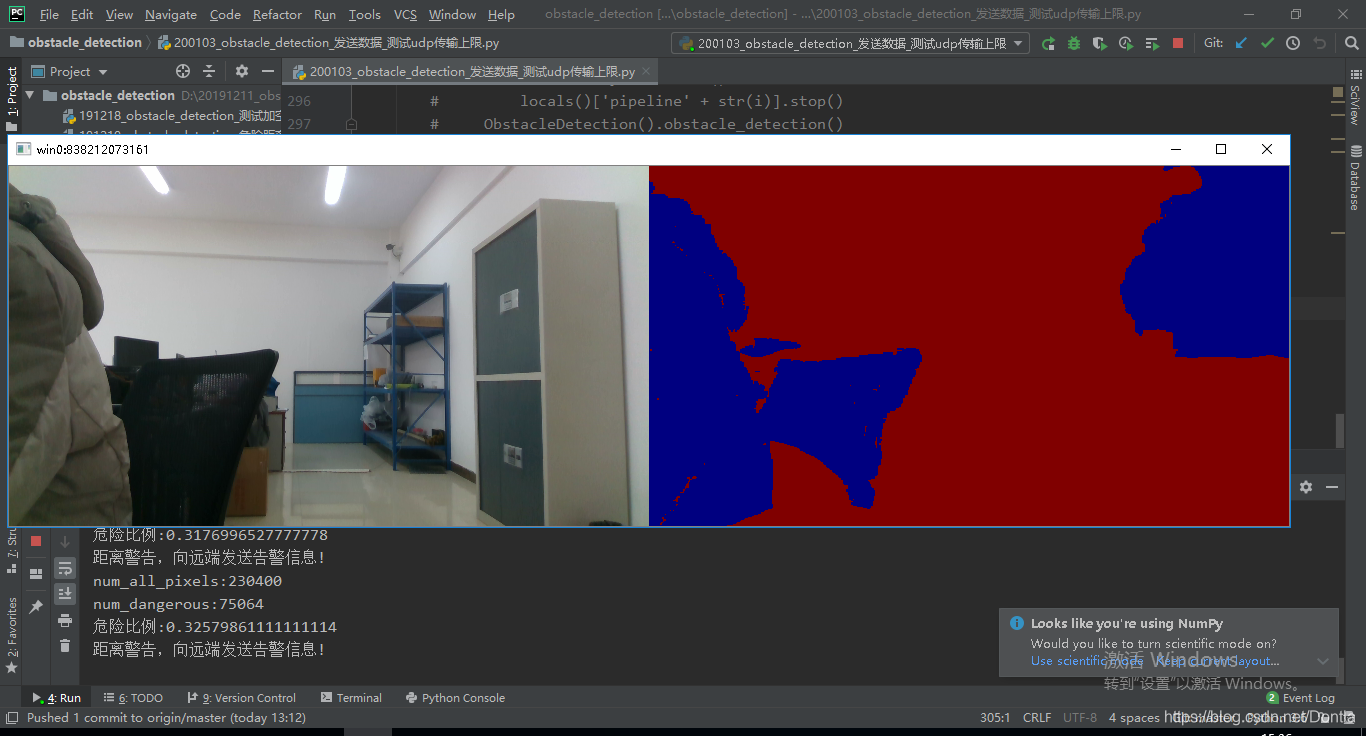
接收端

来源:CSDN
作者:Dontla
链接:https://blog.csdn.net/Dontla/article/details/103833581