
问题
I have an MVC 4 app, using a custom HandleErrorAttribute to handle only custom exceptions. I would like to intercept the default 404 and other non-500 error pages and replace them with something more attractive. To that end, I added the following to my Web.config:
<system.web>
    <customErrors mode="On" defaultRedirect="~/Error/Index" />
...
</ system.web>
I have an Error controller with an Index method and corresponding view, but still I get the default 404 error page. I have also tried setting my defaultRedirect to a static html file to no avail. I have tried adding error handling specific to 404's inside <customErrors>, and I even tried modifying the routes programattically, all with no results. What am I missing? Why is ASP ignoring my default error handling?
Note: I noticed earlier that I cannot test my CustomHandleErrorAttribute locally, even with <customErrors mode="On". It does work when I hit it on my server from my dev box though... not sure if that is related. This guy had the same problem.
回答1:
This should work :
1. Web.Config
<customErrors mode="On"
   defaultRedirect="~/Views/Shared/Error.cshtml">

  <error statusCode="403"
    redirect="~/Views/Shared/UnauthorizedAccess.cshtml" />

  <error statusCode="404"
    redirect="~/Views/Shared/FileNotFound.cshtml" />

</customErrors>
2. Registered HandleErrorAttribute as a global action filter in the FilterConfig class as follows
public static void RegisterGlobalFilters(GlobalFilterCollection filters)
    {
        filters.Add(new CustomHandleErrorAttribute());
        filters.Add(new AuthorizeAttribute());
    }
If that dont work then, Try to make yourself transfer the response by checking status codes like the Following in the Global.asax: at least it must work.
void Application_EndRequest(object sender, EventArgs e)
{
    if (Response.StatusCode == 401)
    {
        Response.ClearContent();
        Server.Transfer("~/Views/Shared/UnauthorizedAccess.cshtml");
    }
}
回答2:
I am going little off topic. I thought this is bit important to explain.

If you pay attention to the above highlighted part. I have specified the order of the Action Filter. This basically describes the order of execution of Action Filter. This is a situation when you have multiple Action Filters implemented over Controller/Action Method
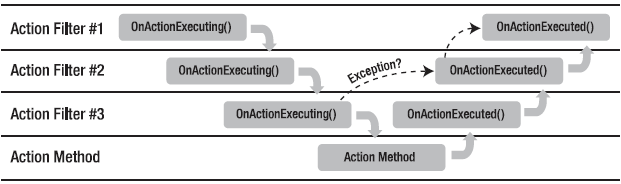
This picture just indicates that let's say you have two Action Filters. OnActionExecution will start to execute on Priority and OnActionExecuted will start from bottom to Top. That means in case of OnActionExecuted Action Filter having highest order will execute first and in case of OnActionExecuting Action Filter having lowest order will execute first. Example below.
public class Filter1 : ActionFilterAttribute
{
    public override void OnActionExecuting(ActionExecutingContext filterContext)
    {
//Execution will start here - 1
        base.OnActionExecuting(filterContext);
    }

    public override void OnActionExecuted(ActionExecutedContext filterContext)
    {
//Execution will move here - 5
        base.OnActionExecuted(filterContext);
    }
}

public class Filter2 : ActionFilterAttribute
{
    public override void OnActionExecuting(ActionExecutingContext filterContext)
    {
//Execution will move here - 2
        base.OnActionExecuting(filterContext);
    }

    public override void OnActionExecuted(ActionExecutedContext filterContext)
    {
//Execution will move here - 4
        base.OnActionExecuted(filterContext);
    }
}

[HandleError]
public class HomeController : Controller
{
    [Filter1(Order = 1)]
    [Filter2(Order = 2)]
    public ActionResult Index()
    {
//Execution will move here - 3
        ViewData["Message"] = "Welcome to ASP.NET MVC!";

        return View();
    }
}
You may already aware that there are different types of filters within MVC framework. They are listed below.
Authorization filters
Action filters
Response/Result filters
Exception filters
Within each filter, you can specify the Order property. This basically describes the order of execution of the Action Filters.
Back to the original Query
This works for me. This is very easy and no need to consider any change in Web.Config or Register the Action Filter in Global.asax file.
ok. So, First I am creating a simple Action Filter. This will handle Ajax and Non Ajax requests.
public class MyCustomErrorAttribute : HandleErrorAttribute
{
    public override void OnException(ExceptionContext filterContext)
    {
        filterContext.ExceptionHandled = true;
        var debugModeMsg = filterContext.HttpContext.IsDebuggingEnabled
                               ? filterContext.Exception.Message +
                                 "\n" +
                                 filterContext.Exception.StackTrace
                               : "Your error message";
//This is the case when you need to handle Ajax requests
        if (filterContext.HttpContext.Request.IsAjaxRequest())
        {
            filterContext.Result = new JsonResult
            {
                JsonRequestBehavior = JsonRequestBehavior.AllowGet,
                Data = new
                {
                    error = true,
                    message = debugModeMsg
                }
            };
        }
//This is the case when you handle Non Ajax request
        else
        {
            var routeData = new RouteData();
            routeData.Values["controller"] = "Error";
            routeData.Values["action"] = "Error";
            routeData.DataTokens["area"] = "app";
            routeData.Values["exception"] = debugModeMsg;
            IController errorsController = new ErrorController();
            var exception = HttpContext.Current.Server.GetLastError();
            var httpException = exception as HttpException;
            if (httpException != null)
            {
                Response.StatusCode = httpException.GetHttpCode();
                switch (System.Web.HttpContext.Current.Response.StatusCode)
                {
                    case 404:
                        routeData.Values["action"] = "Http404";
                        break;
                }
            }

            var rc = new RequestContext
                         (
                             new HttpContextWrapper(HttpContext.Current),
                             routeData
                         );
            errorsController.Execute(rc);
        }
        base.OnException(filterContext);
    }
}
Now you can implement this Action Filter on Controller as well as on the Action only.Example:
Hope this should help you.
回答3:
I want to share my knowledge after investigating this problem. Any comments that help improve my statements are welcomed.
In ASP.NET MVC, there are three layers that handle HTTP requests in the following order (response is transferred in reverse order):
IIS (HTTP Layer)
ASP.NET (Server Layer)
Controller (MVC Layer)
All of these layers have error handling, but each layer does it differently. I'll start with IIS.
IIS Layer
The simplest example of how IIS handles an error is to request a non existing .html file from your server, using the browser. The address should look like:
http://localhost:50123/this_does_not_exist.html
Notice the title of the browser tab, for example: IIS 10.0 Detailed Error - 404.0 - Not Found.
ASP.NET Layer
When IIS receives a HTTP request, if the URL ends with .aspx, it forwards it to ASP.NET since it is registered to handle this extension. The simplest example of how ASP.NET handles an error is to request a non existing .aspx file from your server, using the browser. The address should look like:
http://localhost:50123/this_does_not_exist.aspx
Notice the Version Information displayed at the bottom of the page, indicating the version of ASP.NET.
The customErrors tag was originally created for ASP.NET. It has effect only when the response is created by ASP.NET internal code. This means that it does not affect responses created from application code. In addition, if the response returned by ASP.NET has no content and has an error status code (4xx or 5xx), then IIS will replace the response according to the status code. I'll provide some examples.
If the Page_Load method contains Response.StatusCode = 404, then the content is displayed normally. If additional code Response.SuppressContent = true is added, then IIS intervenes and handles 404 error in the same way as when requesting "this_does_not_exist.html". An ASP.NET response with no content and status code 2xx is not affected.
When ASP.NET is unable to complete the request using application code, it will handle it using internal code. See the following examples.
If an URL cannot be resolved, ASP.NET generates a response by itself. By default, it creates a 404 response with HTML body containing details about the problem. The customErrors can be used to create a 302 (Redirect) response instead. However, accessing a valid URL that causes ASP.NET to return a 404 response does not trigger the redirect specified by customErrors.
The same happens when ASP.NET catches an exception from application code. By default, it creates a 500 response with HTML body containing details about the source code that caused the exception. Again, the customErrors can be used to generate a 302 (Redirect) response instead. However, creating a 500 response from application code does not trigger the redirect specified by customErrors.
The defaultRedirect and error tags are pretty straight-forth to understand considering what I just said. The error tag is used to specify a redirect for a specific status code. If there is no corresponding error tag, then the defaultRedirect will be used. The redirect URL can point to anything that the server can handle, including controller action.
MVC Layer
With ASP.NET MVC things get more complicated. Firstly, there may be two "Web.config" files, one in the root and one in the Views folder. I want to note that the default "Web.config" from Views does two things of interest to this thread:
- It disables handling URLs to .cshtml files (webpages:Enabled set to false)
- It prevents direct access to any content inside the Views folder (BlockViewHandler)
In the case of ASP.NET MVC, the HandleErrorAttribute may be added to GlobalFilters, which also takes into account the value of mode attribute of the customErrors tag from the root "Web.config". More specifically, when the setting is On, it enables error handling at MVC Layer for uncaught exceptions in controller/action code. Rather than forwarding them to ASP.NET, it renders Views/Shared/Error.cshtml by default. This can be changed by setting the View property of HandleErrorAttribute.
Error handling at MVC Layer starts after the controller/action is resolved, based on the Request URL. For example, a request that doesn't fulfill the action's parameters is handled at MVC Layer. However, if a POST request has no matching controller/action that can handle POST, then the error is handled at ASP.NET Layer.
I have used ASP.NET MVC 5 for testing. There seems to be no difference between IIS and IIS Express regarding error handling.
Answer
The only reason I could think of why customErrors is not considered for non-500 status codes is because they are created with HttpStatusCodeResponse. In this case, the response is created by the application code and is not handled by ASP.NET, but rather IIS. At this point configuring an alternative page is pointless. Here is an example code that reproduces this behavior:
public ActionResult Unhandled404Error()
{
    return new HttpStatusCodeResult(HttpStatusCode.NotFound);
}
In such scenario, I recommend implementing an ActionFilterAttribute that will override OnResultExecuted and do something like the following:
int statusCode = filterContext.HttpContext.Response.StatusCode;
if(statusCode >= 400)
{
    filterContext.HttpContext.Response.Clear();
    filterContext.HttpContext.Response.Redirect("/Home/Index");
}
The implemented ActionFilterAttribute should be added to GlobalFilters.
回答4:
Create a Controller ErrorController.
 public class ErrorController : Controller
    {
        //
        // GET: /Error/

        public ActionResult Index()
        {
            return View();
        }
}
Create the Index view for the action.
in Web.config
<customErrors mode="On">
      <error statusCode="404" redirect="Error/Index"/>
</customErrors>
When you are handling errors in your code/logic
[HandleError]
    public class HomeController : Controller
    {
        public ActionResult Index()
        {
            ViewBag.Message = "Modify this template to jump-start application.";

            return View("Index2");
        }
}
[HandleError] attribute - will redirected to the Error.cshtml page inside shared folder.
回答5:
I am not sure this answer will help you but this a simple way... I placed error.html in / and turned mode to on for custom errors in web config and this works perfectly...
  <system.web>
    <customErrors defaultRedirect="~/Error.html" mode="On" />
  </system.web>
this error.html is a basic html page with head and body..
回答6:
To me, it works deleting the default Error.cshtml file, now it is taking the custom Error defaultRedirect page in Web.config.
来源:https://stackoverflow.com/questions/17636806/asp-net-mvc4-customerrors-defaultredirect-ignored