
问题
I have a canvas with width = 900, height = 574. I have all the pixels of the canvas. Inside the canvas there are some rectangles, knowing all the pixels of a rectangle what I want is to find the coordinates of the 4 points of a rectangle and then find the width and height of the rectangle.
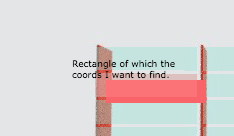
So what I did is:
  pMinX = (_.min(points)/ 4) % highlightCanvas.width
  pMinY = Math.floor((_.min(points) / 4) / highlightCanvas.width)
  pMaxX = (_.max(points) / 4) % highlightCanvas.width
  pMaxY = Math.floor((_.max(points) / 4) / highlightCanvas.width)
Points is the array of the pixels (4 channels rgba) of the rectangle of which the coordinates I want to find.
pMinY and pMaxY seem to work well while pMinX, pMaX sometimes seem correct while others are wrong.
To test, I created a floating div and resize it according to:
  {
    width:  pMaxX - pMinX
    height: pMaxY - pMinY
  }
The height of the div is always correct. But the width there are cases that fails. Any idea why sometimes the calculation fails?
回答1:
Here's annotated code showing how to calculate the bounding box (x, y, width, height) of the salmon colored rectangle in your image.
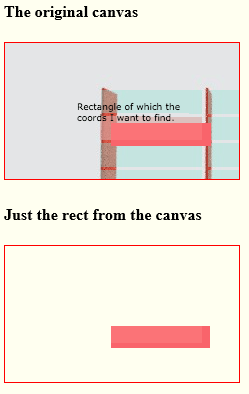
It works like this:
Get the r,g,b,a values for each pixel on the canvas using
.getImageData.Set up test(s) that a pixel's rgba must meet to be considered as "inside the desired rectangle" In your example, the salmon rectangle is made up of 2 colors so this test will capture all pixels inside your rectangle:
// create an array to hold tests that are used to
// find your desired pixels. The tests should be functions
// that return true for your desired rgba pixel values
// (substitue whatever algorithm test that are necessary for your design)
var tests=[];


// add a test into the tests[] array
tests.push(function(r,g,b,a){
    return(
        (r==251 && g==115 && b==119)||
        (r==249 && g==100 && b==107)
    );
});
Determine the minX, minY, maxX & maxY of pixels meeting the tests
Calculate the bounding box of the rectangle pixels from the determined minimums and maximums:
var bounds={
    x:minX,
    y:minY,
    width:maxX-minX,
    height:maxY-minY
};
Important Note: For .getImageData to be allowed, you must satisfy security restrictions. The usual way is to serve the image on the same domain as your webpage. Alternatively, you can set up the server hosting the image to serve that image to any anonymous requestor.
Example code and a Demo:
// canvas related variables
var canvas=document.getElementById("canvas");
var ctx=canvas.getContext("2d");
var cw=canvas.width;
var ch=canvas.height;

// load the image
var img=new Image();
// the image must satisfy cross-origin restrictions
// or else we can't use .getImageData
img.crossOrigin='anonymous';
img.onload=start;
img.src="https://dl.dropboxusercontent.com/u/139992952/multple/findRect.png";
function start(){

  // resize the canvas to the image size
  // and draw the image onto the canvas
  cw=canvas.width=img.width;
  ch=canvas.height=img.height;
  ctx.drawImage(img,0,0);

  // create an array to hold tests that are used to
  // find your desired pixels. The tests should be functions
  // that return true for your desired rgba pixel values
  // (substitue whatever algorithm test that are necessary for
  //    your design)
  var tests=[];

  // sample test returns true if matching the 2 colors making up the rect
  tests.push(function(r,g,b,a){
    return(
      (r==251 && g==115 && b==119)||
      (r==249 && g==100 && b==107)
    );
  });

  // find the bounds of all pixels meeting the prescribed test(s)
  var bounds=findImageBounds(tests);

  // testing...draw just the discovered rect to a second canvas
  var c=document.createElement('canvas');
  var cctx=c.getContext('2d');
  document.body.appendChild(c);
  c.width=cw;
  c.height=ch;
  cctx.drawImage(canvas,
                 bounds.x,bounds.y,bounds.w,bounds.h,
                 bounds.x,bounds.y,bounds.w,bounds.h
                );

}

function findImageBounds(tests){

  // get the rgba color values for all pixels on the canvas
  var d=ctx.getImageData(0,0,cw,ch).data;

  // iterate over each pixel
  // find the min/max X,Y of pixels where all tests are true
  var minX=1000000;
  var minY=1000000;
  var maxX=-1000000;
  var maxY=-1000000;
  var hits=0;
  for(var y=0;y<ch;y++){
    for(var x=0;x<cw;x++){
      // n==the position in the rgba array for canvas position x,y
      n=(y*cw+x)*4;
      // the rgba values at this pixel
      r=d[n];
      g=d[n+1];
      b=d[n+2];
      a=d[n+3];
      // run all tests on this pixel
      var testsTrue=true;
      for(var i=0;i<tests.length;i++){
        testsTrue=testsTrue && tests[i](r,g,b,a);
      }
      // if this pixel meets all tests
      // see if it influences our boundary
      if(testsTrue){
        hits++;
        if(x<minX){minX=x;}
        if(y<minY){minY=y;}
        if(x>minX){maxX=x;}
        if(y>maxY){maxY=y;}
      }
    }}
  // return the x,y,width,height of the bounding box
  // of pixels meeting all the supplied tests
  return({x:minX,y:minY,w:maxX-minX,h:maxY-minY,pixelCount:hits});
}
body{ background-color: ivory; }
canvas{border:1px solid red;}<h4>The original canvas</h4>
<canvas id="canvas" width=300 height=300></canvas>
<h4>Just the rect from the canvas</h4>来源:https://stackoverflow.com/questions/29792199/canvas-pixels-to-coordinates