
Python去除文件中的重复行
PS: 也是从网上各个帖子中学习的Python,因此代码的格式以及内容有粘贴网上其他大神的代码,如有侵权请告知删除
界面示例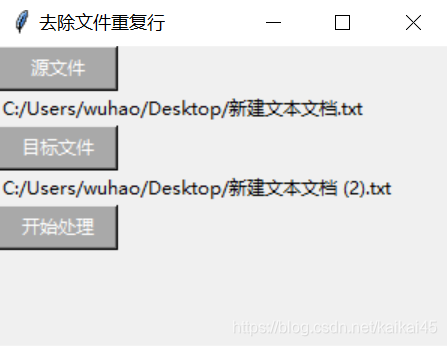
#!/usr/bin/python
# -*- coding: UTF-8 -*-

from tkinter import *
import tkinter.filedialog

root = Tk()
root.title('去除文件重复行')
root.geometry('300x200')
FileName1 = ""
FileName2 = ""

def Button1Anwser():
    global FileName1
    Path = Label(root, text='')
    FileName1 = tkinter.filedialog.askopenfilename()
    Path.config(text=FileName1)
    Path.grid(row=1, column=0, sticky=W)

def Button2Anwser():
    global FileName2
    Path = Label(root, text='')
    FileName2 = tkinter.filedialog.askopenfilename()
    Path.config(text=FileName2)
    Path.grid(row=3, column=0, sticky=W)

def Start():
    fp = open(FileName1, 'r+')
    fp0 = open(FileName2, 'w')
    Read = fp.read()
    Content = Read.split('\n')
    New_Content = []

    Text = Label(root, text='')
    Text.config(text='正在处理')
    Text.grid(row=4, column=1)

    for i in range(len(Content)):
        if Content[i] not in New_Content:
            New_Content.append(Content[i])
    for i in range(len(New_Content)):
        fp0.write(str(New_Content[i] + '\n'))
    fp0.close()

    Text = Label(root, text='')
    Text.config(text='处理完成')
    Text.grid(row=4, column=1)

# -------------------------------------界面---------------------------------
SelectFile1 = Button(root, text="源文件", command=Button1Anwser,width=10, height=1, bg="DarkGray", fg="white")
SelectFile1.grid(row=0, column=0, sticky=W)

SelectFile2 = Button(root, text="目标文件", command=Button2Anwser,width=10, height=1, bg="DarkGray", fg="white")
SelectFile2.grid(row=2, column=0, sticky=W)

ToDeal = Button(root, text="开始处理", command=Start,width=10, height=1, bg="DarkGray", fg="white")
ToDeal.grid(row=4, sticky=W)

root.mainloop()来源:CSDN
作者:kaikai45
链接:https://blog.csdn.net/kaikai45/article/details/103844251