
问题
I want to draw text on a canvas in the inverse color of the background (to make sure the text is readible no matter the background color). I believe in oldskool bitblt-ing, this was an XOR operation.
How to do this?
回答1:
I've removed my old answer, as it did not solve the question. As of recently, there are new globalCompositeOperations that do all kinds of great things. I've created an example that shows how to obtain inverted text. In case that link breaks, the method is essentially this:
ctx.globalCompositeOperation = "difference";
ctx.fillStyle = "white";
//draw inverted things here
https://developer.mozilla.org/en-US/docs/Web/API/CanvasRenderingContext2D/globalCompositeOperation
回答2:
Update: most of the newer browsers now support the blending mode "difference" which can achieve the same result.
context.globalCompositeOperation = "difference";
Updated demo.
Old answer:
One should think that the XOR mode for composition would do this, but unfortunately canvas' XOR only XORs the alpha bits.
By applying the following code we can however receive a result such as this:
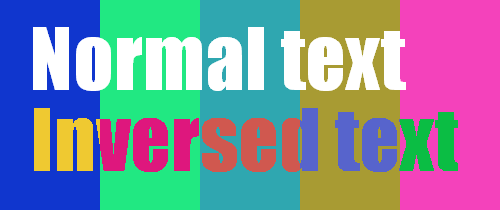
You can make an extension to the canvas like this:
CanvasRenderingContext2D.prototype.fillInversedText =
    function(txt, x, y) {
        //code - see below
    }
Now you can call it on the context as the normal fillText, but with a slight change:
ctx.fillInversedText(txt, x, y);
For this to work we do the following first - measure text. Currently we can only calculate width of text and then assume the height. This may or may not work well as fonts can be very tall and so forth. Luckily this will change in the future, but for now:
var tw = this.measureText(txt).width;
var th = parseInt(ctx.font, '10');
th = (th === 0) ? 10 : th;  //assume default if no font and size is set
Next thing we need to do is to setup an off-screen canvas to draw the text we want ot invert:
var co = document.createElement('canvas');
co.width = tw;
co.height = th;
Then draw the actual text. Color does not matter as we are only interested in the alpha channel for this canvas:
var octx = co.getContext('2d');
octx.font = this.font;
octx.textBaseline = 'top';
octx.fillText(txt, 0, 0);
Then we extract the pixel buffers for the area we want to draw the inverted text as well as all the pixels for the off-screen canvas which now contains our text:
var ddata = this.getImageData(x, y, tw, th);
var sdata = octx.getImageData(0, 0, tw, th);

var dd = ddata.data;  //cache for increased speed
var ds = sdata.data;
var len = ds.length;
And then we invert each pixel where alpha channel for pixel is greater than 0.
for (var i = 0; i < len; i += 4) {
    if (ds[i + 3] > 0) {
        dd[i] = 255 - dd[i];
        dd[i + 1] = 255 - dd[i + 1];
        dd[i + 2] = 255 - dd[i + 2];
    }
}
Finally put back the inverted image:
this.putImageData(ddata, x, y);
This may seem as a lot of operations, but it goes pretty fast.
Demo (warning if you are sensitive to flicker)
(the psychedelic background is just to have some variations as fiddle needs external images and most are prevented by CORS when we use pixel manipulation).
来源:https://stackoverflow.com/questions/16985098/html5-inverse-text-color-on-canvas