
问题
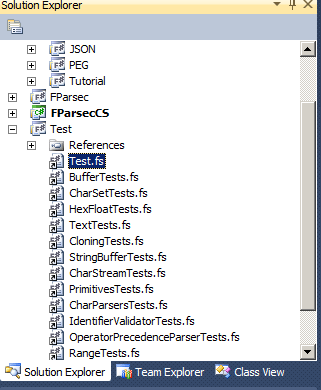
I've downloaded FParsec's library source code, and all the files appear with the shortcut symbol. What does it mean?
回答1:
When the item was added to that project, it was added as a link Project -> Add Existing Item -> Add as Link
The file is most likely hosted in another location in the directory structure, and can also be referenced normally by another project.
From MSDN:
Adding an Existing Item as a Link
You can also add an item as a link rather than directly adding the file to your project. Linked project items in Solution Explorer can be identified by the link indicator in its icon (a small arrow in the lower left corner).
By linking to a file, you can capture ongoing changes to a source file without having to manually update a copy whenever changes are made. However, if the underlying file is deleted, the link will be broken. If you move your project, the link will be broken, because the link is relative.
来源:https://stackoverflow.com/questions/7141310/files-show-up-in-solution-explorer-in-visual-studio-with-a-shortcut-icon-what-d