
问题
Is there a jQuery plugin or code with which I could resize an image (or canvas (with this image)) and copy that into another image (or canvas)? Picture #2 is a
EDIT:
Idea: Maybe make use of -moz-transform: scale(sx, sy)/-webkit-transform: scale(sx, sy)?
Or this Resizing an image in an HTML5 canvas

回答1:
You can resize-and-copy an image or canvas into another canvas easily.
context.drawImage(image, dx, dy, dw, dh) allows you to resize any image (or canvas) you want to draw as you draw it.
You can draw a 100x100 image as 50x50 or 200x200.
There is additionally context.drawImage(image, sx, sy, sw, sh, dx, dy, dw, dh) if you only want to draw a portion of the original image.
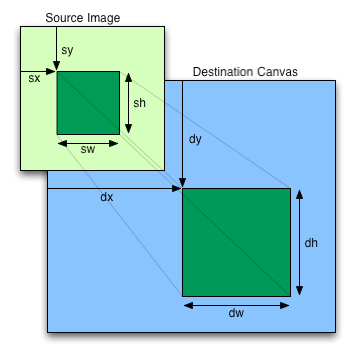
You want the drawn images to be resizable and movable? That's a whole 'nother can of worms, such functionality is not built in to canvas in the least, meaning you'll have to make it. I wrote a small tutorial on getting resizable, movable objects in the canvas, which is a good place to start.
来源:https://stackoverflow.com/questions/7423754/canvas-image-resize-and-copy-into-another