
问题
First of all, when to use what and the overall differences between them has already been answered before. But I couldn't find an answer to this question:
Where can I check if my Visual Studio project is a Web Application or a Web Site?
回答1:
Personally, one tell tale sign for me is whether the project folder actually contains a project file, or not.
You can see the icons differ slightly in VS - a web application has a layered world->docs->language icon and a web site just consists of world->docs.
Also, once opened within VS, right-clicking will display Properties and Property Pages for web applications and web sites respectively; further, on clicking this option you will be greeted with a dialog for the former and MDI tabbed form for the latter - the latter also exposes more functionality to control pre and post build steps and so forth.
A a web application will also display Properties and References special folders as part of the project tree in the Solution Explorer, whereas a web site does not necessarily; unless manually created for some reason (but they still won't be special - web sites use the bin folder for their references).
回答2:
The easiest way to differentiate between Web Site and Web Application is to look at the project's icons.
Web Site
- has an icon without the used language
- displays its physical root path
- does not have a Properties folder
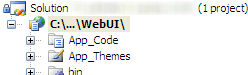
Web Application
- has an icon including the used language
- displays the project's name
- has a Properties folder
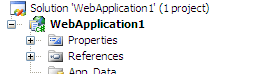
To find out more about the technical differences between them ...
ASP.NET Web Site or ASP.NET Web Application?
回答3:
I recently found out (painfully) that web applications do not support Profiles which is not fun. Web sites however do support them and make life much easier. I noticed here people saying there are no major differences. This one is quite major and can make your life difficult if you select to make a web application instead of a web site.
回答4:
Web application and Web Site are VS templates, nothing more. I doubt you will find this information directly somewhere in project. You can try to go through template differences list and guess how this particular project was created.
回答5:
For Web Site project, once run (F5) you can change the code in the code-behind, the solution will allow it and it will compile on the fly when saved.
A Web Application project, however, will not allow this. This is the simplest way of being able to tell between the two.
来源:https://stackoverflow.com/questions/5403221/is-my-visual-studio-project-a-web-application-or-a-web-site