
问题
Is there any possible way to share layout(part) between activities? For example, in my app, all activities have similar layout, the top part is long operation indicator (a progress bar, hidden when no operation is being executed), the bottom part is for showing errors. Only the middle part is different for all activities. See the picture below.
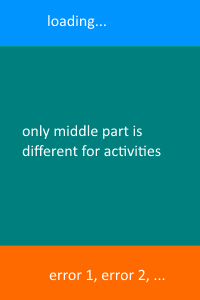
so my question is, is it possible to reuse the common layout(loading and error part) for all activities in my app? (currently I don't want to use fragment to do it for some reasons)
maybe the layout resources should like this:
layoutfolder
activity_common.xml

activity_one_content.xml

activity_two_content.xml
thanks
回答1:
You can create an abstract 'base' activity that all your activities extend from, overriding setContentView to merge the base, and sub activity layouts.
This way you can handle all the loading/error code in the base activity, and simply toggle between hiding and showing the views in the sub activities.
The abstract activity:
public abstract class BaseActivity extends Activity {

    protected RelativeLayout fullLayout;
    protected FrameLayout subActivityContent;

    @Override
    public void setContentView(int layoutResID) {
        fullLayout = (RelativeLayout) getLayoutInflater().inflate(R.layout.activity_base, null);  // The base layout
        subActivityContent = (FrameLayout) fullLayout.findViewById(R.id.content_frame);            // The frame layout where the activity content is placed.
        getLayoutInflater().inflate(layoutResID, subActivityContent, true);            // Places the activity layout inside the activity content frame.
        super.setContentView(fullLayout);                                                       // Sets the content view as the merged layouts.
    }

}
the layout file:
<RelativeLayout xmlns:android="http://schemas.android.com/apk/res/android"
    android:layout_width="match_parent"
    android:layout_height="match_parent">


    <!-- The main content view -->
    <FrameLayout
        android:id="@+id/loading_frame"
        android:layout_width="match_parent"
        android:layout_height="wrap_content" />

    <!-- The main content view -->
    <FrameLayout
        android:id="@+id/content_frame"
        android:layout_width="match_parent"
        android:layout_height="match_parent" />

    <FrameLayout
        android:id="@+id/error_frame"
        android:layout_width="match_parent"
        android:layout_height="wrap_content" />

</RelativeLayout>
回答2:
You could use include in XML to, well.. include the re-useable part of your layout code.
As an example, here's my layout file for the Toolbar I used in my app:
// /res/layout/component_toolbar.xml

<android.support.v7.widget.Toolbar xmlns:android="http://schemas.android.com/apk/res/android"
    xmlns:taggr="http://schemas.android.com/apk/res-auto"
    android:id="@+id/toolbar"
    android:layout_width="match_parent"
    android:layout_height="wrap_content"
    android:background="@color/primary"
    android:minHeight="?attr/actionBarSize"
    taggr:popupTheme="@style/ThemeOverlay.AppCompat.Light"
    taggr:theme="@style/ThemeOverlay.AppCompat.Dark.ActionBar" />
Now, say if I want to use that Toolbar again in a different Activity, this is all I'd have to write:
// /res/layout/whatever_layout_this_might_be.xml

<include layout="@layout/component_toolbar" />
Bear in mind that this would only copy the layout - not the actual behavior of said widget/component.
If you want to actually copy all of the aspects (layout, behaviour) I'm afraid Fragment is the only way to go.
回答3:
Although ActivityGroup is deprecated fro API 13 but if you don't wish to go with fragments then this can be your best choice.
According to documentation, an ActivityGroup is:
A screen that contains and runs multiple embedded activities.
You can find a tutorial here and here Although the mentioned tutorial uses a Tablayout you can replace that with your common layout in XML.
A second Approach could be Reuse the layout with include tag, in this approach you could just reuse your once created common layout everywhere in the app.
来源:https://stackoverflow.com/questions/27011739/how-to-share-common-layout-between-activities-without-fragment