
问题
Lately my F12 key does not seem to be working as expected in Visual Studio 2010 Professional SP1. It should go to the definition of what is selected, but instead it's performing the find all references task - Ctrl+K, R.
Does anyone have any ideas how I can fix this? It is getting quite annoying as I routinely use this shortcut - I am working on a large solution where it sometimes locks visual studio briefly trying to find all references.
I have tried going to Tools -> Options -> Enviroment -> Keyboard -> Reset with no success.
One other thing: it only does it sometimes and I am yet to distinguish a pattern when it does and does not work as expected.
Edit: One thing I forgot to say is that when it does not work, the second time I press F12 it does take me to the definition, it's just the first press that finds all references.
回答1:
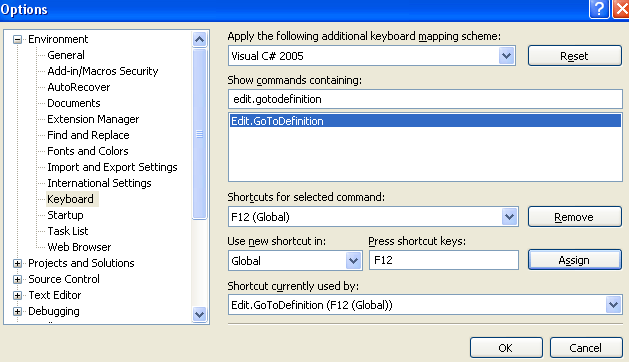
You can set any keyboard shortcut to any command. Type edit.gotodefinition to select the command and press F12 to assign the key.
like this
回答2:
Maybe there is more than one definition for the class or function in your project?
I had this problem after copy/pasting a class definition. After pressing F12 on the class name, it first brought up a search result showing both files in which the class name was found. If you press F12 another time, it will jump to the first one in the search results.
Did you know that you can use Ctrl + - (Minus) to jump back? :-)
回答3:
I experienced this exact misbehavior today with VC++ 2013: pressing F12 was no longer jumping to a method's definition, but was instead showing a list of references to that method.
Turns out IntelliSense is required in order for the command Edit.GoToDefinition to work, which I had disabled this morning. Setting Tools>Options>Text editor>C/C++>Advanced>IntelliSense> Disable IntelliSense back to False fixed the problem.
回答4:
Delete your SUO file before opening your project in Visual Studio. Unfortunately you have to do this every time before opening your project. This will also work when Visual Studio stopped regenerating the designer files.
回答5:
I had the same issue where my F12 key was not working nor were any of my other Function keys. After spending some frustrating time Googling I found that my fancy keyboard had the function key locked! So check that too before try the Tools-> Options
来源:https://stackoverflow.com/questions/11799187/f12-finds-all-references-not-go-to-definition